
Blockchain Explorer Guide: Track Every Transaction
A blockchain explorer is a tool for querying public on-chain data. By entering a transaction hash, address, or block height, you can view the transaction status, block, confirmation count, fees, and asset movements, but you cannot modify or reverse a transaction.
After opening an explorer, first confirm the network and then paste the information you want to search. The same address may exist on multiple compatible chains, and a transaction hash can only be found on the network where it was actually broadcast.
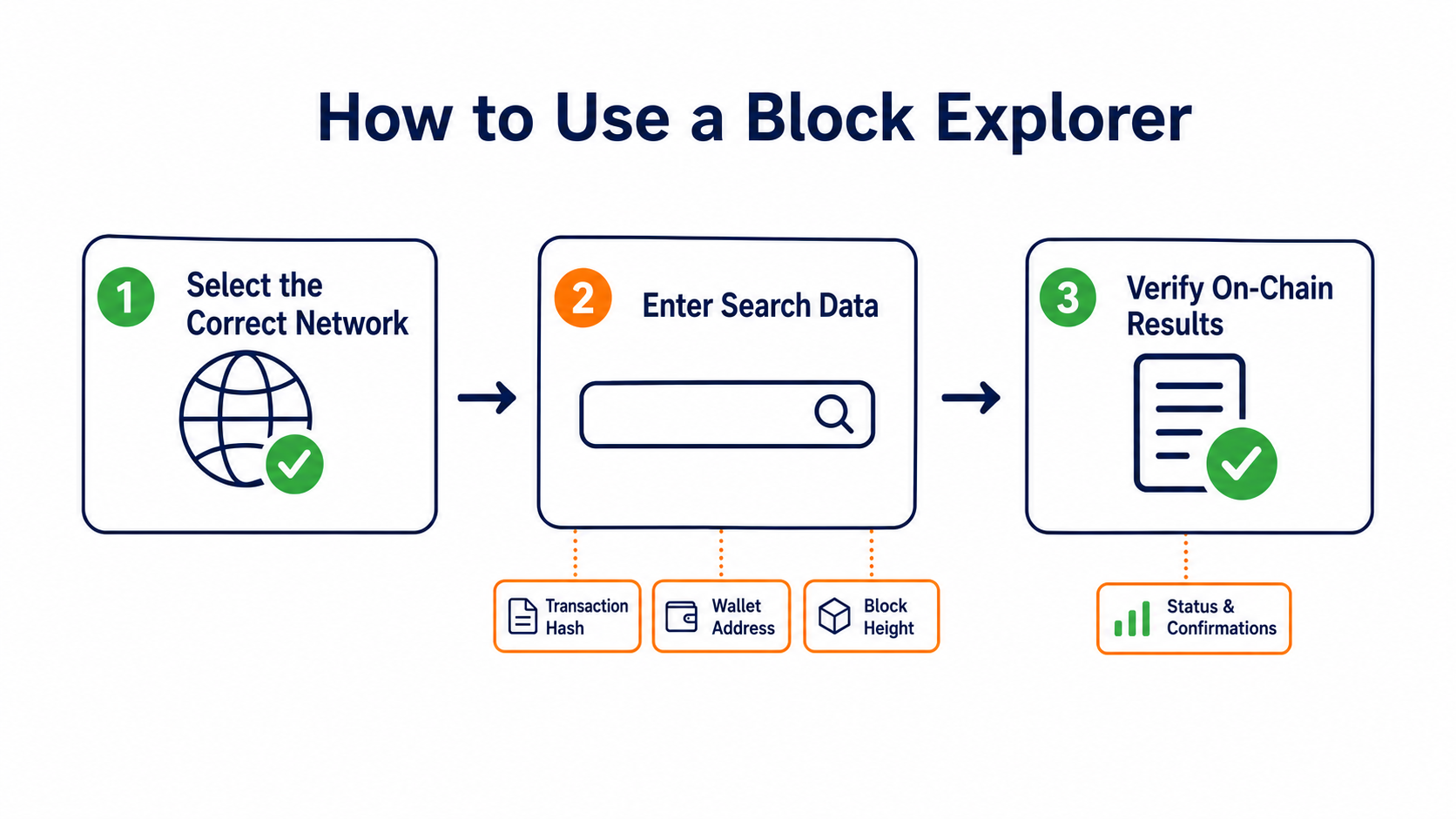
What Information Can You Search With?
- Transaction hash: The best way to locate a specific transaction. It is usually available in your wallet or withdrawal record.
- Wallet address: Shows the address's balance, transaction history, and token interactions, but does not identify the person behind it.
- Block height or block hash: Shows a block's production time, transaction count, and parent block.
- Token or contract address: Helps verify the token standard, holders, and contract interactions so that you do not mistake one asset for another based only on its name.
Transaction hashes, addresses, and block hashes can look similar in length. If a search returns no results, first check whether the value was copied in full and whether you selected the wrong network, then confirm that the transaction was actually broadcast.
How Do You Read a Transaction Details Page?
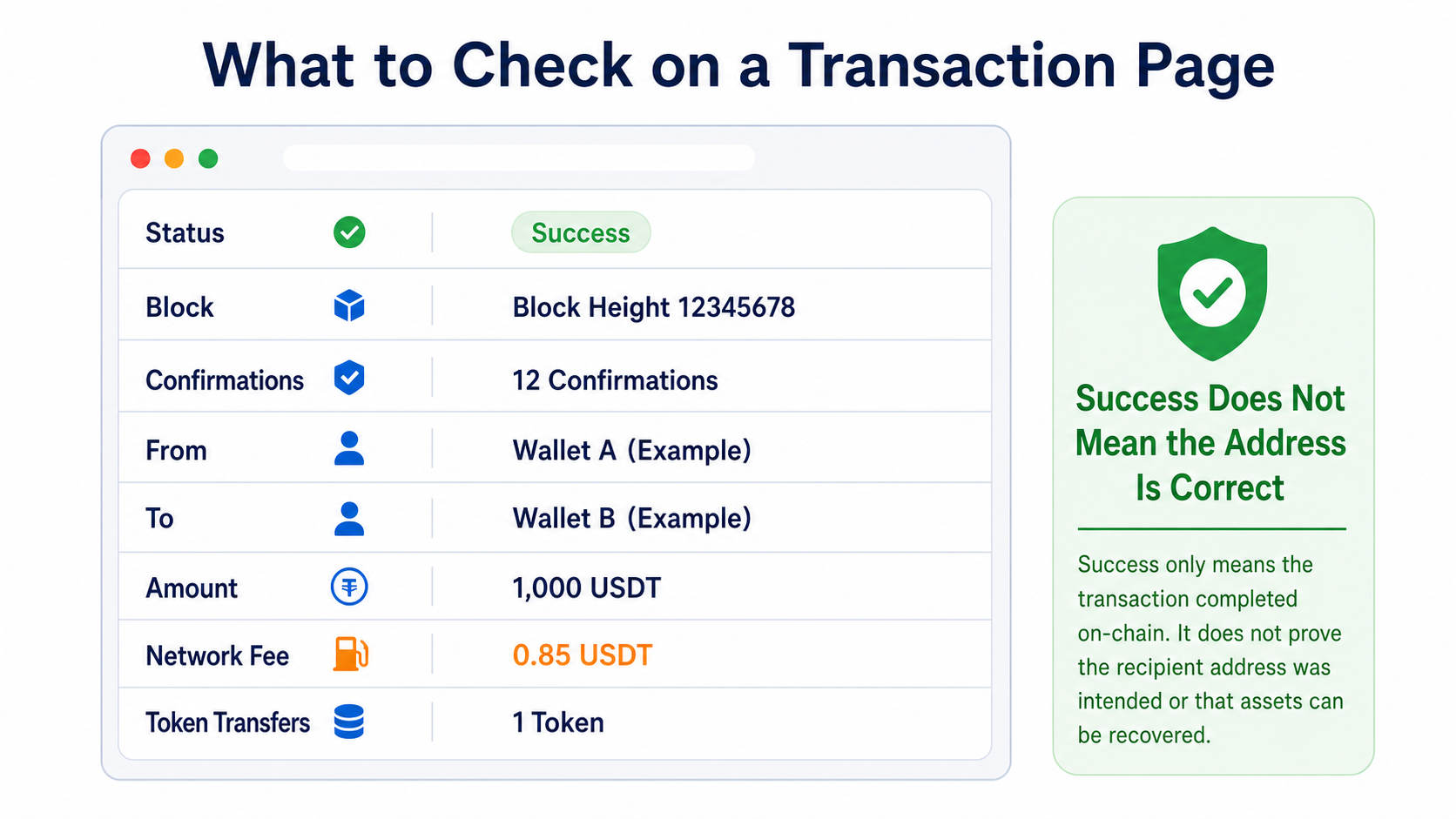
Status
Pending means the transaction has not yet entered an accepted block. Success means it has been recorded on-chain and its top-level execution succeeded. Failed means execution was reverted or its requirements were not met. A failed transaction may still consume network fees.
Block and Confirmations
The block field identifies the block containing the transaction, while the confirmation count increases as new blocks are added. Confirmation counts should not be compared directly across chains, and a trading platform may wait for its own minimum number of confirmations before crediting funds.
From, To, and Amount
From is usually the initiating address. To may be a regular address or a smart contract. The Value field at the top of a contract interaction can be zero even when assets moved in the token transfer records. To determine the actual destination, review token transfers, internal transactions, and event logs together.
Fees
Fees are usually calculated by multiplying the computing resources or block space actually consumed by the unit price. The fee limit shown on the page may differ from the final amount charged, and networks use different fields.
How Do You Check Whether a Withdrawal Has Arrived?
First copy the transaction hash from the platform's withdrawal record and confirm the asset and network. Open an explorer for the correct chain and check the following in order:
- Can the transaction be found, and is its status successful?
- Does the To address exactly match the address provided on the deposit page?
- Is the token contract the official contract for the intended asset?
- Does the transfer amount meet the minimum deposit requirement?
- Was a Memo, Tag, or another identifier required?
- Has the on-chain confirmation count reached the receiving platform's requirement?
If a transaction succeeded on-chain but the platform has not credited it, common causes include selecting the wrong network, omitting a required tag, using an unsupported asset contract, insufficient confirmations, or indexing delays. Save the transaction hash, network, address, amount, and time before contacting the receiving platform for assistance.
Why Does a Successful Transaction Not Guarantee the Intended Result?
A successful status in an explorer generally means the transaction executed according to the protocol. It does not determine whether the result matched the user's intention. A transfer to the wrong address, an approval granted to an unsafe contract, or an unexpected token received through a decentralized trade may still appear successful.
A contract call can also contain multiple internal steps. Even when the top-level transaction succeeds, the business meaning of an event may still require interpreting the contract code and logs. Unfamiliar tokens, airdrop links, and note fields may contain misleading content and should not be trusted simply because they appear in an explorer.
What Can an Address Page Tell You, and What Can It Not Tell You?
An address page can summarize public balances and interaction history to help trace fund flows. It cannot prove that an address belongs to a particular person, and it may not fully reflect cross-chain activity, privacy protocols, centralized platform ledgers, or off-chain transactions.
Explorers also depend on nodes and indexing services, so display delays, incorrect labels, and service failures can occur. For important checks, use a second independent explorer and compare the transaction hash, block hash, and raw node data. An explorer can display public records, but it cannot replace secure key custody in a wallet. For a comparison of custody methods, see the difference between hot and cold wallets.
To understand the process from broadcast to confirmation, read How Blockchain Works. To learn where block height begins, see What Is the Genesis Block?. For essential terminology, return to Blockchain Core Concepts Explained.
Frequently Asked Questions
Are Address Labels in an Explorer Always Accurate?
No. Labels may be maintained by platforms, communities, or explorer teams, and they can be outdated or incorrect. High-risk decisions should rely on official platform announcements, contract verification, and multiple sources rather than a single label.
Why Does the Token Balance Differ From What My Wallet Shows?
A wallet may hide spam tokens, use a different price source, or still be indexing data. Also verify the contract address, token decimals, and network. Assets with the same name are not necessarily the same token.
Can I Find an IP Address in an Explorer?
Ordinary blockchain explorers display on-chain data and generally do not show the IP address from which a transaction was first broadcast. Peer-to-peer network observations and on-chain address analysis cover different types of data.
Is It Safe to Share a Transaction Hash With Customer Support?
A transaction hash is a public lookup identifier and can generally be shared for support investigations. However, it exposes the related addresses and amount. Never provide your private key, seed phrase, verification code, or wallet password with it.
Recommended
View more

service hotcoin.com
producthotcoin.com
businesshotcoin.com
casecnhotcoin.com