Wallet Migration Guide: How to Switch Wallets Safely
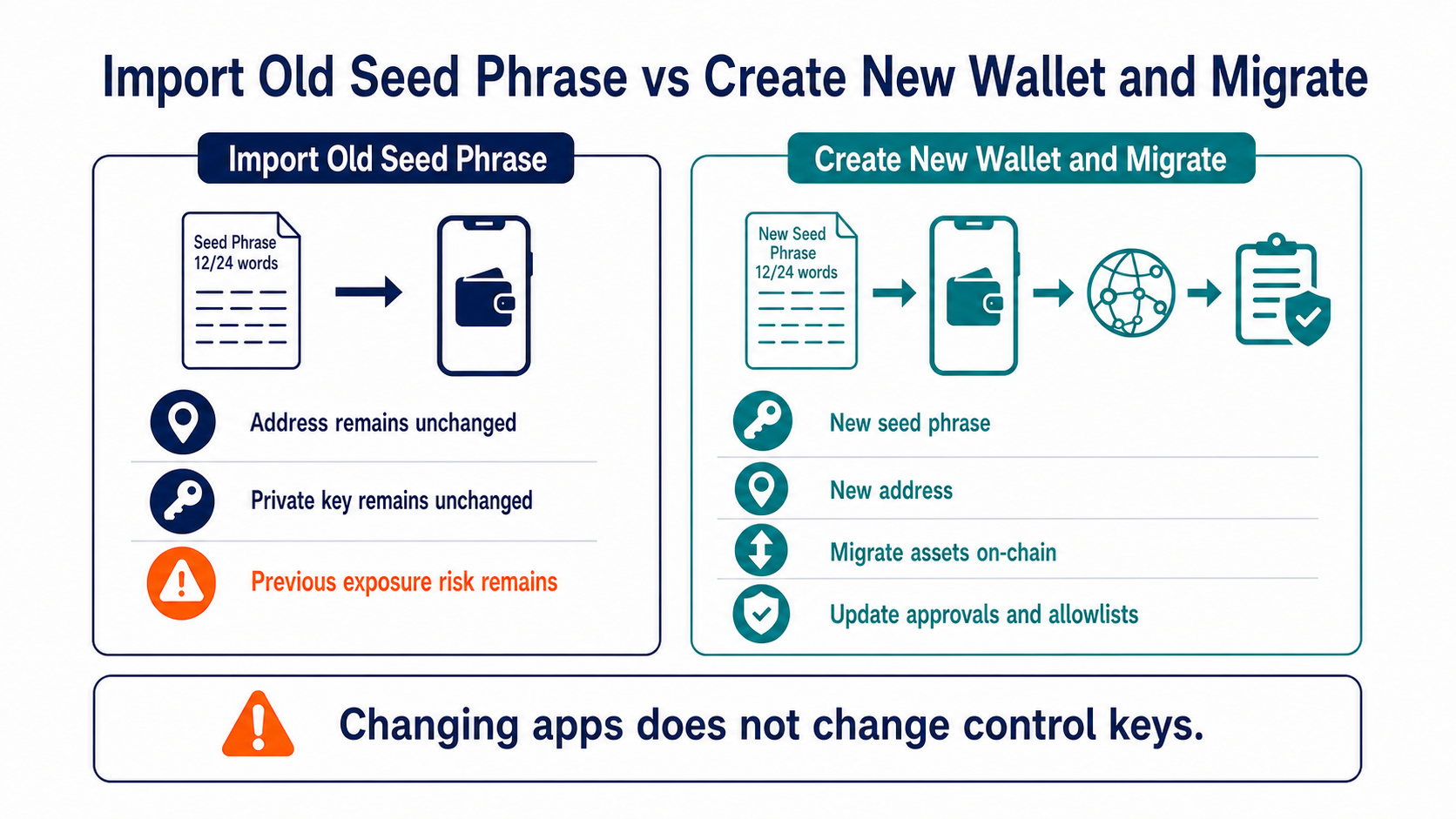
Safely switching wallets usually means creating a brand-new seed phrase and transferring your assets on-chain. Importing an old seed phrase into a new app only changes the interface; it does not eliminate the risk that the old keys may have been exposed.
First, Identify Why You Are Migrating
If the original wallet app is simply being discontinued and the keys have never been exposed, you may restore the wallet in a compatible tool and verify the derivation path. If the device is infected, the seed phrase has been entered on a website, or trust in the original wallet has declined, generate an entirely new seed.
Do not delete the old app or destroy the device before migrating. First confirm the complete asset inventory and your ability to recover the wallet, then securely clean up after the migration is complete.
Build an Asset Inventory Across Networks
Record the native coins, tokens, NFTs, staked assets, liquidity positions, loans, unclaimed rewards, and cross-chain assets on every network. Keep enough native coins to pay the gas required for transfers, unstaking, and approval revocations.
Check hidden tokens and contract positions, but do not interact with unfamiliar spam assets. For networks that use memos or different account models, confirm that the new wallet provides full support.
Follow the Correct Migration Order
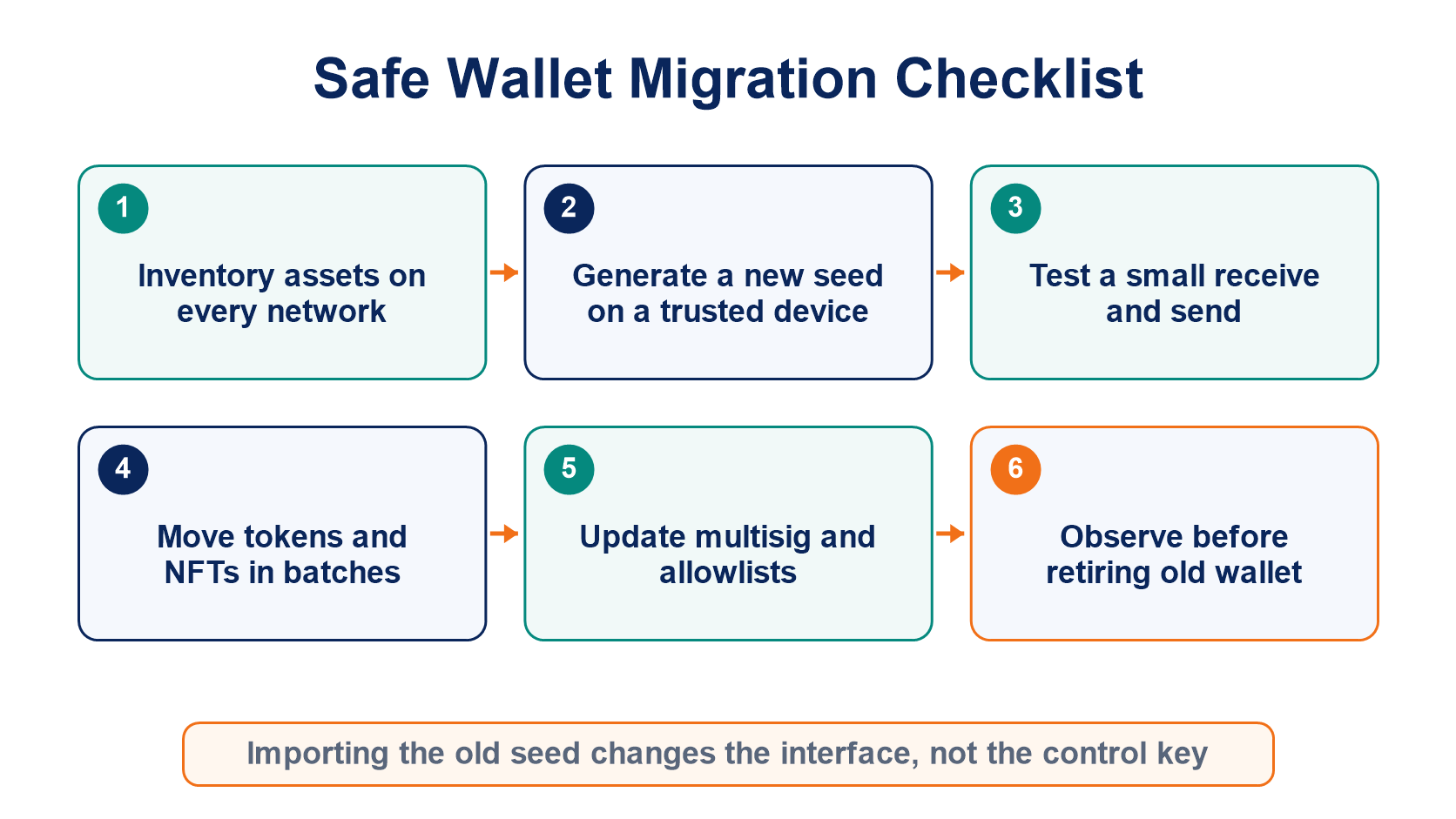
- Generate a new wallet on a trusted device and back it up offline.
- Generate a receiving address with the new wallet and verify it on the device screen.
- Transfer a small amount of the network's native asset first, then verify that the new wallet can sign an outgoing transaction.
- Migrate tokens, NFTs, and protocol positions network by network, keeping records of each operation.
- Revoke approvals from the old wallet and update multisig owners, allowlists, and frequently used payment addresses.
- Notify anyone who still sends payments to the old address, monitor it for a period, and then retire the old wallet.
If the keys may have been compromised, move the liquid assets that an attacker could take immediately first. Complex staking and locked positions require separate assessment; do not connect to unfamiliar tools during an emergency recovery.
How Can You Verify That the Migration Is Complete?
Do not rely on the total balance alone. Check the assets, NFTs, protocol positions, domains, and governance permissions on every network, and test a small outgoing transfer from the new wallet.
Export the old transaction history and address notes for tax and audit records, but never retain private keys in plaintext. For hardware-wallet migration considerations, read the hardware wallet guide. For broader key security, return to private keys and seed phrases.
Frequently Asked Questions
Why Is My Address Exactly the Same After Switching Wallet Apps?
If you import the same seed phrase and use the same derivation path, receiving the same address is normal. It also means that control of the wallet has not changed.
Can All Tokens Be Migrated in One Batch?
It depends on the network and the tool. Batch contracts add call complexity, so moving assets in smaller batches is easier to verify when many asset types are involved.
My Old Wallet Still Holds Locked Assets. Can I Destroy It First?
No. First confirm the rules for unlocking, migrating, or changing the beneficiary address, and retain a reliable means of access.
Can I Publicly Destroy the Old Seed Phrase After Migrating?
You should securely destroy its physical and digital copies, but only after confirming that no assets, future airdrops, refunds, or signing responsibilities have been overlooked.
Recommended
View more