
Complete Hardware Wallet Guide: Ledger, Trezor, and OneKey
Hardware wallets generate private keys and sign transactions inside a dedicated device, reducing the risk of keys being stolen directly from an internet-connected computer. Ledger, Trezor, and OneKey use different implementations, but none of them can determine whether a transaction is malicious on the user's behalf.
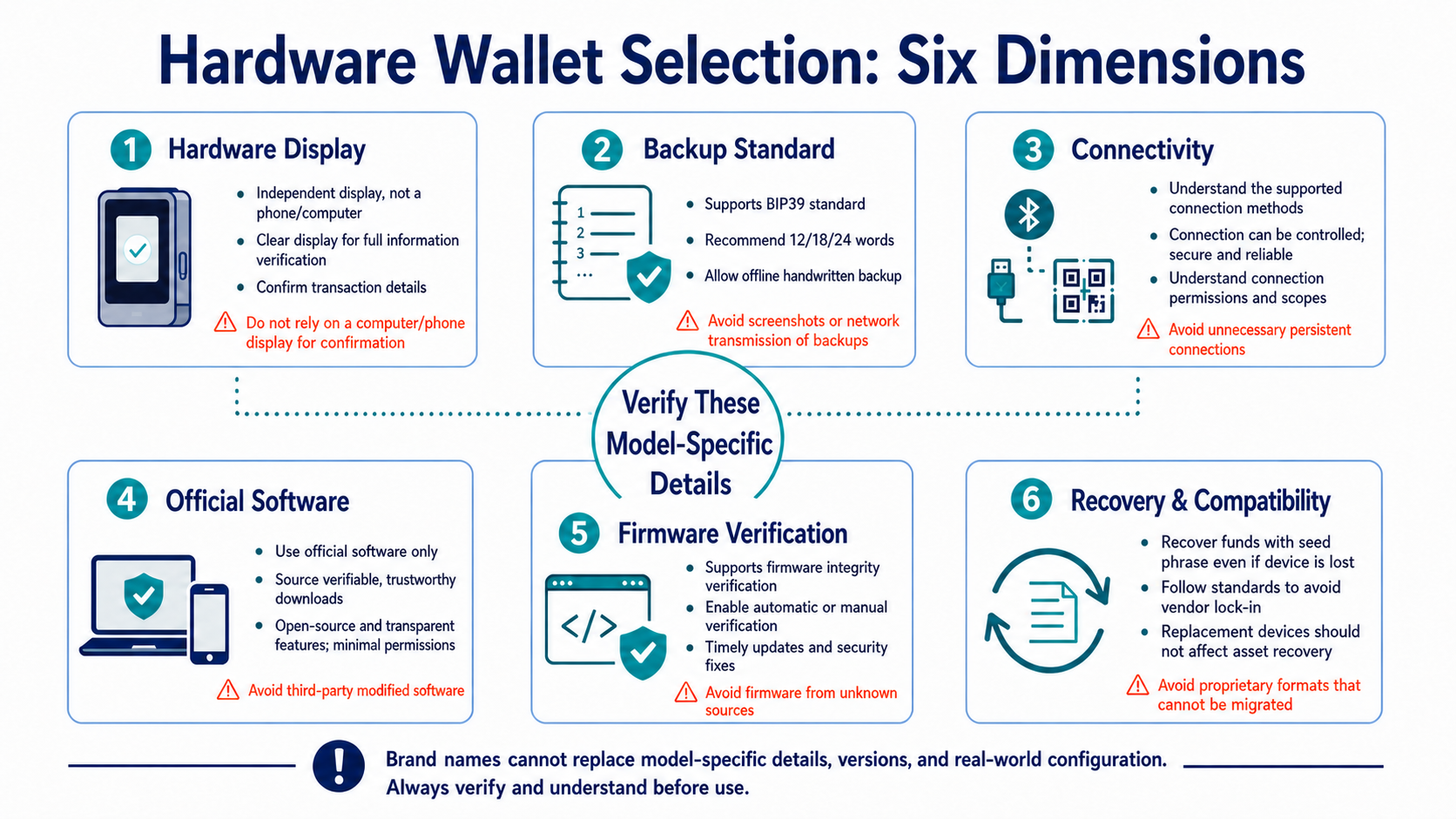
What Should You Compare First?
Ledger uses a dedicated secure element and works with Ledger Wallet. Trezor emphasizes auditable hardware and software and offers Shamir Backup on supported models. OneKey also uses a secure element, while the OneKey Pro supports air-gapped signing through QR codes.
Screen capabilities, chips, connectivity, open-source coverage, backup standards, and supported networks vary by model and may change over time. Always review the official documentation for the exact device you plan to buy instead of applying brand-level claims to every product.
| Category | Question to Ask |
|---|---|
| Transaction display | Can the device show the full address, amount, network, and contract details? |
| Backup | Does it use BIP39, Shamir Backup, or another method, and which recovery tools are compatible? |
| Connectivity | Which features are available through USB, Bluetooth, NFC, or QR codes? |
| Software | Which official desktop, mobile, and browser environments are supported? |
| Firmware | How are signatures, updates, rollbacks, and security advisories handled? |
| Recovery | How can assets be recovered if the device is lost, the manufacturer shuts down, or inheritance becomes necessary? |
How Should You Buy and Initialize a Hardware Wallet?
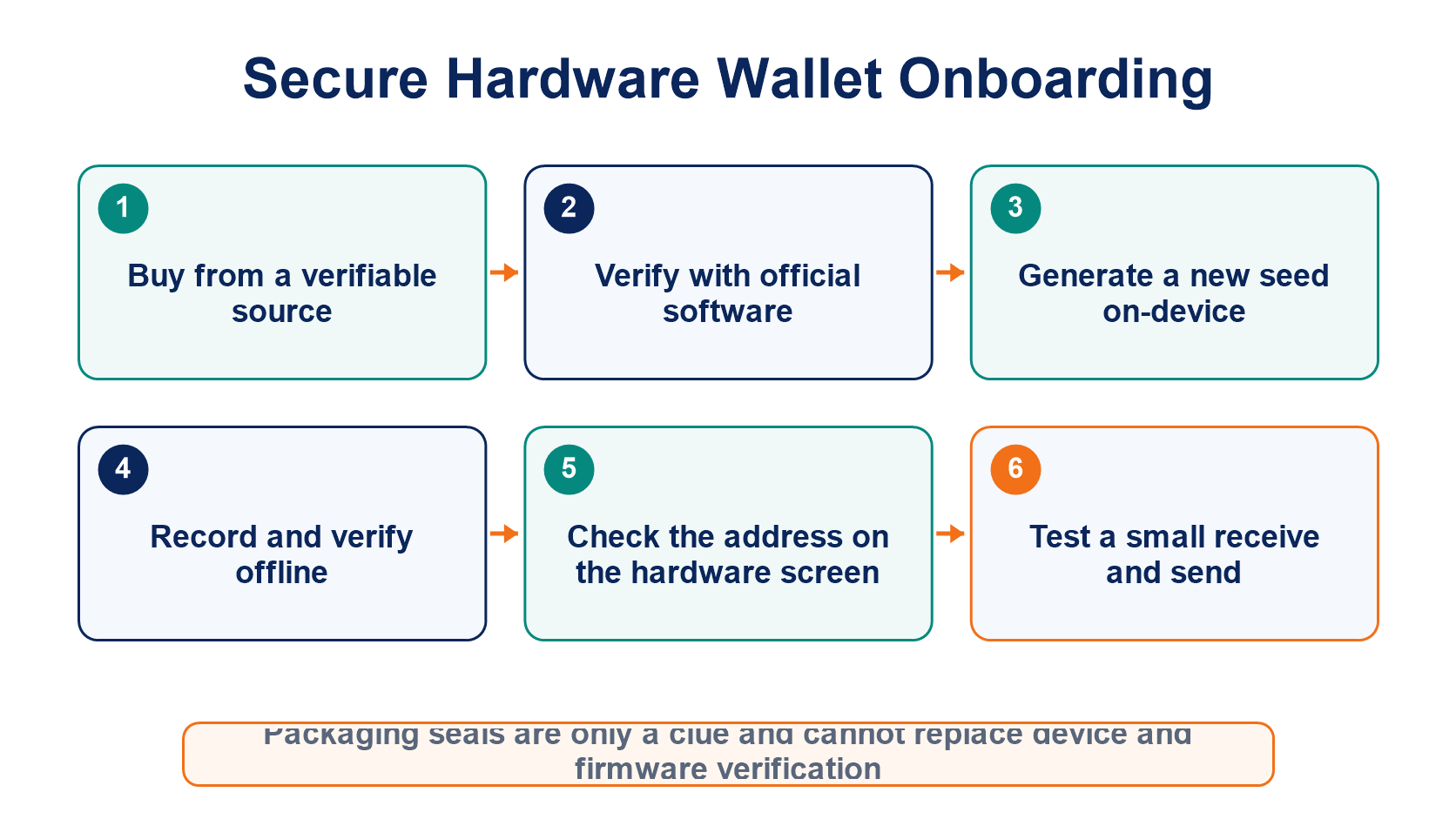
Buy directly from the manufacturer or a verifiable authorized seller. Packaging checks are only an additional precaution; authenticity and firmware must be verified on the device and through official software. Never use a seed phrase that arrived prewritten in the box, and never let a seller remotely “activate” the device for you.
Have the device generate a completely new seed phrase, record it offline, and complete the device's verification process. Set a unique PIN, confirm that the first receiving address matches on both the software and hardware screens, and then send a small test amount before transferring more funds.
Why Can Hardware Wallet Users Still Be Phished?
A malicious website may be unable to read the private key directly, but it can still construct a harmful transaction that the user agrees to sign. Blind signing, unlimited token approvals, fake addresses, and compromised front ends can all lead a hardware wallet to authorize a damaging action legitimately.
Verify every transaction on the hardware screen rather than trusting the computer display alone. If the device cannot clearly explain a contract interaction, do not approve it simply because you assume the hardware wallet will protect you.
What Happens If the Device Breaks or the Manufacturer Shuts Down?
Your assets are not stored inside the device; the device holds the ability to sign. As long as the backup standard and required parameters remain compatible, you can recover access on a new device or another trusted implementation.
Confirm official compatibility before recovery, and do not forget the passphrase or derivation path. If the original seed phrase has ever been entered into internet-connected software, it should no longer be treated as a cold key. Generate a new seed and migrate the assets through an on-chain transfer.
For differences between cold-storage methods, read Hardware Wallets vs. Cold Wallets vs. Paper Wallets. For broader key security, see Private Keys and Seed Phrases.
Frequently Asked Questions
Is a Bluetooth Hardware Wallet Always Less Secure Than USB?
Security cannot be judged by the transport method alone. The protocol, encryption, device confirmation process, and implementation quality all matter, and users must still verify transaction details on the hardware screen.
Can I Import an Old Software-Wallet Seed Phrase into a New Hardware Wallet?
You can restore it, but doing so cannot erase the possibility that the seed was previously exposed online. A safer migration usually means generating a new seed on the hardware wallet and transferring the assets on-chain.
Is It Safer Never to Update the Firmware?
No. Old firmware may contain vulnerabilities that have already been fixed. Follow official channels for release information and verify the device's status before updating.
Is It a Good Idea to Buy Two Brands and Use the Same Seed Phrase on Both?
This can improve device availability, but it also creates more places where the seed must be entered and protected. Whether to reuse one seed should be evaluated against compatibility requirements and the additional exposure surface.
Đề xuất đọc
Xem thêm
Service@hotcoin.com
Product@hotcoin.com
Business@hotcoin.com
Casecn@hotcoin.com