Essential Tools and Skills for Hands-On Web3 Use
Web3 tools are the infrastructure people use to connect wallets, verify contracts, inspect transactions, manage approvals, and protect assets on-chain.
Entering Web3 involves more than installing a wallet. Users need to know which network they are connected to, which asset pays for Gas, whether a contract address is authentic, what permissions a signature grants, and how to diagnose a failed transaction with a block explorer.
A dependable toolkit normally includes a wallet, block explorers, Gas trackers, approval managers, DeFi dashboards, signature interpretation, airdrop verification, and multisig management. Tools reduce operational friction, but they cannot decide whether a project is safe. Official entry points, minimum permissions, small test transactions, and on-chain verification remain essential skills.
What Core Skills Does Hands-On Web3 Use Require?
The first skill is identifying the network. Ethereum, Arbitrum, Base, BNB Chain, Solana, and other networks differ in addresses, Gas assets, confirmation speeds, and contract systems. The same token name can appear on several chains, and choosing the wrong network can make assets invisible or send them to an incompatible platform.
The second is verifying the object involved. Users should check domains, contract addresses, token mints, wallet addresses, and transaction methods instead of trusting names, logos, search ads, or social media screenshots.
The third is understanding the action. Connecting a wallet, signing in, approving a token, approving an NFT, swapping, bridging, and staking are not the same operation. Each action affects a different set of permissions and assets.
The fourth is verifying the outcome. A wallet's “success” message may only mean that a request was submitted or a local step finished. Confirm the final state by cross-checking a block explorer, the protocol position, and asset balances.
The fifth is containing losses. A separate interaction wallet, limited approval amounts, a reserve of native Gas, small tests, and regular approval revocation can reduce the impact of a single mistake.
Why Is a Block Explorer the First Essential Tool?
A block explorer reads node and indexer data and presents blocks, transactions, addresses, tokens, and smart contracts on a website. It is not the blockchain itself, but it is closer to the public ledger than a wallet or DApp front end.
When inspecting a transaction, first check Status, block height, and confirmations, then review From, To, Value, the transaction fee, and Input Data. Token movements may appear under Token Transfers or event logs, so a zero native-coin Value does not mean that no asset moved.
When inspecting an address, review its native assets, tokens, NFTs, Nonce, and interaction history. Unknown low-value tokens may be spam airdrops, and users should not open their attached websites. Platform-maintained address labels may also be incomplete or incorrect.
When inspecting a contract, check whether its code is verified, whether it is a proxy, which implementation it uses, whether an administrator can upgrade it, and whether its methods and events match the project's documentation. Verified code improves transparency; it does not prove that the contract was audited or has no vulnerabilities.
Etherscan is widely used for Ethereum, while Solscan and the official Explorer are common for Solana. Other EVM networks have their own explorers. For a field-by-field walkthrough, read Complete Guide to Block Explorers: Etherscan, Solscan, and More.
How Do Wallets Such as MetaMask Become a Web3 Gateway?
A non-custodial wallet stores or invokes private keys to sign transactions and messages. MetaMask supports browser extensions and mobile devices and can connect to EVM networks and DApps. A wallet does not store on-chain assets; the blockchain records the assets, while the wallet controls the keys that can spend them.
Install wallets only through official websites or official app-store listings. Verify the developer and extension ID, and beware of imitation downloads in search ads. After creating a wallet, back up the seed phrase offline. Never take a screenshot, upload it to cloud storage, or disclose it to alleged support staff.
When adding a network, verify its chain ID, RPC, block explorer, and native Gas token. A malicious RPC can conceal or falsify interface data but cannot directly steal a private key. Assets can still be lost if the false information persuades a user to sign a malicious transaction.
A practical setup keeps long-term holdings in hardware or cold storage, trusted daily protocols in a regular wallet, and new projects or airdrop interactions in a separate low-balance wallet. Account separation cannot prevent phishing, but it limits the blast radius.
For installation, backups, adding networks, importing a hardware wallet, and connecting to DApps, read MetaMask Installation and Usage Guide: Your Gateway to Web3.
How Should Gas Fees Be Understood and Optimized?
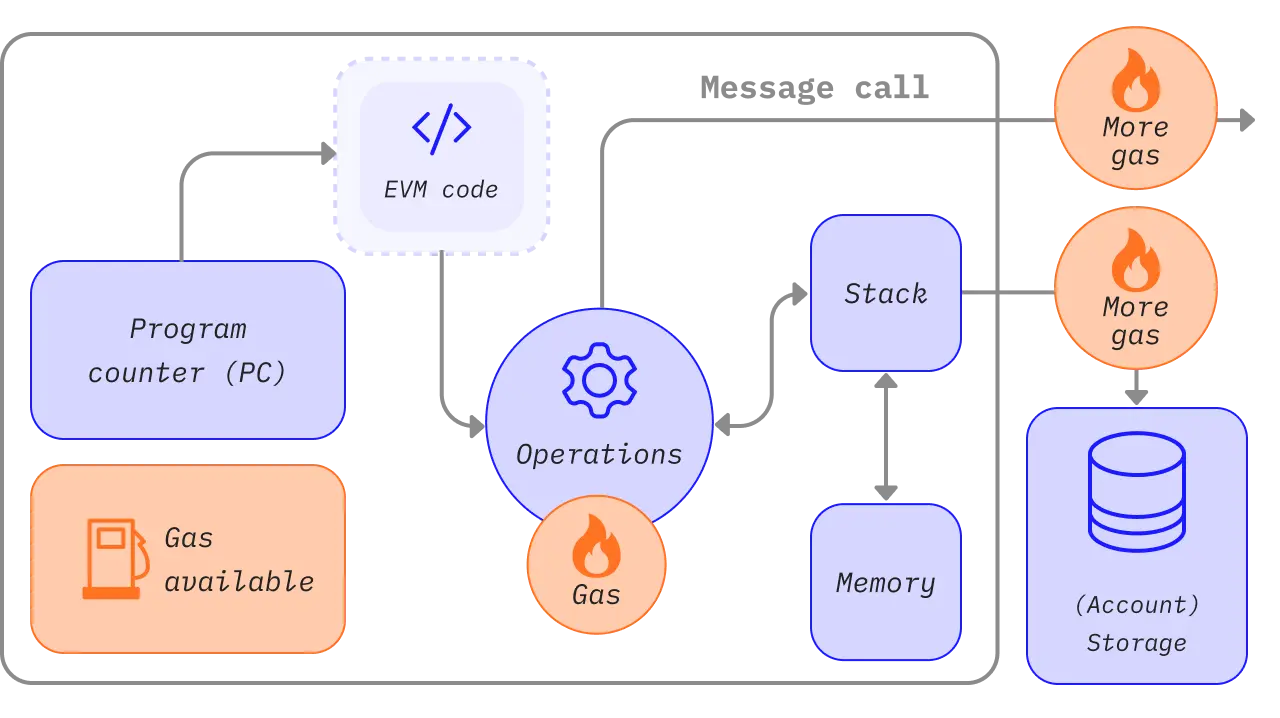
Gas measures the computation and storage needed to execute a transaction. An EVM transaction fee is generally determined by Gas Used and the effective price per unit of Gas. On EIP-1559 networks, the fee contains a base fee and priority fee, while the wallet also sets the maximum price the user is willing to pay.
The base fee changes with block congestion, and the priority fee encourages validators to include a transaction sooner. Setting a high Gas Limit does not normally spend the entire limit automatically, but setting it too low causes an Out of Gas failure. Gas already consumed is generally not refunded when execution fails.
Fees can be optimized in four ways: avoid congested periods, use a trustworthy Gas Tracker, remove unnecessary approval or contract steps, and select an appropriate network or L2. An L2 fee may combine local execution costs with the cost of publishing data to L1, so one number does not tell the whole story.
For a transaction that remains Pending, a wallet's Speed Up feature can replace it using the same Nonce and a higher fee. Cancel is also a replacement transaction with the same Nonce and cannot reverse the original if that transaction confirms first.
For details about base fees, priority fees, Gas Limit, Nonce, and L2 costs, read Gas Fee Optimization Strategies: Saving Tips and Gas Tracking.
Why Must Token Approvals Be Managed Regularly?
An ERC-20 approval allows a Spender contract to move tokens from a user's address up to the approved amount. DEX trading, lending, staking, and bridging generally require an Approve transaction before the actual action.
An unlimited approval reduces repeated transactions and Gas costs, but it also means that the contract may use the entire available balance later. Long-lived approvals increase losses if a contract has a vulnerability, an administrator performs a malicious upgrade, or a user connects to a fake front end.
Revoking an approval is an on-chain transaction that changes the allowance to zero or a smaller amount. It requires switching to the network where the approval exists and paying native Gas. Disconnecting a DApp, deleting a wallet account, hiding a token, or clearing the browser cache does not revoke an on-chain permission.
NFTs may use approval for one token or Set Approval for All. The latter can authorize an Operator to manage an entire collection, so the Operator address must be checked before signing. Permit, Permit2, and off-chain signatures may also create usable permissions and require compatible inspection tools.
To learn how to verify the network, Spender, allowance, and risk in revoke.cash, read Token Approval Management: Protect Your Wallet with revoke.cash.
What Problems Can DeFi Dashboards Solve?
After using multiple wallets, networks, and protocols, it is difficult to see a complete position in one wallet. Dashboards such as DeBank, Zapper, and Zerion aggregate tokens, NFTs, loans, liquidity pools, staking positions, and interaction history using public addresses.
Dashboards are useful for asset discovery, portfolio overviews, and risk checks. They may uncover forgotten liquidity rewards, a loan approaching liquidation, or a residual position in an unfamiliar protocol. Their prices, protocol integrations, and indexing can nevertheless lag.
A public address can be viewed without connecting a wallet. If the goal is only to inspect positions, pasting a public address is safer than connecting. If a dashboard requests a signature, Swap, or approval, treat it as a fresh DApp interaction and verify it again.
A dashboard's net-worth figure is not settlement proof. Complex LP positions, locked assets, bridged assets, unclaimed rewards, and thinly traded tokens may be valued incorrectly. Confirm important positions on the protocol's official interface and a block explorer.
For differences in network support, position detection, and usage, read DeFi Dashboard Tools: DeBank, Zapper, and Zerion.
What Is the Difference Between a Signature and a Transaction?
An on-chain transaction changes blockchain state and generally requires Gas. Examples include transfers, approvals, Swaps, staking, and revoking permissions. A message signature does not normally go on-chain and may be used to sign in, prove address ownership, create an order, or authorize a particular action.
“No Gas required” does not mean “no risk.” Permit signatures, orders, and NFT listings may let a third party move assets when specified conditions are met. EIP-712 structured signatures make the domain, contract, and fields easier to display, but users still need to understand their real meaning.
A normal login signature should include the correct domain, address, Nonce, issue time, and expiration. Cancel if a site displays only unreadable Hex, requests an indefinite validity period, shows the wrong domain, or creates an urgent countdown.
Wallet simulations and risk warnings help, but they cannot cover every new contract, proxy upgrade, or off-chain order. Users should understand the action before relying on a tool. Refusing to sign something unclear is normal security practice.
For a complete comparison of transactions, login signatures, Permit, approvals, and phishing, read How to Interact On-Chain Safely: Signatures vs. Transactions.
How Can Users Participate in Airdrops Legally and Safely?
Airdrops often reward early users, community contributions, or specific on-chain behavior. Projects may calculate eligibility from snapshots, trades, governance, liquidity, development contributions, and anti-Sybil rules. The project sets the rules, and no universal formula guarantees a reward.
Legitimate participation should reflect real activity and follow the terms of service, local rules, and project restrictions. Controlling batches of fake identities, circularly generating volume, or bypassing regional restrictions may be treated as Sybil behavior and can lead to disqualification or legal risk.
Fake websites are especially common during a Claim period. Enter through the project's official site, official documentation, or verified announcements, and check the contract address, claim network, deadline, and signature content. A real airdrop never needs a seed phrase or private key.
Costs also matter. Bridging, swapping, providing liquidity, and repeated interactions create Gas, slippage, impermanent loss, and contract risk. The final reward may be worth less than those costs. Airdrop income may also create reporting and tax obligations.
To learn how to filter official tasks, record costs, and avoid fake claims, read Airdrop Interaction Guide: How to Participate Legitimately.
How Does a Multisig Wallet Protect Team Assets?
A multisig wallet requires a threshold number of owners to approve a transaction. For example, two of three owners may need to sign, so an attacker who compromises one private key still cannot transfer assets alone.
Safe uses a smart account to manage owners, the threshold, Nonce, modules, and transaction execution. A team can create a transaction and have members on separate devices independently verify the recipient, amount, and call data before execution once the threshold is reached.
Multisig does not replace internal controls. It still fails if most owners are controlled by one person, keys share one device, members sign blindly, or a malicious module has execution rights. Owners should be distributed across locations and devices, with policies for limits, roles, incident response, and offboarding rotation.
Teams also need a recovery plan. A threshold that is too high can freeze funds when a member becomes unavailable; one that is too low weakens security. Modules, Guards, and recovery functions require auditing and minimum permissions.
For creating a Safe, setting a threshold, approving transactions, and managing a team treasury, read Multisig Wallets (Gnosis Safe): Managing Team Assets.
What Should a Standard On-Chain Interaction Look Like?
Step one: verify the entry point. Use a bookmarked official domain, project documentation, or an announcement verified through multiple channels. Avoid search ads, direct-message links, and look-alike domains.
Step two: confirm wallet separation. Use a low-balance interaction wallet for high-risk new projects, and do not connect a long-term holdings wallet directly to an unfamiliar site.
Step three: confirm the network and Gas. Check the chain ID, RPC, native Gas balance, estimated fee, and networks supported by the target protocol.
Step four: confirm the contract. Cross-check the complete address between official documentation and a block explorer, then review its creation time, verified code, proxy, and administrator.
Step five: understand the request. Distinguish connection, login signature, approval, transaction, and Permit; verify the Spender, allowance, received asset, slippage, and deadline.
Step six: run a small test. For a new bridge, address, wallet, or protocol, complete a round trip with an amount you can afford to lose.
Step seven: verify on-chain. Save the transaction hash, inspect its status, events, asset destination, and actual cost in an explorer, then confirm the protocol position.
Step eight: clean up. Disconnect unused sessions, revoke risky or unlimited approvals, record costs, addresses, and transactions, and move remaining assets back to an appropriate custody environment.
How Can You Build a Personal Web3 Toolkit?
The base layer includes a regular wallet, an isolated interaction wallet, a reliable password manager, an offline seed-phrase backup, and official bookmarks. Hardware wallets can be added for higher-value assets.
The verification layer includes an explorer for every regularly used network, a Gas Tracker, contract-source tools, and token-permission checkers. Keep two verification sources where possible to reduce reliance on one indexer.
The asset layer includes DeFi dashboards, official protocol interfaces, and personal records. Dashboards discover positions, protocol interfaces handle actions, and explorers provide final verification. Do not confuse their roles.
The team layer includes Safe multisig, separate signing devices, an approval communication channel, transaction templates, address books, and an incident handbook. Important addresses require two-person review and should not be copied from chat without verification.
The information layer includes official documentation, status pages, security announcements, and verified social accounts. Community groups can reveal problems, but they are not a place to accept seed-recovery instructions, remote-control requests, or “compensation Claim” links.
How Should Common On-Chain Errors Be Handled?
If a transaction is Pending, first use an explorer to see whether it entered the mempool, whether Nonces are continuous, and what the current fee rate is. Do not repeatedly send different Nonces from several wallets and make the queue more complicated.
If a transaction fails, inspect the execution error, method, and event logs. Common causes include slippage, an expired deadline, insufficient balance or allowance, a paused contract, and Out of Gas. Paying Gas for a failed transaction does not necessarily mean that assets left the address.
If assets are not displayed, first verify the network, address, and token contract, then check whether the wallet hides the token or the dashboard has indexed it. Never enter a seed phrase into a “sync website” supplied by a stranger.
If bridged assets have not arrived, inspect the source-chain lock or burn transaction, message status, and destination-chain execution separately. For an abnormal bridge status, contact an official public support channel and provide only public information such as the transaction hash.
If you suspect a compromised approval, revoke it first and transfer remaining assets to a secure wallet. If the seed phrase or private key leaked, revocation alone is insufficient; stop using the account.
What Risks Do Third-Party Tools Share?
The first is front-end compromise. Even with the correct domain, an attack on DNS, a deployment account, or a dependency can replace the transaction target. High-value actions require a hardware wallet and on-chain simulation checks.
The second is indexing delay. Explorers, dashboards, and approval tools depend on nodes and databases and may briefly display an old state. Confirm important transactions by hash and through more than one source.
The third is brand impersonation. Attackers copy official sites, extensions, social accounts, and support scripts. An official team will not request a seed phrase or ask users to install remote-control software.
The fourth is privacy leakage. Address searches, RPC usage, and wallet connections may reveal an IP address, address relationships, and behavior. Public addresses are already visible, and using several accounts with one service may link them.
The fifth is excessive tool permissions. Wallet extensions can read website requests, DApps can request approvals, and automation scripts may hold private keys. Every component should follow minimum-permission and timely-update principles.
The Hotcoin ON-CHAIN Eight-Dimension Method
This eight-dimension method is a quick check before and after each on-chain interaction. It is not a security endorsement of any DApp, wallet, or asset.
14.1 O: Official — Is the Entry Point Official?
Enter through bookmarks, official documentation, and announcements confirmed across channels. Verify the domain, extension developer, social accounts, and contract address.
14.2 N: Network — Is the Network Correct?
Confirm the chain ID, RPC, native Gas asset, target token network, and deposit support on the platform. Avoid confusing same-name assets across chains.
14.3 C: Contract — Is the Contract Trustworthy?
Inspect the full address, code verification, proxy implementation, administrator, creation time, contract permissions, and interaction history instead of relying on a logo.
14.4 H: Human Intent — Does the Action Match Your Real Intent?
Translate the wallet request into “who can do what to which asset, for how much, and for how long.” Refuse to sign if you cannot explain it.
14.5 A: Approval — Is the Permission Minimal?
Prefer limited amounts. Recognize global NFT approval, Permit, and unlimited Approve, and revoke permissions that are no longer needed.
14.6 I: Inspect — Was the Outcome Verified On-Chain?
Save the transaction hash and inspect status, events, asset flows, and fees in an explorer. Do not treat a webpage animation or screenshot as final proof.
14.7 N: Native Fee — Are Gas and Nonce Reasonable?
Keep some native assets for fees, and verify Gas, slippage, Nonce, and replacement transactions so insufficient fees do not prevent revocation or exit.
14.8 S: Segmentation — Are Assets Separated by Risk?
Separate long-term custody, daily DeFi, new-project interactions, and team treasury funds so one compromised wallet cannot cause a total loss.
On-Chain Security Baselines for Regular Users
Never give anyone a seed phrase, private key, or complete backup. Support, airdrops, wallet upgrades, and asset recovery never require them.
Do not connect a main wallet to an unfamiliar website, sign something you do not understand, or skip verification because of a countdown or high-return promise. Pausing for one minute is usually easier than recovering assets.
Use a hardware wallet or multisig for high-value actions, and verify the beginning, end, and full data of an address before and after a transaction. Clipboard malware can replace addresses, and address books also need periodic review.
Keep wallets, browsers, and operating systems updated, but do not download updates from pop-ups or direct messages. Install fewer unknown extensions and cracked applications on important devices.
Assume that on-chain losses may be irreversible. No tool can eliminate smart-contract, private-key, bridge, oracle, governance, or market risk.
Frequently Asked Questions
16.1 The Block Explorer Shows Success. Why Is There No Wallet Balance?
The wallet may be on the wrong network, the token may not have been added, indexing may be delayed, or the asset may be in a contract position. Check the address, Token Transfers, and contract events first.
16.2 Does Disconnecting a DApp Revoke Its Approval?
No. Disconnecting only ends the front-end session. On-chain Approve, NFT Operator, or Permit permissions may remain active and must be checked separately.
16.3 Is a Wallet Signature Always Safe If It Does Not Require Gas?
No. A login signature normally does not transfer assets, but Permit, order, and NFT-listing signatures may grant executable permissions.
16.4 Will Setting Gas Too High Spend the Entire Balance?
Wallets usually settle based on actual Gas usage and the effective price, but an incorrect maximum fee, malicious contract, or complex call can still be expensive. Review the estimate before signing.
16.5 Is the Net Worth Shown by a DeFi Dashboard Accurate?
It is not guaranteed. Prices, protocol support, and cross-chain indexing may lag. Verify important positions on the official protocol page and a block explorer.
16.6 Does Airdrop Participation Guarantee Tokens?
No. Eligibility depends on project rules, snapshots, and anti-Sybil decisions. Interactions also create fee, contract, market, and tax risks.
16.7 Is a Multisig Wallet Completely Safe?
No. Collusion among most owners, shared-device compromise, blind signing, or a malicious module can still cause losses. Multisig requires sound procedures.
Conclusion: Verification Matters More Than Clicking
Web3 tools turn public blockchains into usable application environments. Wallets handle keys and signatures, block explorers provide queries, Gas tools estimate costs, approval managers control persistent permissions, dashboards aggregate positions, and multisig wallets create shared approval for teams.
These tools cannot replace one another. A dashboard is not a ledger, disconnecting is not revocation, transaction simulation is not a security guarantee, and multisig cannot stop most owners from jointly signing a malicious transaction.
Reliable on-chain skill means confirming the official entry point, network, contract, and intent before every click; limiting permissions and fees while signing; verifying the result with a transaction hash; and separating long-term assets from high-risk interactions.
Verify first, approve second, and review afterward. This should become a habit for every on-chain action.
To connect to Web3 applications with a separate wallet, consider Hotcoin Web3 Wallet. For mobile market and trading tools, visit the Hotcoin App. For more educational content, visit Hotcoin.
Risk warning: This article is for education and information only and does not constitute investment, trading, cybersecurity, legal, or tax advice. Web3 tools and on-chain interactions may involve private-key leaks, phishing, malicious signatures, unlimited approvals, smart-contract vulnerabilities, compromised RPCs or front ends, bridges, oracles, administrator privileges, Gas, slippage, indexing errors, and regulatory risks. Verify current official documentation, the network, contract address, transaction simulation, and permissions before acting, and use only assets you can afford to lose.
Leitura recomendada
Veja mais