How to Buy SOL: A Solana Buying Guide
The most direct way to buy SOL is through a cryptocurrency exchange that supports Solana trading, using a spot pair such as SOL/USDT. On Hotcoin, for example, you can open the spot trading page, search for a SOL pair, choose an order type, and enter the amount you want to buy. If you later want to move SOL to a personal wallet, you must also confirm the Solana network, recipient address, and withdrawal rules.
For first-time buyers, the real questions go beyond simply understanding what SOL is. You need to know how to buy it, what asset to pay with, which order type to use, where to keep it after the purchase, and when extra SOL is needed for on-chain fees. This guide follows the practical sequence from funding your account to buying, holding, and withdrawing SOL.
What Do You Need Before Buying SOL?
Buying SOL generally requires an account on a platform that supports SOL trading and an asset you can use as payment. For spot buyers, the most common route is to prepare USDT and then use the SOL/USDT pair. If the platform offers other SOL pairs, you can choose one that matches the asset you hold.
If you plan to hold SOL for a long time, decide in advance whether you will temporarily keep it on the exchange or transfer it to your own Solana wallet. If you only want to make a purchase and observe the market, start by learning the spot trading and asset pages. If you intend to use Solana applications, make on-chain transfers, or join other ecosystem activities, you will also need to understand wallets and network operations.
What Is SOL, and Why Does Buying SOL Mean Buying Solana's Native Asset?
SOL is the native token of the Solana blockchain. In addition to being a tradable and investable asset, it is used to pay fees on the Solana network. According to Solana's official documentation, transactions require SOL for the base fee and any priority fee. If you later move SOL or another Solana asset to an on-chain wallet, you will generally need to keep some SOL available for network operations.
This makes SOL somewhat different from an ordinary trading asset. It is not only a token that can be bought and sold on an exchange, but also a foundational asset used by the Solana network. Understanding this in advance can help you avoid having USDT in a Solana wallet but no SOL to pay network fees.
How Do You Buy SOL? What Is the Complete Process?
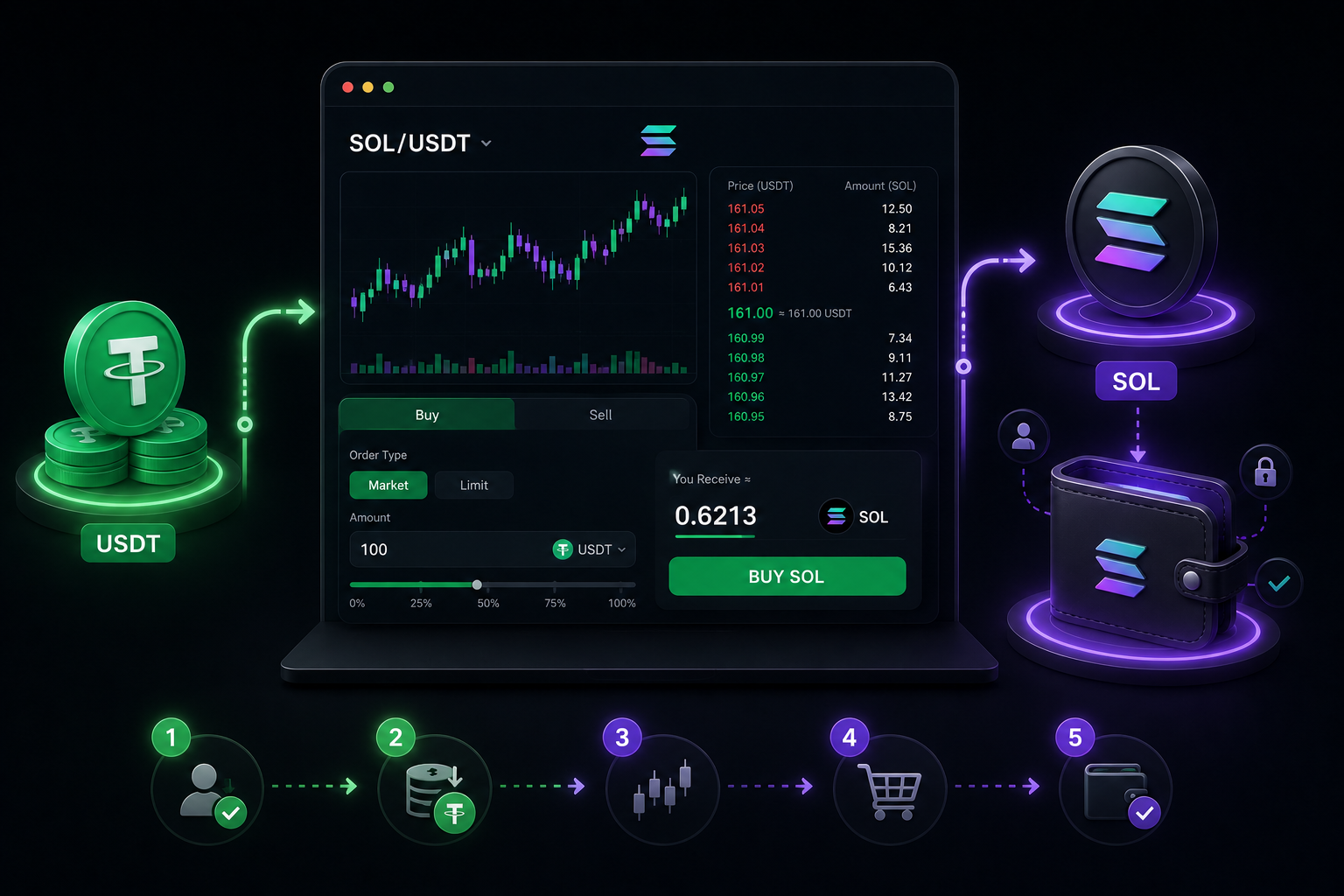
The core SOL buying process can be summarized as follows:
Register and prepare your account → prepare USDT → open spot trading → search for SOL/USDT → choose an order type → enter the purchase amount → confirm the order → check your SOL balance.
On Hotcoin, you can open the spot market from the trading page, search for the relevant pair, and submit an order in the buy panel. Available pairs, features, and minimum order requirements may change with platform rules, so always rely on the information currently shown on the page.
The process is straightforward, but first-time users most often make mistakes in three areas: selecting the wrong pair, misunderstanding market and limit orders, and failing to confirm where their SOL is stored after the purchase.
Step 1: Prepare USDT or Another Supported Funding Asset
If you use the SOL/USDT pair, first make sure your account contains USDT that is available for trading. USDT serves as the quote asset, allowing you to exchange it directly for SOL without first buying another cryptocurrency.
When preparing funds, distinguish between different account balances. USDT already held in your spot account can generally be used immediately. If it is held in another account or product, you may need to transfer it internally first. Refer to the current Hotcoin interface for the available account types and transfer route.
If you are not familiar with USDT, read:
What Is USDT and How Can You Buy It Safely?
Step 2: Open the Hotcoin Spot Trading Page
After signing in to Hotcoin, open Trading and select Spot. A spot trading page normally displays the trading pair, candlestick chart, order book, recent trades, and buy and sell panels. Together, these elements form the interface used to place an order.
Enter SOL in the pair search box to view the currently available SOL markets. If your account contains USDT, SOL/USDT will usually be the relevant pair. If other pairs are available, choose one that matches the asset you intend to spend.
Do not simply click the first result after searching for SOL. Confirm the complete pair. If you want to buy SOL with USDT, make sure SOL/USDT is selected rather than a pair quoted in another asset.
Step 3: Select the SOL/USDT Trading Pair
After selecting SOL/USDT, the displayed price represents SOL's current quote in USDT. In simple terms, when you submit a buy order, you exchange USDT for SOL at the available market price or your specified limit price.
Prices on the trading page change continuously, so no historical price mentioned in an article should be treated as the current purchase price. When you are ready to place an order, check the live price, order book, and available liquidity directly on Hotcoin's current SOL/USDT page.
If your goal is simply to buy and hold SOL, you do not need to change your method constantly in response to short-term price movements. Understanding order types and execution is more important than focusing on a single price figure.
Step 4: Should You Use a Market Order or a Limit Order?
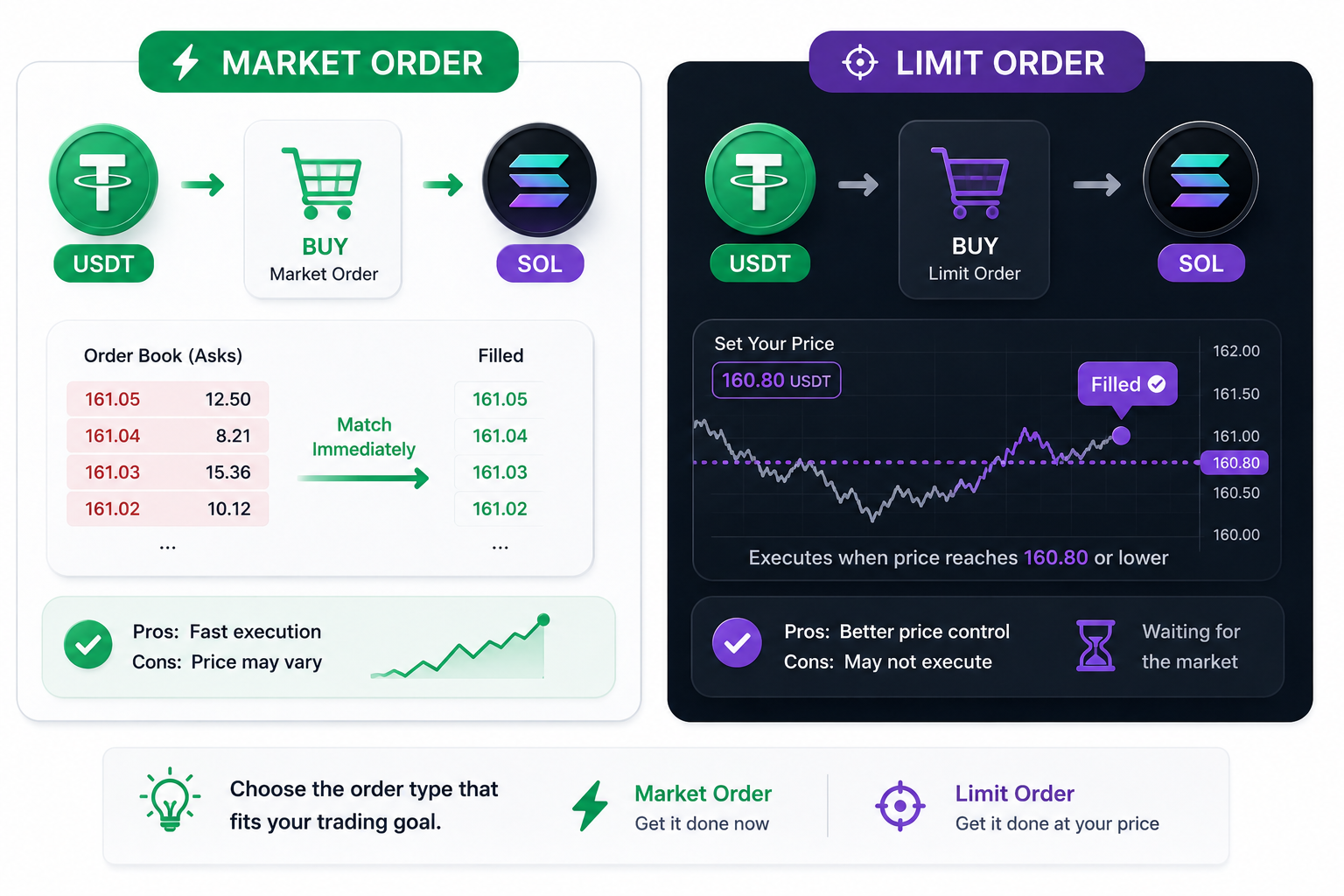
The two most common ways to buy SOL are market and limit orders. A market order prioritizes execution at the currently available prices. A limit order lets you set the highest price you are willing to pay and can fill only when the market reaches that level and sufficient sell liquidity is available.
For example, a market buy executes against sell orders currently in the order book, so the final average price may differ from the price displayed when you submitted it. With a limit order, you control the maximum price, but the order may remain open indefinitely if the market never reaches it.
If you are buying SOL for the first time, consider using a small amount to learn how both order types work instead of placing a large first order.
Step 5: Enter the Purchase Amount and Confirm the Order
After choosing an order type, enter either the amount of SOL you want to buy or the amount of USDT you want to spend. The trading page will show estimated execution information based on the current price and order status. Before submitting, check the amount, price, available balance, and order type.
With a market order, the final execution price can change as the market moves. With a limit order, check both whether the selected price is reasonable and whether the order has actually filled. After submitting, review the order status in your order history or asset page.
The following is only a calculation example and does not represent Hotcoin's current trading rules.
Suppose SOL/USDT is priced at 100 USDT and you plan to spend 500 USDT:
500 ÷ 100 = 5 SOL
If the execution price, trading fee, or order execution changes, the final amount of SOL credited to your account will change as well. This formula explains the basic transaction logic; it does not predict the actual amount you will receive.
Step 6: Confirm That You Actually Bought SOL
After the order is submitted and filled, open your spot asset page to check the SOL balance. If you used a limit order, remember that successful submission does not necessarily mean the order has fully filled.
This is an important distinction for beginners: placing an order and completing a trade are separate states. Market orders usually fill quickly, while limit orders may remain open because the market has not reached the price you specified.
Do not assume the purchase is complete just because the interface says the order was submitted. Check the order history, trade history, and actual SOL balance to confirm that the asset has reached the correct account.
Where Should You Keep SOL After Buying It?
After buying SOL, you can either keep it on the exchange or withdraw it to a personal wallet. Keeping it on the exchange is convenient if you want to trade or convert it later. Moving it to a personal wallet gives you direct access to the Solana ecosystem, but also makes you responsible for managing the wallet address, private key, or seed phrase.
There is no single correct answer about whether a beginner should withdraw immediately. If you are not yet familiar with wallet operations, first learn how spot trading, withdrawal addresses, and network matching work before moving assets on-chain.
If you decide to use a personal wallet, confirm that it supports the Solana network and carefully verify the recipient address. Do not assume that any address accepting an asset named SOL necessarily supports the correct network.
What Should You Check When Withdrawing SOL to a Wallet?
To withdraw SOL from Hotcoin to a personal wallet, first confirm that the wallet supports Solana and copy the correct SOL deposit address. On Hotcoin's withdrawal page, select SOL and the available network option, then verify the address, network, amount, and fee again before submitting.
Unlike withdrawing USDT, SOL is itself Solana's native asset. Be careful not to confuse the withdrawal network for SOL with network choices used for other assets. For a first transfer, consider sending a small test amount and confirming receipt before transferring more.
Solana transactions also require SOL for fees. If you move or spend all your SOL, you may later be unable to complete another on-chain action because no SOL remains to pay the network fee.
Why Do You Still Need SOL If Your Wallet Contains USDT?
This is a common point of confusion for people new to Solana. Network transaction fees are paid in SOL, so even when you transfer another token on Solana, you may need to keep a small SOL balance for fees.
For example, a wallet may hold USDT issued on Solana. Sending that USDT still creates a Solana transaction that requires a network fee. If the wallet contains no SOL, the transfer may fail.
This is one practical reason to buy SOL: it is not only a trading asset but also the base fee asset of the Solana network. If your objective is to use the Solana ecosystem rather than only trade SOL on an exchange, include this requirement in your funding plan.
Are Solana Network Fees High?
Solana's base transaction fee is denominated in SOL, and the network also supports optional priority fees. Solana's official documentation currently states that the base fee is calculated per signature at 5,000 lamports for each signature. Actual costs may also depend on the transaction type, priority fee, and other on-chain operations.
Solana network fees and an exchange's SOL withdrawal fee are different charges. The fee shown when withdrawing SOL from Hotcoin follows the platform's withdrawal rules. After SOL reaches your wallet, subsequent on-chain transactions follow Solana's own fee mechanism.
Therefore, a relatively low Solana network fee does not mean that withdrawing SOL from every exchange will always be cheap. The two fees are charged by different parties and calculated differently. Always refer to the current withdrawal page for the actual cost.
How Much SOL Should You Buy at Once?
There is no fixed amount suitable for everyone. SOL's price can fluctuate, and every buyer has a different budget, risk tolerance, and holding period. First decide how much loss you can afford, then choose a purchase size instead of copying another person's position.
If your purpose is to learn the process, use a small amount you can afford to lose while becoming familiar with funding, spot trading, and withdrawals. The goal is not to pursue a specific return, but to reduce the impact of a first-time mistake involving an order, address, or network.
Is a Market Order or Limit Order Better for Buying SOL?
If immediate execution matters most, a market order is generally more direct. If you care more about the purchase price and can accept that the order may not fill immediately, a limit order may be more suitable. Neither type is universally better; the choice is mainly a trade-off between execution speed and price control.
During volatile periods, market-order users should pay attention to order-book depth because a large order can fill across multiple sell prices. Limit-order users need to monitor their selected price because an order may remain unfilled if the market never reaches it.
Before choosing, ask yourself: “Do I want to buy SOL now, or only at a particular price?” That question is usually more useful than asking which order type is best.
What Common Mistakes Should You Avoid When Buying SOL?
The most common first-time mistakes do not involve finding the Buy button. They come from confusing trading-page information, order states, and on-chain assets. Pay particular attention to the following:
Selecting the wrong trading pair.
Failing to distinguish market and limit orders.
Not checking whether a submitted limit order has filled.
Repeatedly changing orders in response to every price movement.
Sending a large withdrawal as the first test transaction.
Failing to confirm that the wallet supports Solana.
Withdrawing all SOL and leaving none for future network fees.
Treating an exchange withdrawal fee and a Solana network fee as the same thing.
The seventh mistake is especially easy to overlook. If you plan to use a Solana wallet, consider not only how much SOL to send to it, but also how much SOL should remain available for later transactions.
A Safer SOL Buying Process
If this is your first SOL purchase, divide the process into four stages: prepare funds, complete the spot purchase, confirm the asset status, and then decide whether you actually need to withdraw to a wallet.
In the first stage, confirm that your account and USDT are ready. In the second, open the SOL/USDT spot page, understand market and limit orders, and place a small purchase. In the third, confirm the order has filled and check your SOL balance. In the fourth, learn wallet and withdrawal operations if you need to use Solana applications.
Separating the purchase from on-chain use makes the process easier to understand. Beginners often try to handle trading, wallets, networks, and DeFi at the same time, which makes it easier to confuse several unrelated operations.
SOL Buying Process at a Glance
This process highlights an important distinction: buying SOL is normally a spot trade, while moving SOL to a personal wallet introduces on-chain operations and network fees. Do not treat these two stages as a single action.
SOL Buying FAQ
Can You Buy SOL Directly With USDT?
Yes. If the platform offers a SOL/USDT spot pair, you can use USDT to buy SOL. Open the spot trading page, confirm that SOL/USDT is selected, and choose a market or limit order based on your needs.
What Is the Minimum Amount Needed to Buy SOL?
There is no universal minimum that applies to every platform and every time. The minimum order quantity, minimum trade value, and other restrictions depend on the rules currently shown on the platform's SOL trading page.
Do You Have to Move SOL to a Wallet After Buying It?
No. You can keep SOL on the exchange if you only plan to trade or hold it temporarily. If you want to use Solana applications, you will generally need a wallet that supports the Solana network.
What Should You Check When Withdrawing SOL?
Most importantly, confirm that the wallet supports Solana and verify the recipient address and network option on the withdrawal page. When sending to a new wallet for the first time, consider making a small test transfer before moving more assets.
Why Does a Solana Wallet Need SOL?
Solana network transactions require SOL for fees. Even when you transfer another token on Solana, you may still need SOL to pay for the transaction. If you plan to use a Solana wallet regularly, keep a small SOL balance for future network operations.
Is SOL Suitable for Long-Term Holding?
SOL's future price is uncertain. Solana's relatively low transaction costs and ecosystem development do not guarantee that SOL will rise. Any long-term holding decision should reflect your risk tolerance, liquidity needs, time horizon, and assessment of the Solana ecosystem. Past performance does not guarantee future returns.
Risk Warning
SOL is a highly volatile crypto asset, and its price can change substantially over a short period. Buying SOL involves a risk of losing principal. This guide explains the buying and usage process; it is not investment advice and does not imply that SOL will increase in value.
When spot trading, size your position according to your financial circumstances and never use funds you cannot afford to lose. For on-chain withdrawals, carefully confirm the wallet address, network, and asset type. Blockchain transfers are generally irreversible, and an error can result in asset loss.
Any Hotcoin trading processes, interface functions, and rules mentioned here are subject to the information currently displayed by Hotcoin. Trading pairs, minimum order requirements, withdrawal fees, and supported networks may change.
Continue Learning How to Buy Popular Cryptocurrencies
SOL is a popular crypto asset, but different cryptocurrencies have different purchase methods, use cases, and risk profiles. To learn how to buy USDT, SOL, and DOGE, continue with the full guide in this learning cluster:
Leitura recomendada
Veja mais