
What Is a Passkey? A Safer Next-Generation Alternative to Passwords
A Passkey is a public-private key login credential bound to a website's domain. The website stores only the public key, while the private key remains on a device or in a protected sync system. This means there is no password that a fake page can directly capture.
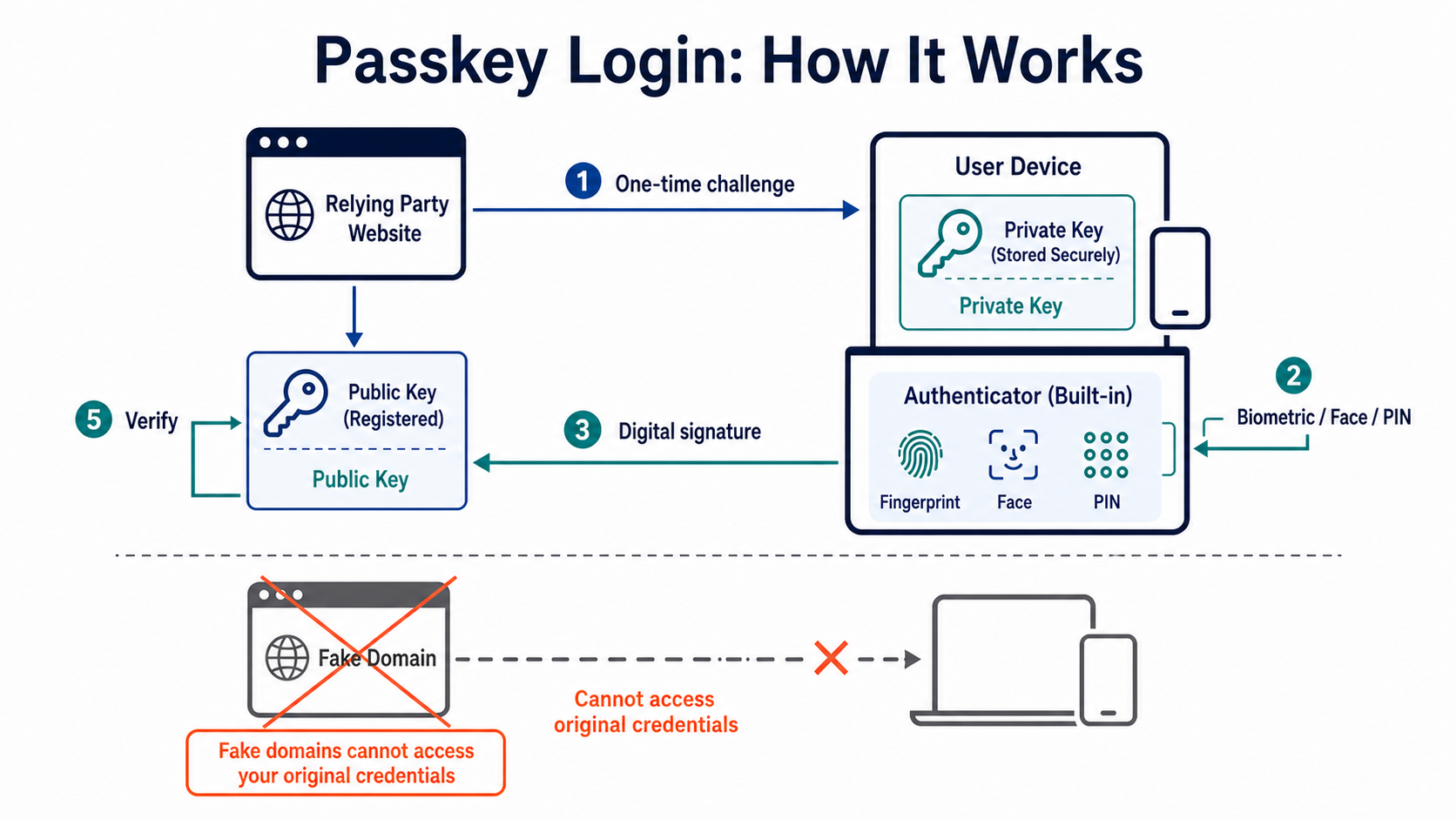
How Does a Passkey Complete a Login?
When a Passkey is created, the authenticator generates a key pair for a specific website. The website stores the public key, while the private key is kept by a phone, computer, hardware security key, or password manager. During login, the website sends a one-time challenge. After the user unlocks the device, it signs the challenge, and the website verifies the signature with the public key.
A fingerprint, face scan, or device PIN normally serves only to unlock the authenticator locally. Biometric data does not need to be sent to the website; the website receives the signature result. Even if an attacker obtains the public key from the website's database, they cannot use it to produce a valid signature.
WebAuthn binds each credential to the legitimate domain. A phishing site cannot ask an authenticator to sign with a Passkey issued for another domain. This is why Passkeys resist phishing more effectively than passwords and manually entered verification codes.
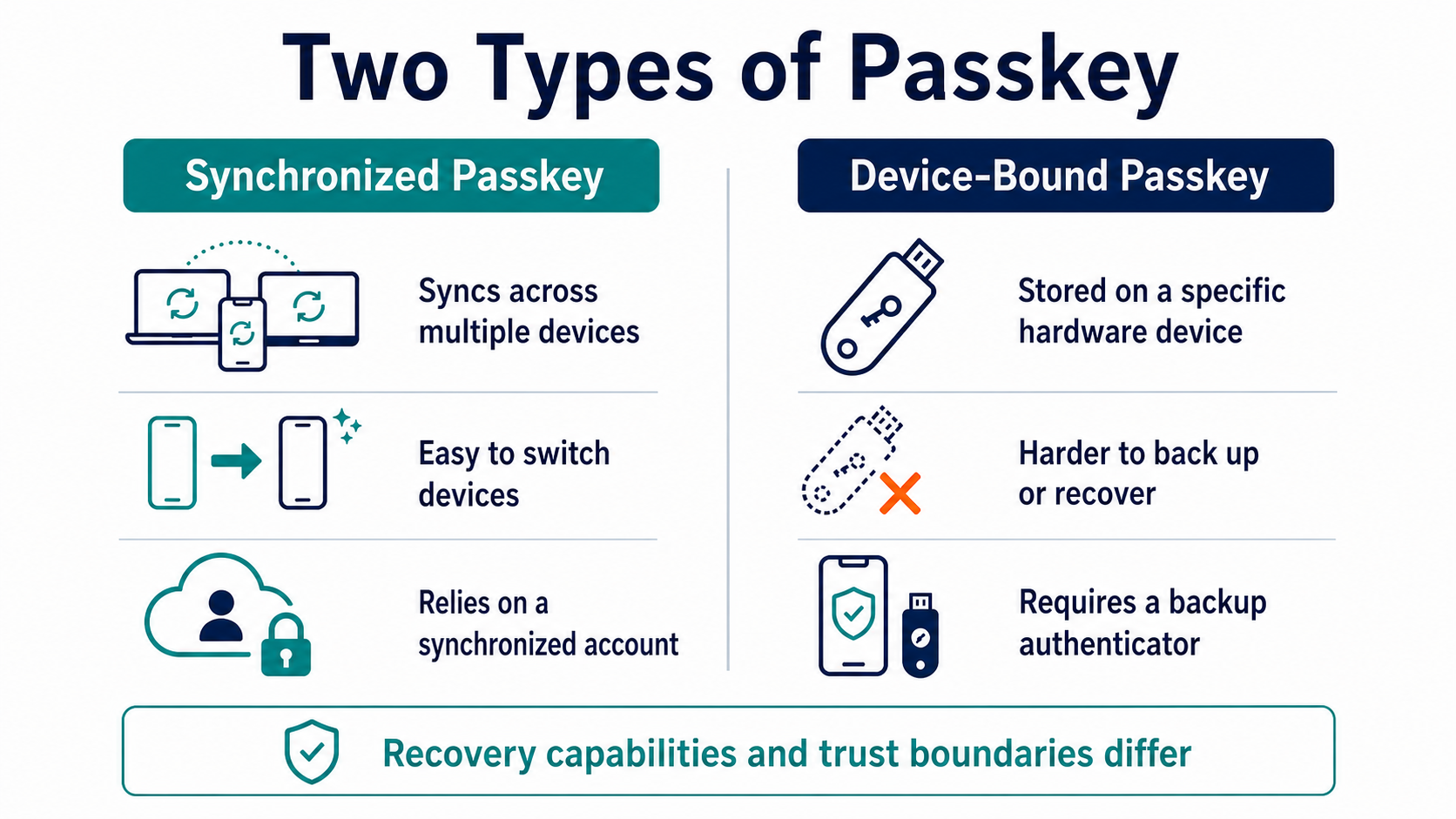
What Is the Difference Between Synced and Device-Bound Passkeys?
A synced Passkey can become available on multiple devices through a protected sync feature provided by an operating system or password manager, making device replacement easier. A device-bound Passkey normally remains on specific hardware and is harder to copy, but it requires a backup authenticator or a formal recovery path.
Before choosing one, check who synchronizes the credential, what account recovery depends on, and how a new device is verified. Syncing improves usability, but it also brings cloud-account and device-unlock security into the trust boundary. Disabling sync creates greater reliance on backup hardware and in-person administration.
How Should Passkeys, TOTP, and Passwords Work Together?
| Method | What the user provides | Resistance to phishing sites | Main recovery issue |
|---|---|---|---|
| Password | A reusable string | Weak; it can be copied and relayed | Email or platform reset |
| TOTP | A short-lived one-time code | Limited; it can still be relayed in real time | Setup secret, recovery code, or manual reset |
| Passkey | A signature over a domain challenge | Strong; the credential is bound to the website | Device, sync account, or backup authenticator |
If a platform continues to offer password login, attackers may still target that weaker fallback. After enabling a Passkey, review old passwords, SMS recovery, customer-support resets, and signed-in devices instead of looking only at the primary login button.
What Should You Check Before Setting One Up?
Confirm that the device has a screen lock and an up-to-date operating system. Record where the Passkey is stored, then add an independent backup method. A shared computer is unsuitable for storing a personal Passkey. Before selling or repairing a device, revoke the credential from both the account and the device.
A Passkey protects authentication; it does not determine whether a transfer address, contract approval, or customer-support instruction is safe. Scams that persuade an authenticated user to transfer funds still require transaction verification and fund controls to stop them.
For TOTP setup and recovery, read the 2FA setup guide. For a broader account strategy, return to cryptocurrency security fundamentals.
Frequently Asked Questions
Does a Website Receive My Fingerprint When I Use a Passkey?
Usually not. A fingerprint or face scan unlocks the authenticator locally, while the website verifies a cryptographic signature. Consult the device and authenticator documentation for details about how biometric data is handled.
Can One Passkey Log In to Multiple Unrelated Websites?
Each website uses a separate credential. An authenticator can manage many Passkeys, but it does not reuse the same private key across websites.
If I Lose My Phone, Can Someone Use My Passkey Directly?
Whether they can use it depends on the device lock, authenticator protection, and remote revocation status. Lock or erase the device immediately, then remove the associated credential and sessions from the account.
Will Passkeys Eliminate Phishing Completely?
No. They prevent many login-credential phishing attacks, but attackers can still exploit authenticated sessions, malware, fake customer support, and prompts that trick users into signing or transferring funds.
Leitura recomendada
Veja mais


Service@hotcoin.com
Product@hotcoin.com
Business@hotcoin.com
Casecn@hotcoin.com