
Crypto Security Basics: 15 Essential Rules for Protecting Digital Assets
Protecting cryptocurrency means securing login points, devices, withdrawal routes, and wallet signatures at the same time. The following 15 rules can reduce the damage caused by a single point of failure.
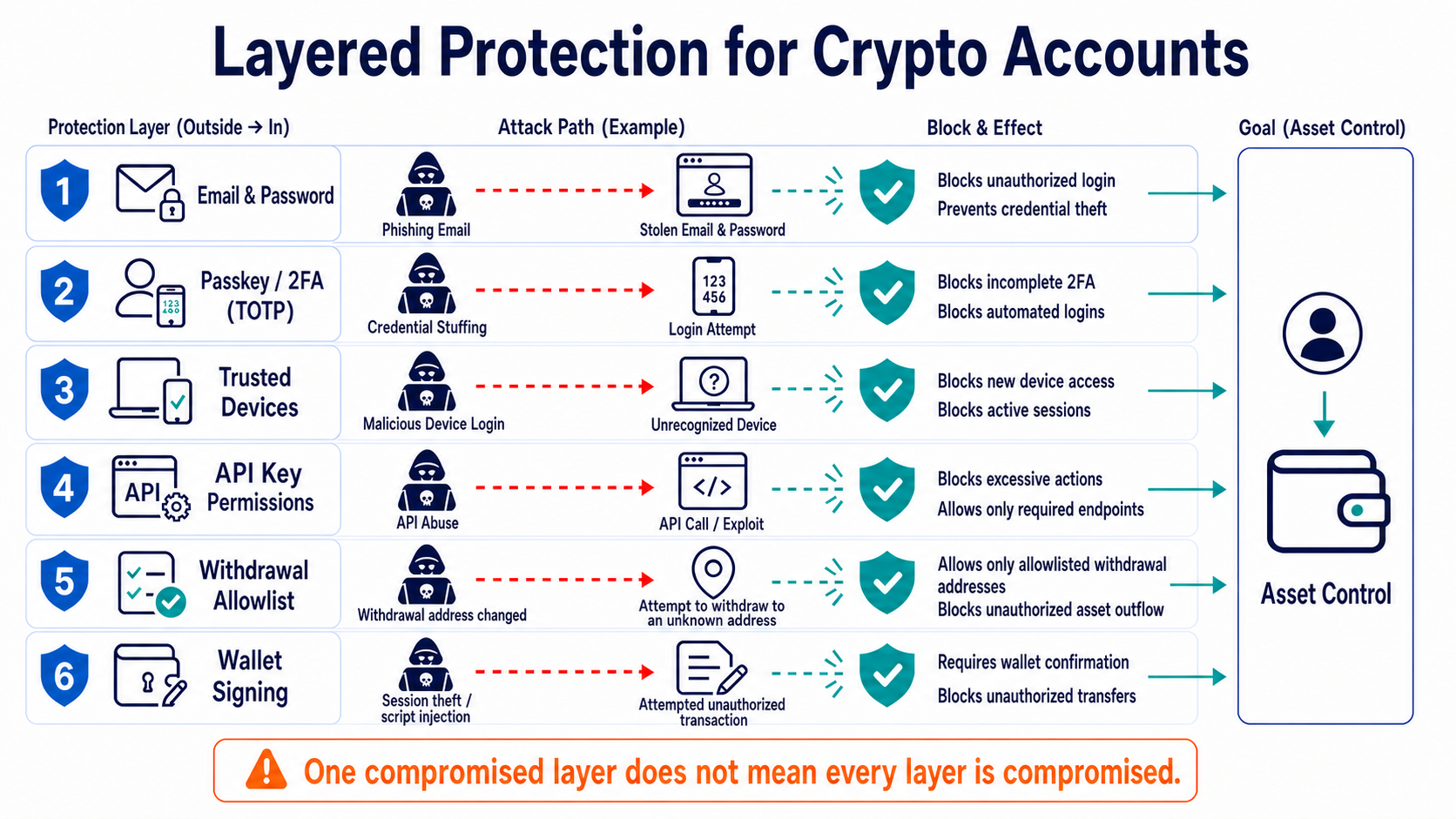
Understand the Three Types of Control First
With a centralized trading platform account, the platform verifies identity and holds the relevant keys, while the user mainly protects the email address, password, authentication methods, and withdrawal settings. A self-custody wallet is controlled by its private key or seed phrase, and there is usually no customer service team that can reset it. An API key delegates part of an account's permissions to software or a third-party tool.
Each entry point offers different recovery options. If a password is exposed, it can still be changed and active sessions can be revoked. If an API key is exposed, the key should be deleted immediately. If a seed phrase is exposed, the old wallet itself can no longer be trusted, so the assets must be moved to a wallet created with a new seed phrase.
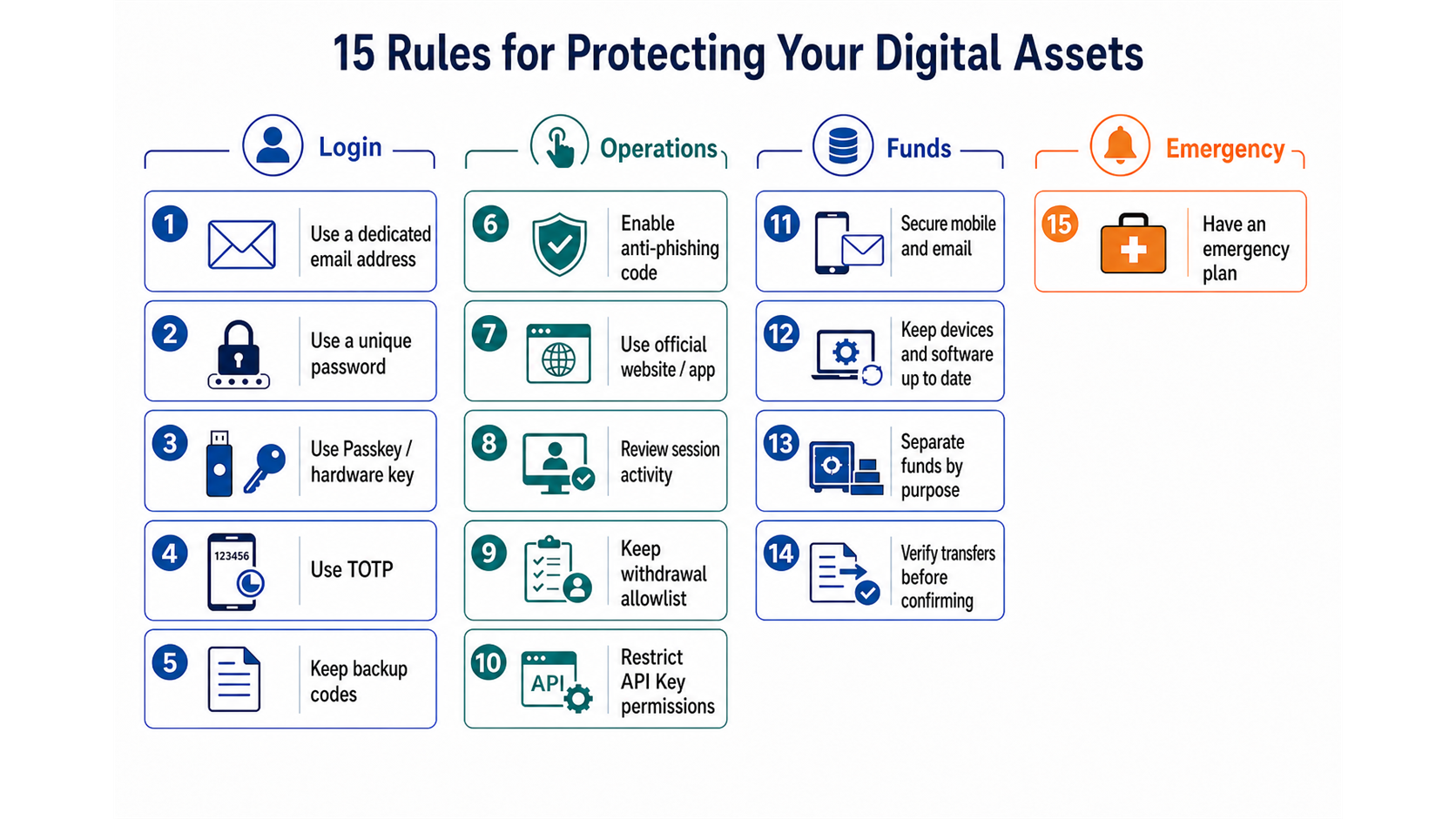
15 Security Rules
- Use a dedicated email address for trading accounts. If the email account is compromised, an attacker may reset passwords, approve new devices, or hide security alerts.
- Use a different random password for every website. Let a trusted password manager generate and store passwords so that credential-stuffing attacks cannot spread across accounts.
- Prefer passkeys or hardware security keys. They bind authentication to the legitimate website and resist fake login pages better than manually entered verification codes.
- At minimum, enable TOTP codes generated by an authenticator app. SMS can serve as a backup, but it is vulnerable to SIM swapping, number porting, and message interception.
- Store recovery codes separately. Do not keep them with passwords or authenticator export files on the same device or in the same cloud drive.
- Set an anti-phishing code. If the code in a platform email is missing or incorrect, stop instead of continuing through the email link.
- Sign in through a bookmarked or manually entered official URL. Do not treat search ads, group-chat links, or QR codes in direct messages as trusted entry points.
- Review sessions, devices, and security settings regularly. An unfamiliar IP address is only one clue; evaluate it together with the device, time, activity history, and email alerts.
- Enable a withdrawal whitelist and apply a waiting period to new addresses. A whitelist cannot correct the wrong network or a copied address error, so every withdrawal detail still requires verification.
- Give API keys only the permissions required for their task. Market-data software does not need trading access, and trading bots usually do not need withdrawal access. Bind keys to an IP address when using a fixed server.
- Protect your phone number and email recovery channels. Add an account PIN or port-out lock with your carrier, and remove unfamiliar recovery addresses, forwarding rules, and authorized apps.
- Keep the operating system, browser, and wallet updated. Remove untrusted extensions, remote-control software, and cracked programs, and do not manage large holdings on a jailbroken or rooted device.
- Separate trading funds from long-term storage. Keep only the amount needed for routine activity in an active wallet, and use a separate wallet or suitable custody arrangement for long-term holdings.
- Verify the asset, network, address, and any memo or tag for every transfer. Test a new route with a small amount first, but recheck limits and arrival conditions before a large transaction as well.
- Write down the incident-response order in advance. It should cover freezing accounts, revoking sessions and APIs, migrating wallets, preserving transaction evidence, and contacting the platform and local law enforcement through independent channels.
Use Layered Defense Instead of One “Safest Tool”
No single setting covers every attack. A passkey can reduce login phishing but cannot stop someone from voluntarily transferring funds to a scammer. A hardware wallet isolates private keys but cannot determine whether a contract is malicious. A withdrawal whitelist limits destinations but cannot protect a self-custody wallet whose seed phrase has already been exposed.
Protection can be divided into four layers: the login layer prevents account takeover, the operations layer restricts permissions, the funds layer limits exposure per incident, and the response layer shortens detection and loss-containment time. An attacker must break through several layers in sequence, and any anomaly from any layer should be a reason to pause.
To configure your account step by step, continue with the 2FA setup guide, how passkeys work, anti-phishing codes, API key security, withdrawal whitelists, unusual login detection, exchange security ratings, and the password manager selection guide.
Five-Minute Monthly Checklist
Open the trading platform and your primary email account to confirm that recent sessions, devices, recovery methods, API keys, and withdrawal addresses have not changed. Then check the operating system and wallet versions, and confirm that offline recovery materials are still accessible, clearly labeled, and understood by the person responsible for the emergency procedure.
A review does not mean re-entering a seed phrase on an internet-connected device. A wallet recovery drill should use trusted backup hardware or a purpose-built offline process. Do not expose a secret that was safely offline merely to “confirm the backup” on a webpage or in a phone screenshot.
Frequently Asked Questions
Should I Keep a Phone Only for Trading?
Whether it is worthwhile depends on the value of the assets, how often you trade, and your personal threat model. A dedicated device reduces exposure to social apps, games, and extensions, but it is not automatically secure if you still install untrusted software or share the same email account.
Does Signing In on Public Wi-Fi Always Lead to Theft?
Not necessarily, but public networks increase exposure to fake hotspots, malicious portals, and shoulder surfing. Use a trusted network for high-value actions, verify HTTPS and the domain name, and never enter passwords or recovery information on a public device.
Must I Change My Password Every Month?
When there is no sign of compromise, frequent mandatory changes often produce predictable variations. It is more important to use a long, unique, random password and change it immediately after a breach notice, credential-stuffing alert, or suspicious login.
Can Fingerprint or Face Recognition Replace Every Security Setting?
No. Biometrics generally unlock a local device or authenticator, while account security also depends on recovery channels, device binding, platform policies, and fund permissions.
Leitura recomendada
Veja mais


Service@hotcoin.com
Product@hotcoin.com
Business@hotcoin.com
Casecn@hotcoin.com