
HOTCOIN Logo
暗号を購入する
マーケット
取引
先物
稼ぐ
ボーナス
もっと
Web3 ウォレット
サービス連絡先

Service@hotcoin.com

製品フィードバック

Product@hotcoin.com

ビジネス協力

Business@hotcoin.com

法務連絡先

Casecn@hotcoin.com

お 問い合わせ
サービス連絡先

Service@hotcoin.com

製品フィードバック

Product@hotcoin.com

ビジネス協力

Business@hotcoin.com

法務連絡先

Casecn@hotcoin.com

我々について
プラットフォーム紹介
アナウンスセンター
システムステータス
ユーザー規約
プライバシー・ポリシー
法的説明
製品
先物
現物
TradFi取引
コピートレード
証拠金取引
Earn
P2P購入
カードで暗号通貨を購入
Web3 ウォレット
仕える
ライブストリーミング
厳選されたホットコイン
報酬センター
友達招待
VIP特典
ダウンロード
P2P加盟店に申し込む
サポート
ホットコインカレッジ
ヘルプセンター
APIドキュメント
手数料率
通貨情報
リスティングアプリケーション
オンラインサービス
お客様の声
公式検証
取引
BTC USDC
ETH USDC
BTC USDT
ETH USDT
PI USDT
SOL USDT
XRP USDT
©2017-2026
ヘルプセンター
/Web3 Wallet/Getting Started/
Network Fees for Wallet Transfers
ヘルプセンター
/Web3 Wallet/Getting Started/
Network Fees for Wallet Transfers

Network Fees for Wallet Transfers

Hotcoin
共有


When you send assets from your Web3 Wallet, you'll need to pay a blockchain network fee (gas fee). This guide explains how to check the required network fee and add the native tokens needed to complete your transfer.


I. Check the Network Fee


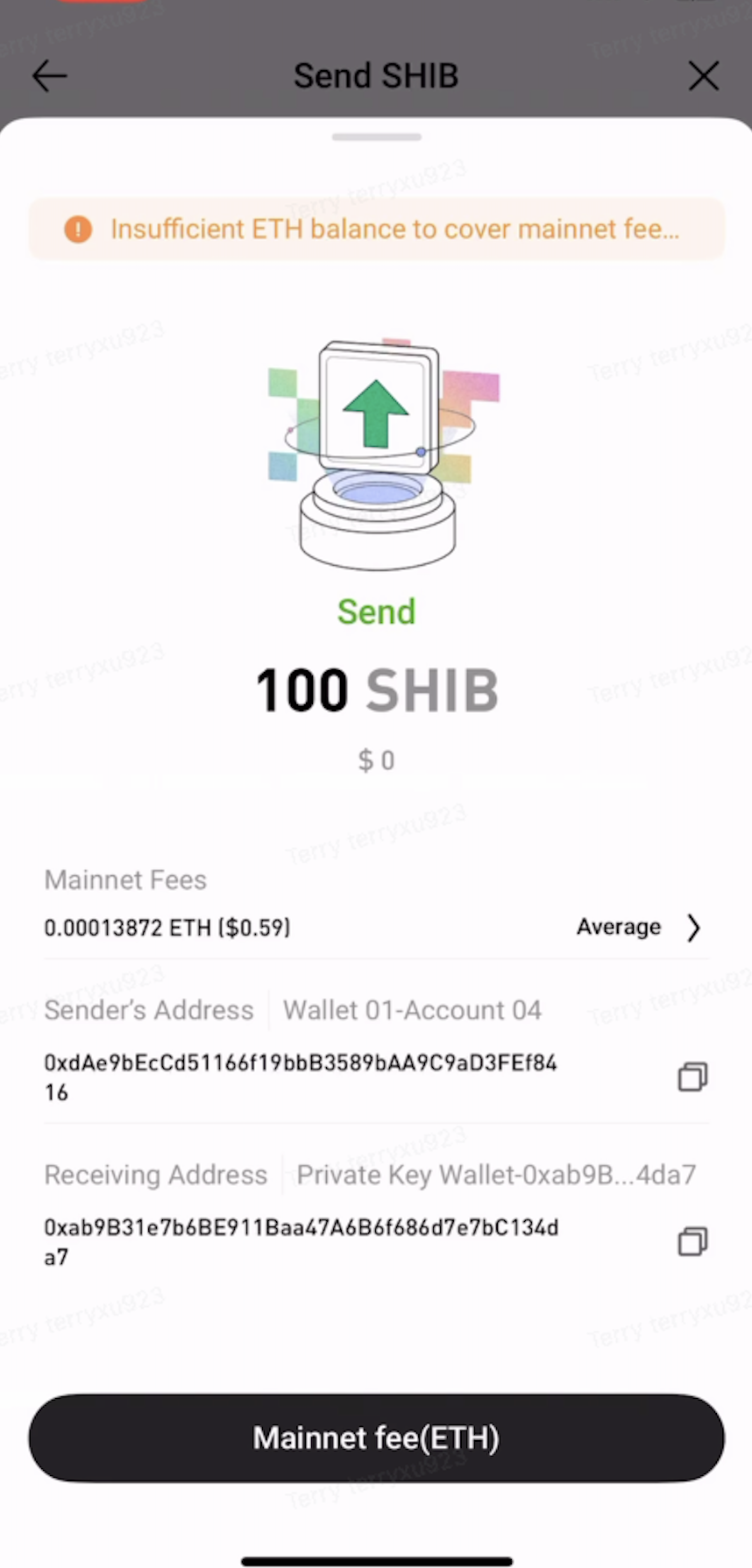
When you initiate a transfer from your wallet, the estimated network fee and the required native token are displayed on the confirmation page.


Note:

  • Network fees are charged per transaction and are not based on the transfer amount.
  • Network fees fluctuate depending on network congestion. The fee shown on the confirmation page is an estimate at the time of submission.
  • Make sure your wallet has enough native tokens to cover the network fee. Otherwise, the transaction cannot be completed.


II. Insufficient Balance to Cover Network Fee


If your wallet displays the "Insufficient Balance to Cover Network Fee" message, it means you don't have enough native tokens in your wallet to pay the required network fee.

You can complete the transfer after adding enough native tokens for the selected blockchain network.


For example:

  • Ethereum requires ETH.
  • BNB Chain requires BNB.
  • Polygon requires MATIC.


III. Add Native Tokens for Network Fees


Step 1: Confirm which blockchain network you're using (such as Ethereum, BNB Chain, or Polygon).


Step 2: Deposit the native token for the selected network into your wallet to cover the network fee.
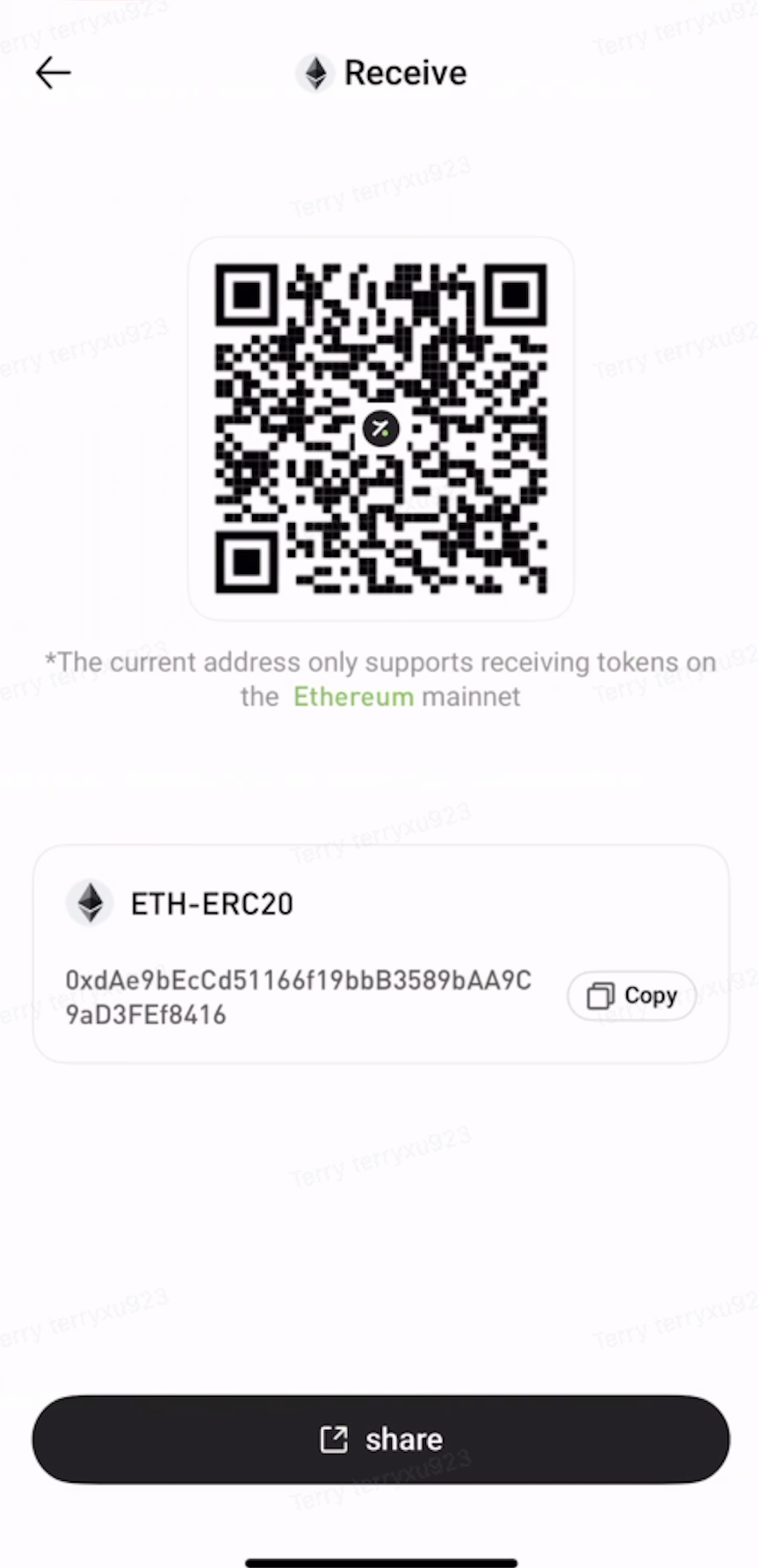


Step 3: Once your wallet has enough native tokens to cover the network fee, try sending your assets again.


IV. Common Networks and Their Native Tokens

 Network  Native Token   
Ethereum ETH
Solana SOL
TRON TRX
BNB Chain BNB


Important Notes:


  • Network fees are paid to the blockchain network, not to the platform.
  • Once a transaction has been broadcast to the blockchain, the network fee is generally non-refundable.
  • Before sending assets, make sure your wallet has enough native tokens to cover the required network fee.
  • If you're unsure which native token is required or how much you'll need, check the transfer page or contact Customer Support for assistance.

入金と出金
Deposit
Withdrawal
暗号通貨を購入する
P2P FAQ
加盟店管理
プロトコルルール
現物取引と証拠金取引
現物取引
先物取引
Contract Grid
Contract documentary
Getting Started
Follower Guide
Lead Trader Guide
Hotcoin財務管理
その他のトピック (プロトコル関連)
NFT