How to Interact Safely On-Chain: Signatures vs. Transactions
Safe on-chain interaction starts with understanding what wallet connections, message signatures, token approvals, and on-chain transactions each permit.
An on-chain transaction broadcasts an instruction that may transfer assets, call a contract, or change an approval, and it normally requires gas. A message signature is usually not broadcast immediately and does not directly create a transaction hash, but it proves control of an address and may authorize a login, order, Permit, or later asset operation.
“No gas” does not mean “no risk,” and a wallet prompt labeled “Sign” is not necessarily just a login. Before confirming, check the domain, network, target contract, asset, amount, spender, nonce, expiry, and your actual intent. Refusing a request you do not understand is a normal security decision.
For a broader foundation covering wallets, explorers, gas, approval management, and dashboards, read Essential Tools and Skills for Practical Web3 On-Chain Use.
What actions can one DApp interaction contain?
After a user clicks one DApp button, the wallet may receive several different requests in sequence. A common flow is to connect the address, sign a login message, approve a token, and finally send a Swap, Mint, Stake, or Bridge transaction.
The prompts may look similar, but their permissions differ. Connecting normally lets the site read an address; a login signature proves address control; Approve lets a contract pull tokens later; the final transaction executes the requested business logic.
Do not approve every subsequent prompt merely because the first one was safe. Treat each step as a separate authorization and match it to the action you just initiated. A page that only says “Continue” while the wallet requests an unlimited stablecoin approval is clearly suspicious.
What does connecting a wallet mean?
Connecting a wallet normally gives a site the current public address, selected network, and limited wallet capabilities so it can display balances, personalize the interface, or propose later signature requests. Public addresses are already visible on-chain.
A normal connection does not reveal the private key, create an ERC-20 allowance, or transfer assets automatically. It is closer to showing a public account to a website than handing the wallet over to it.
However, a connection creates a channel for further interaction and may link the address to browsing activity. Disconnecting ends the session, but it does not revoke existing on-chain approvals, signed orders, or Permits.
What is a wallet message signature?
A message signature uses an account key to create cryptographic proof. A verifier can confirm that the corresponding address produced the signature and that the message was not modified, but cannot derive the private key from it.
A normal message signature is usually not broadcast to the blockchain, costs no gas, and does not automatically appear in transaction history. Common uses include login, acceptance of terms, proof of address ownership, order creation, and authorization for relayed execution.
Its risk depends on who may use the message and under what conditions. A signature that appears not to transfer funds may still serve as a credential for a smart contract or marketplace settlement system to move assets later.
What is an on-chain transaction?
An on-chain transaction is an instruction signed by an account and broadcast to a blockchain. Once validators or sequencers execute it, the transaction may change balances, contract storage, token approvals, NFT ownership, or protocol positions.
An Ethereum transaction normally includes the sender, destination, native-token value, call data, nonce, gas limit, and fee parameters. When a contract is called, the real action is primarily determined by the target contract and input data.
After submission, a transaction hash is created and the transaction moves through states such as Pending, Success, or Failed. A failed transaction normally does not complete the intended state change, but the computation already performed may still consume gas.
What is the key difference between a signature and a transaction?
A transaction directly asks the network to change state and therefore requires broadcasting, execution, and block confirmation. A message signature directly creates verifiable authorization, which is often stored off-chain and later used by a website, relayer, or contract.
Transactions normally expose a network, To address, Value, Data, and gas fields and can be queried by hash. A message signature may contain only text or structured fields and may leave no immediate public on-chain record.
Both use private-key authority, so neither should be confirmed blindly. Transaction risk is more immediate, while signature risk may be delayed: an order or Permit signed today may only be submitted once its conditions are met.
What is Personal Sign commonly used for?
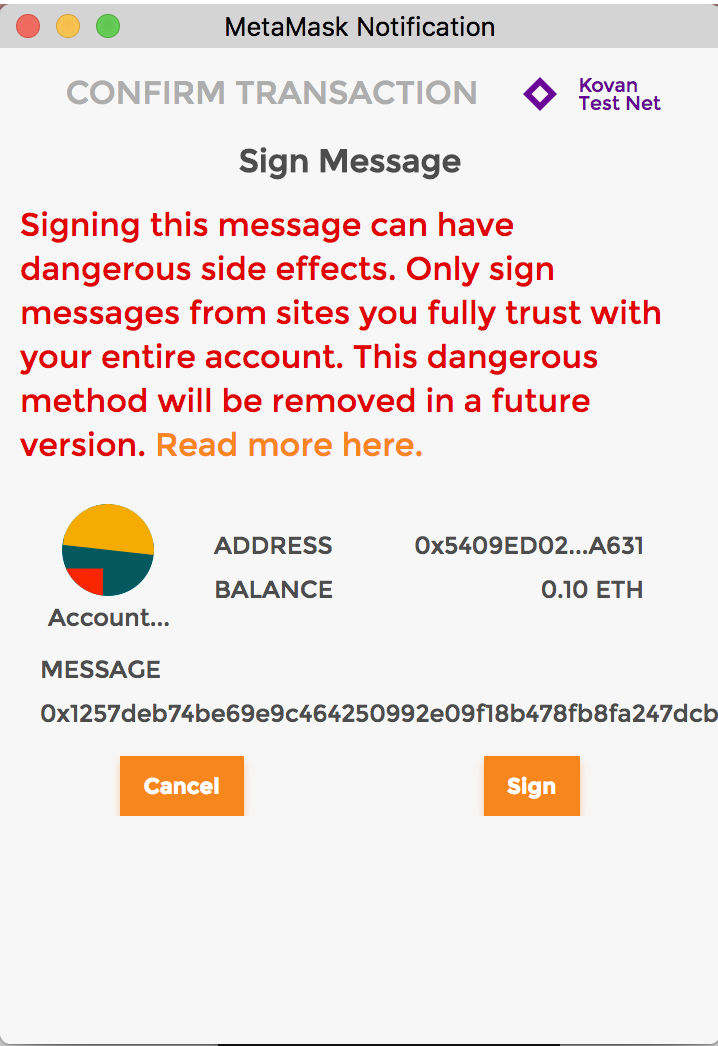
Personal Sign commonly signs readable text for login, address verification, acceptance of service terms, or governance. The wallet signs a message with an Ethereum-specific prefix, which helps distinguish it from raw transaction data.
A legitimate login message should clearly state the requesting domain, wallet address, purpose, nonce, issue time, and expiry. The Sign-In with Ethereum standard also defines fields such as URI, Chain ID, and Resources.
Do not treat a request as a normal login if it contains unreadable hex, an unfamiliar domain, no expiry, no nonce, or language that grants control over tokens or NFTs.
What is an EIP-712 structured signature?
EIP-712 defines types, messages, and a domain for structured data. This gives wallets a chance to show a contract, address, amount, nonce, and deadline as readable fields instead of one long byte string.
The domain often includes the application name, version, Chain ID, and verifying contract to distinguish protocols, contracts, and networks. Check that it matches the current site and the contract you expect.
Readable structure improves transparency but does not make a request safe. EIP-712 itself does not implement replay protection for an application; the protocol must correctly use nonces, deadlines, and one-time state.
What is Sign-In with Ethereum?
Sign-In with Ethereum, or SIWE, is a standard message format for logging in to an off-chain service with an Ethereum address. The site creates a login message, the wallet signs it, and the server verifies the signature before establishing an address-linked session.
A standard message normally contains Domain, Address, URI, Version, Chain ID, Nonce, and Issued At, and may also contain Expiration Time and Resources. The nonce helps stop the same signature from being reused.
Confirm that Domain matches the actual browser domain, Address is the current account, and URI, Chain ID, and Resources are expected. A lookalike domain remains a phishing site even if it copies the standard format.
Why can a gas-free signature still be dangerous?
Gas only identifies who pays for on-chain computation; it does not say whether an action affects assets. A third party can store a signature and have a relayer pay gas to submit it later, changing an allowance, filling an order, or moving assets.
Permit, Permit2, NFT listings, DEX limit orders, and meta-transactions may all use a sign-now, execute-later model. Paying no gas at signing time does not mean the authorization has no economic value.
Ask three questions: what does the signature authorize, who can use it, and when does it expire? If the wallet and official documentation cannot answer all three, do not continue.
Why is Approve an on-chain transaction?
ERC-20 Approve calls a token contract and sets a spender's allowance to a specified amount. It changes on-chain storage, so the account must sign a transaction and pay gas on the relevant network.
A successful approval does not normally reduce the current wallet balance, but the spender can call TransferFrom within the allowance. An unlimited approval can also affect tokens received in the future.
NFT SetApprovalForAll is also an on-chain transaction and can let an operator manage every NFT in a collection. Stop if a page claims to “verify a collectible” but requests global operator permission.
Why can Permit create an approval through a signature?
EIP-2612 Permit allows a user to sign EIP-712 data that changes an ERC-20 allowance without first sending a separate Approve transaction. Any address may submit the Permit if its conditions are satisfied.
Typical fields are Owner, Spender, Value, Nonce, and Deadline. The nonce prevents reuse of the same Permit, the deadline limits when it can be submitted, and the domain helps bind it to a token contract and network.
A wallet may label Permit as a signature rather than a transaction, but it still grants token spending power. Review the spender, amount, expiry, and verifying contract as carefully as an Approve request.
Why does Permit2 require extra care?
Permit2 commonly separates an ERC-20 approval to a shared contract from signed permissions granted to a specific DApp. A user first approves Permit2, then signs a request defining a spender, amount, expiry, or one-time transfer.
This design reduces repeated approvals and improves multi-protocol usability, but it also makes signatures a critical security boundary. Attackers may disguise a large Permit2 authorization as a login, airdrop, or eligibility check.
Inspect both layers: the token's upstream allowance to Permit2 and Permit2's downstream permission for the specific spender. Removing only one layer may not eliminate every risk.
How can a DEX order signature affect assets?
Some DEXs and aggregators create limit, RFQ, or intent orders using off-chain signatures. The order is not filled immediately, but a settlement contract may execute it later when price, time, and liquidity conditions are met.
The order should define the sell asset, buy asset, quantity, minimum return, recipient, nonce, expiry, and settlement contract. A wrong recipient or an unreasonably low minimum return can cause serious loss.
Revoking an allowance may prevent settlement but may not cancel the order itself. Cancel the order or invalidate its nonce through the official protocol interface, then review whether related approvals are still necessary.
What are the risks of an NFT listing signature?
NFT marketplaces often store listings as off-chain signatures and let a buyer or relayer submit them at settlement. The seller may pay no gas when listing, yet the signature can remain fillable until expiry.
A listing often also depends on NFT Approval or SetApprovalForAll. If an NFT is moved away and later returned, an old order combined with an active operator permission may become executable again.
Before signing, verify the collection contract, token ID, price, payment token, fees, royalties, recipient, and deadline. After canceling, confirm that the order nonce or marketplace state was updated.
What are gasless flows, meta-transactions, and relayers?
“Gasless” normally means a relayer, paymaster, project, or other account pays the on-chain fee, not that the operation has no cost. The user signs an intent or authorization and a third party wraps it in an on-chain transaction.
Meta-transactions can improve onboarding, but the target contract, function, token, and permission still matter. The sponsor may also delay, decline, or order requests according to protocol rules.
When a flow says “free” or “gasless,” check who submits it, which forwarder or EntryPoint it uses, whether fees are deducted in tokens, and when the signature expires. Free execution is not a reason to skip verification.
How do smart-account signatures differ from ordinary wallets?
A normal externally owned account signs transactions and messages directly with a private key. A smart contract wallet, multisig, or account-abstraction wallet can validate owners, thresholds, modules, passkeys, session keys, or spending limits through contract rules.
ERC-1271 defines a standard way for contract accounts to validate signatures. Validity may depend on current owners, contract state, and verification logic, so it need not remain constant like an ordinary EOA signature.
Smart accounts can also authorize session keys, modules, or delegations to execute within a defined scope. Check the authorized party, permitted functions, asset cap, network, and expiry rather than looking only at one transaction amount.
Which fields should you inspect in a wallet confirmation?
First, identify the request type. Determine whether it is a connection, Personal Sign, EIP-712 request, Approve, transfer, or contract call instead of relying on the button label.
Second, check the site and network. The browser domain, Origin shown by the wallet, Chain ID, and selected network must match your intent.
Third, inspect the target. For transactions, check To, Value, and Method; for approvals, check Token and Spender; for structured signatures, check Domain and Verifying Contract.
Fourth, check the scope. Verify quantity, minimum received, NFT token ID, global or unlimited permissions, and any batch-execution rights.
Fifth, check time and replay boundaries. A signature should have a reasonable nonce, deadline, or expiry. Long validity and cross-domain usability increase risk.
How do you verify the spender and target contract?
Do not rely only on a protocol name or logo shown by a wallet. Labels may come from third parties, and phishing contracts can use similar names. Find the complete contract address in official documentation and compare every character.
Use a blockchain explorer to inspect verified source code, deployment time, proxy implementation, administrators, transaction history, and security labels. For proxies, pay attention to the implementation and upgrade authority.
Aggregators, bridges, and DEXs may use router, vault, Permit2, or settlement contracts, so the destination may differ from the token contract. A different address is not automatically malicious, but official sources must explain it.
Can transaction simulation guarantee safety?
No. Simulation estimates balance, approval, and contract-call changes at a particular block state. It can reveal obvious transfers, unlimited approvals, failures, and malicious calls, but it is not a security proof.
The real result may differ because of state changes, oracle updates, MEV, proxy upgrades, conditional branches, off-chain signatures, or unsupported contracts. Risk databases may also miss new attack techniques.
Treat simulation as additional evidence, not a substitute for verifying the domain, contract, method, amount, and permissions. Cancel if the simulation is unreadable or contradicts what the page claims.
What is blind signing?
Blind signing means confirming raw data or a hash when the wallet or hardware device cannot clearly show the real destination, method, amount, and permission. It gives the frontend and external device complete control over interpretation.
Complex contract calls and structured signatures may contain more data than a device screen can display. If the computer is compromised, the frontend may also show different information from what the hardware device actually signs.
High-value wallets should favor devices and wallets that support clear signing, contract parsing, and full-address display. Do not enable blind signing merely to save time when you see unknown hex, truncated addresses, or unexplained methods.
How should you prepare before interacting?
First, enter through an official domain, trusted bookmark, or verified project account. Avoid search ads, direct-message support, and urgent group-chat links.
Second, confirm the network, contract version, and expected workflow. Know how many connections, signatures, approvals, and transactions a normal operation should request before you start clicking.
Third, separate wallets by purpose. Keep long-term holdings away from everyday DeFi and experimental airdrops, and test new contracts with a limited-balance interaction wallet.
Fourth, check devices and extensions. Disable unnecessary plugins, update wallet software and hardware firmware, and never enter credentials or sign while another party has remote-control or screen-sharing access.
Fifth, prepare only a small amount of gas and test assets. Start with the minimum practical amount and verify the contract, flow, and received result before increasing exposure.
How should you verify a signature or transaction request?
Match the wallet request to the page action field by field. Clicking “Log in” should produce a login message; clicking “Approve 100 USDC” should not produce an unlimited allowance or a global NFT operator.
For signatures, focus on Domain, URI, Verifying Contract, Spender, Value, Nonce, and Deadline. For transactions, focus on Network, To, Value, Method, Asset Change, and Gas.
If the wallet cannot parse the data, cancel first and consult official documentation, an explorer, or a verified announcement. Rejecting one request cannot make real assets disappear, and you do not need to contact supposed support to “remove a restriction.”
How should you review a submitted transaction?
Save the transaction hash and inspect Status, From, To, Value, Method, token transfers, events, and actual gas on the correct network explorer. Do not rely only on a DApp success animation.
Confirm that the received token contract is correct, a Swap respected the minimum return, a Bridge reached the destination chain, and an Approve set the expected allowance.
If the transaction failed, read the error and internal calls before clicking again. For a complete verification workflow, see Blockchain Explorer Guide: Etherscan, Solscan, and More.
Can a signature be revoked after signing?
Once generated, an ordinary signature cannot be retrieved from every recipient like deleting a file. Whether it can still execute depends on whether the protocol supports canceling an order, advancing a nonce, enforcing a deadline, or changing validation state.
An on-chain Approve or NFT operator can be removed with a new transaction. For an unused Permit, some contracts let a user consume or advance the nonce to invalidate it, depending on the implementation.
Cancel marketplace listings and DEX orders through the official interface, then verify the protocol or on-chain order state. For a full approval cleanup process, read Token Approval Management: Protect Your Wallet with revoke.cash.
Which wallet prompts are high-risk signals?
First, the request does not match the task. An airdrop asking for an unlimited stablecoin Permit or a login asking for SetApprovalForAll is a strong warning.
Second, the information is unreadable. Reject long unexplained hex, opaque batch calls, truncated addresses, or any prompt the wallet explicitly flags as risky.
Third, the scope is abnormal. Stop when the amount greatly exceeds the intended operation, the expiry is extremely long, the spender is unfamiliar, or the recipient is not yours.
Fourth, the site creates urgency. Countdowns, account-freeze threats, pushy support, remote assistance, and “sign first, explain later” are classic social-engineering tactics.
Fifth, it requests secrets. No legitimate signature, sync, revocation, or claim requires entering a seed phrase or private key on a webpage.
Why are airdrops especially prone to malicious signatures?
Airdrop pages often combine eligibility checks, login signatures, claim transactions, and token approvals, making it hard for new users to identify a normal sequence. Attackers copy a project's visual identity and disguise a malicious Permit or NFT operator as “eligibility verification.”
A legitimate claim may require gas, but the request should match the asset being claimed. Merely receiving a token normally gives no reason to authorize a site to spend stablecoins or manage an entire NFT collection.
Use a separate interaction wallet, enter from an official announcement, verify the contract, and test with a small amount. For more attack patterns, read Airdrop Scams and Contract-Approval Traps.
What should you do after a suspicious signature?
If you have not confirmed it, reject the request, close the page, disconnect the site, and save the domain and prompt screenshots. Do not use a “revocation page” supplied by the same party.
If you signed a login message, terminate related sessions, clear site permissions, and monitor the account. An ordinary login signature is not the same as private-key exposure, but it may still be used to impersonate a session.
If you signed a Permit, Permit2 request, order, or NFT listing, cancel through the official protocol, advance the nonce where possible, revoke related on-chain approvals, and move high-value assets out of the affected scope.
If a seed phrase or private key was entered into a fake site, create a new wallet on a clean device and migrate assets. Changing a password or revoking one approval cannot make the old wallet safe again.
Hotcoin's six-part SIGNED verification method
Before confirming any wallet prompt, apply the SIGNED framework. It is a checklist for on-chain operations, not a guarantee that any wallet, contract, or protocol is secure.
28.1 S: Site — Is the site authentic?
Check the full browser domain, HTTPS, bookmark source, and the request Origin shown by the wallet. Do not trust lookalike characters, search ads, or direct-message links.
28.2 I: Intent — Does the request match your intent?
Be explicit about whether you intend to log in, approve, swap, bridge, stake, or claim, and confirm that the wallet request matches the action you just selected.
28.3 G: Gas and Chain — Are the fee and network correct?
For transactions, check Chain ID, native-token gas, maximum fee, and Value. For gasless signatures, identify who will submit them and whether a token fee is deducted.
28.4 N: Nonce and Deadline — Are replay boundaries reasonable?
Inspect the nonce, deadline, expiration, and order validity. Missing one-time controls or excessive validity increases the risk of delayed signature use.
28.5 E: Extent — Is the permission minimized?
Check the token, NFT, spender, operator, amount, minimum received, and permitted functions. Prefer exact amounts and short expiries over unnecessary global permissions.
28.6 D: Destination — Who is the target contract or recipient?
Verify To, Verifying Contract, Receiver, Router, and proxy implementation against complete addresses from official documentation, not just a name or logo.
Standard workflow for safe on-chain interaction
Before interacting, use an official entry point, understand the expected steps, choose a limited-balance wallet, and confirm the network, contract, and expected fees.
When connecting, expose only the address you need. For login signatures, verify the domain, nonce, and expiry, and reject permissions unrelated to the page action.
For approvals, confirm the token, spender, amount, and duration. For transactions, confirm To, Value, Method, asset changes, slippage, and gas, and start with a small test.
After submission, save the hash, verify the result in an explorer, and recheck allowances, orders, Permit2 permissions, and protocol positions. Disconnect and review approvals after a high-risk interaction.
If something is wrong, do not sign again and do not trust direct-message support. Depending on the risk, terminate the session, revoke approvals, invalidate orders, or migrate the wallet.
Frequently asked questions
30.1 Does signing a wallet message cost gas?
An ordinary message signature normally costs no gas, but it may authorize a Permit, order, or later transaction. Whether an action charges gas and whether it affects assets are separate questions.
30.2 Can a signature directly transfer coins from a wallet?
A normal login signature usually cannot transfer coins directly, but a malicious Permit, Permit2 request, NFT listing, or order signature may let a third party move assets later.
30.3 Does connecting a wallet expose the private key?
A normal connection does not send the private key to the site, but it exposes the public address and lets the site request signatures. Leave any page that asks for a seed phrase or private key.
30.4 Does disconnecting a DApp revoke token approvals?
No. Disconnecting ends the frontend session only. Approve permissions, NFT operators, signed orders, and some Permit permissions must be handled separately on-chain or through the protocol.
30.5 Is an EIP-712 structured signature always safe?
No. It makes fields easier to read, but a malicious contract can also request structured data. You must still verify Domain, Verifying Contract, amount, nonce, and expiry.
30.6 Does a Success transaction status mean the action was safe?
No. Success means execution did not revert. A malicious approval, wrong recipient, or unfavorable Swap can also execute successfully.
30.7 What should I do after signing a malicious message?
Identify the signature type first, then terminate the session, cancel the order or nonce, revoke related approvals, and monitor assets. If the private key was exposed, create a new wallet and migrate funds.
Conclusion: understand the authorization before signing and verify the result after transacting
Wallet connections, message signatures, token approvals, and on-chain transactions are distinct actions. A connection opens an address and request channel, a signature creates verifiable authorization, Approve establishes on-chain permission, and a transaction changes state.
An ordinary login signature often costs no gas, but Permit, Permit2, DEX orders, and NFT listings can affect assets later. Risk cannot be judged from whether the button says “Sign” or “Transaction.”
Safe interaction requires checking Site, Intent, Chain, Nonce, Extent, and Destination, while combining wallet simulation, a blockchain explorer, approval checks, and official protocol sources.
The most important habit is to confirm only one fully understood step at a time: do not keep signing after connecting, do not equate gasless with harmless, and do not trust a success animation without post-transaction verification.
On-chain safety is not about avoiding every interaction. It is about knowing what authority each confirmation grants, to whom, for how long, and how to verify or withdraw it.
Return to Essential Tools and Skills for Practical Web3 On-Chain Use to continue learning about blockchain explorers, MetaMask, gas, approval management, DeFi dashboards, airdrops, and multisig wallets.
To connect independently to Web3 applications, consider Hotcoin Web3 Wallet. For mobile market and trading tools, visit the Hotcoin App. Browse more educational content at Hotcoin.
Risk warning: This article is for education and information only and is not investment, trading, cybersecurity, legal, or tax advice. On-chain activity may involve fake sites, malicious signatures, unlimited approvals, Permit, Permit2, replayed orders, NFT operators, blind signing, proxy upgrades, bridges, smart contracts, compromised devices, and leaked private keys. Before acting, verify current official documentation, the domain, network, complete contract addresses, signature fields, permission scope, and transaction simulation, and use only assets you can afford to lose.
読書をお勧めします
もっと見る