
How to Use Hotcoin Elite Picks
Hotcoin Elite Picks is an asset-discovery feature that brings trending cryptocurrencies, project information, market data, and trading links together in one place. You can use the page to identify market leads, then review price, volume, project background, and token information before deciding whether an asset deserves further research.
What this guide covers
- Feature overview: What Elite Picks is and what information it provides.
- Access: How to open Elite Picks on the web and in the app.
- Trending assets: How to read prices, 24-hour changes, and popularity labels.
- Project information: How to understand a project's purpose and basic token data.
- Markets and trading: How to open chart, spot, and futures pages.
- Opportunity screening: How to use Elite Picks as a source of research leads.
- FAQs: Common questions about access, trading, and risk.
1. What Is Hotcoin Elite Picks?
Elite Picks is Hotcoin's aggregated asset-information hub. It primarily highlights cryptocurrencies receiving recent market attention, project summaries, and related market data. Hotcoin presents the feature as a place for expert picks, live explanations, information on potentially promising assets, and diversification references. Users can discover assets, learn about projects, and open the relevant trading page from one screen.
The feature is designed to narrow your research scope, not to tell you what to buy. An Elite Picks label, a price gain, or a project summary is only a starting point. You still need to independently consider trading volume, circulating market capitalization, token supply, project progress, and market risk.
2. How Do I Access Elite Picks?
2.1 How Do I Access Elite Picks on the Web?
On the Hotcoin website, find “Elite Picks” in the Services section near the bottom of the page and select it to open the feature. You can also visit the official Hotcoin Elite Picks page directly. Before proceeding, verify that the browser address belongs to Hotcoin's official domain so that you do not enter an imitation website.
Web navigation may change as the site is updated. If Elite Picks is not visible in the top navigation, check the More menu or the Services list at the bottom of the page. When arriving through a search engine, do not judge authenticity from the page icon alone, and never enter your password, SMS code, or two-factor authentication code on an unfamiliar website.
2.2 How Do I Access Elite Picks in the App?
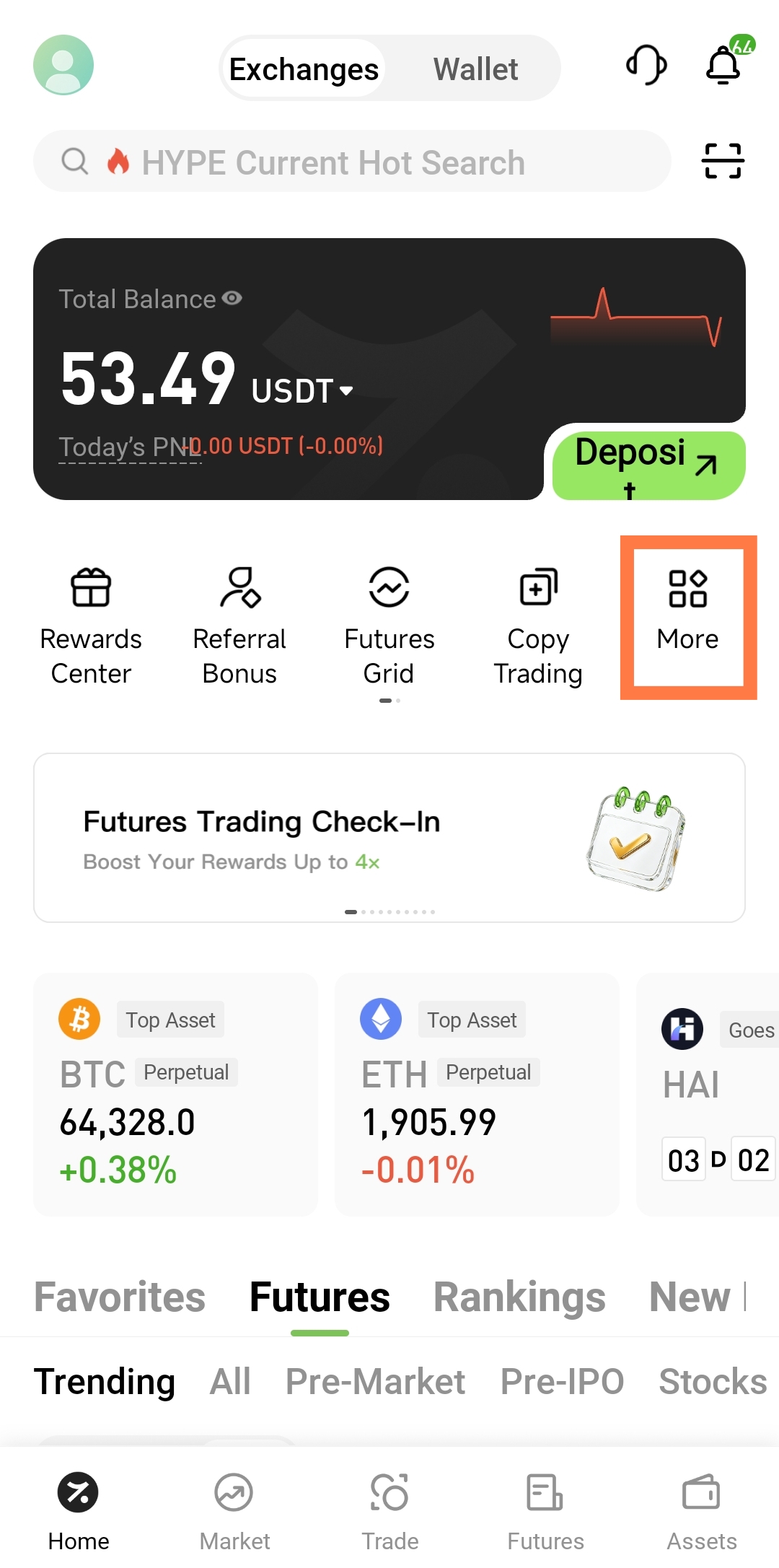
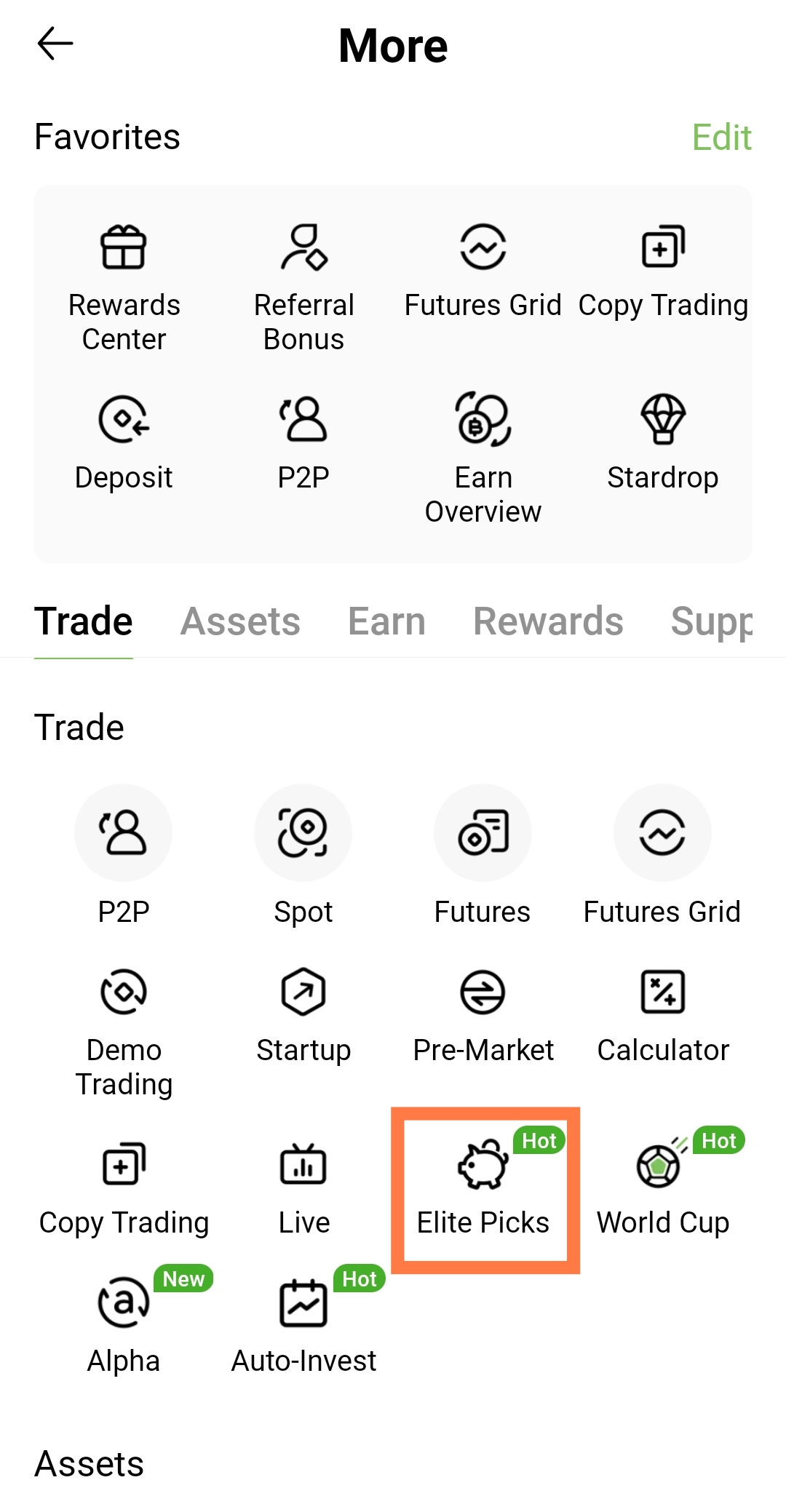
On the Hotcoin app home screen, check the shortcuts for Elite Picks and tap it to open the feature. If it is not shown there, open the More feature list and look for Elite Picks. Its location may vary by operating system, region, and app version, so use the interface displayed in your current client.
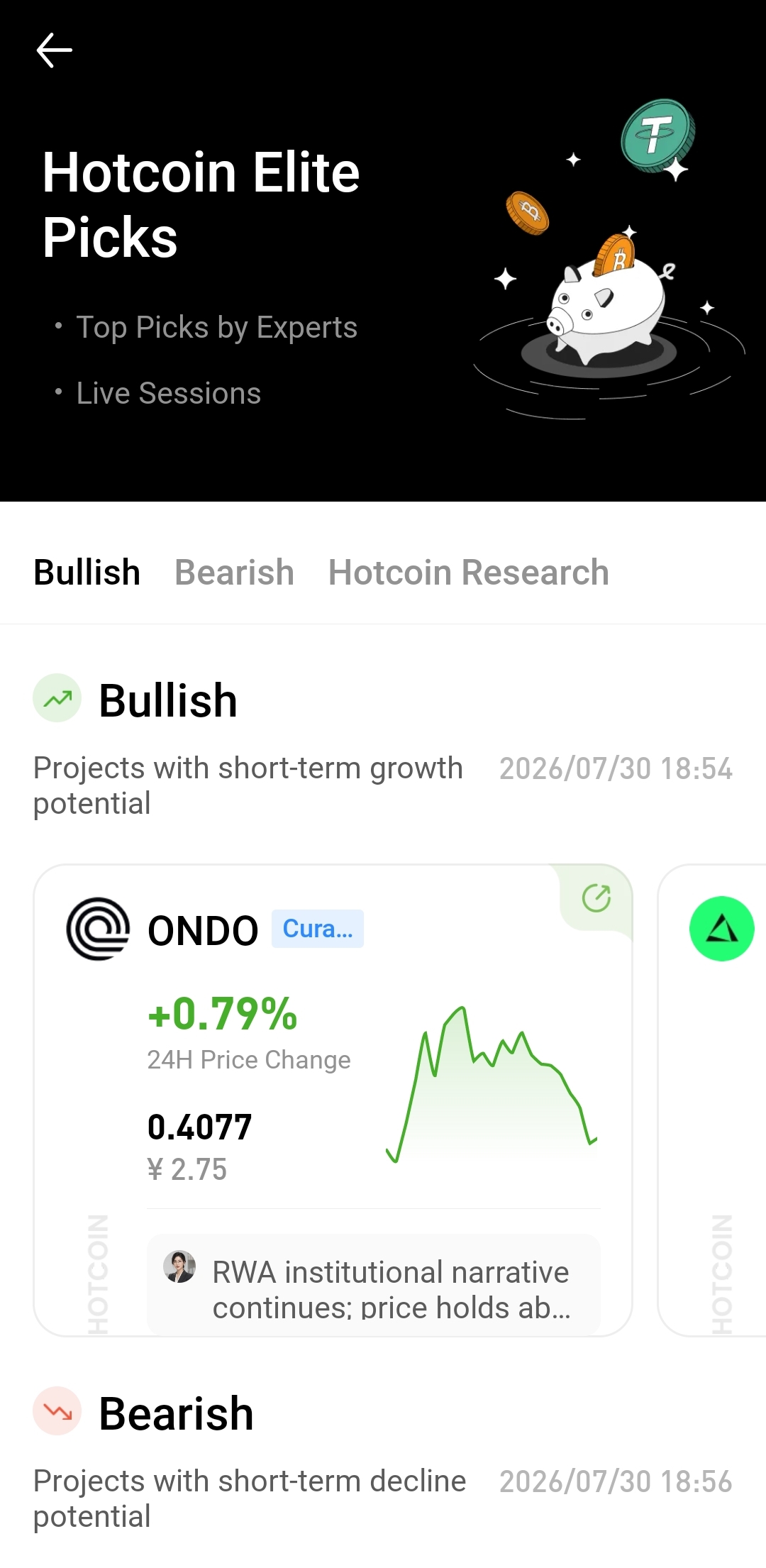
The Elite Picks page normally contains a feature banner, trending assets, and related project content. If it does not load properly, check your network connection, update the app, or sign in again and retry. Before taking or sharing screenshots, hide your total balance, UID, email address, order history, and other personal information.
3. How Do I Review Trending Assets?
After opening Elite Picks, you can review the assets currently included in its trending section. Assets may appear as cards or in a list, with fields such as the asset name, ticker, current price, 24-hour price change, popularity labels, and a short summary. The exact fields depend on the current version of the page.
A trending asset is receiving increased market attention; that does not mean its price will keep rising. A sharp short-term gain may be driven by project news, a new listing, sector rotation, or speculative capital, and it can also signal higher volatility and greater risk of buying near a peak. Do not rely only on the percentage change—also review volume, the order book, and the asset's price range.
3.1 How Should I Read Asset Names and Trading Pairs?
The asset name identifies the project, the ticker identifies the specific token, and the trading pair shows which asset is used to price it. For example, ABC/USDT means that ABC is priced in USDT. Some projects have similar names, duplicate tickers, or tokens issued on multiple networks, so an icon alone is not enough to identify an asset.
Before continuing, confirm the token's full name, ticker, network, and contract address. If trading pairs are new to you, learn how quote assets work in pairs such as BTC/USDT and ETH/BTC.
3.2 How Should I Read the 24-Hour Price Change?
The 24-hour price change compares the current price with the price 24 hours earlier. It can help indicate the asset's recent direction, but it does not represent a complete trend. For example, a 20% gain only shows that the price rose substantially during the previous day; it does not prove that the same increase will continue.
Review 24-hour volume, the high and low, and the candlestick chart alongside the percentage change. If price rises quickly while volume remains low or the bid-ask spread is wide, the actual trade may incur substantial slippage. Beginners should not buy an asset solely because it appears near the top of a gainers list.
4. How Do I Review Basic Project Information?
Select an asset name, project card, or details entry to open the corresponding project information. Depending on the current interface, this may include a project summary, sector, token utility, issuance details, circulation data, official website, or related research. The first goal is to understand what the project does and why its token exists.
If Elite Picks provides only a short summary, cross-check it against the project's official website, white paper, blockchain explorer, and official announcements. A project summary is an information overview, not a substitute for full research. It does not by itself prove that a project is safe, that its product is live, or that its token is fairly valued.
4.1 What Should I Look for in the Project Summary?
First identify the problem the project aims to solve, its target users, whether it has released a working product, and whether its sector addresses genuine demand. Claims about products, partnerships, funding, and user numbers should be traceable to the project's official website or public materials from the relevant organizations.
If a summary relies heavily on terms such as “leading,” “high growth,” or “huge potential” without explaining product status, user scale, revenue sources, or on-chain data, reduce your confidence in the claim and seek independent evidence.
4.2 What Token Information Matters Most?
Review total supply, circulating supply, circulating market capitalization, fully diluted valuation, and the unlock schedule. A token with low circulation but a high fully diluted valuation may face additional supply and selling pressure when allocations for the team, investors, or ecosystem are unlocked.
Also verify the token contract address and network. Tokens with the same name may exist on different blockchains, and counterfeit tokens can imitate legitimate names and icons. Elite Picks provides a research entry point; use the contract address published through the project's official channels as the final reference.
5. How Do I Open the Market Page?
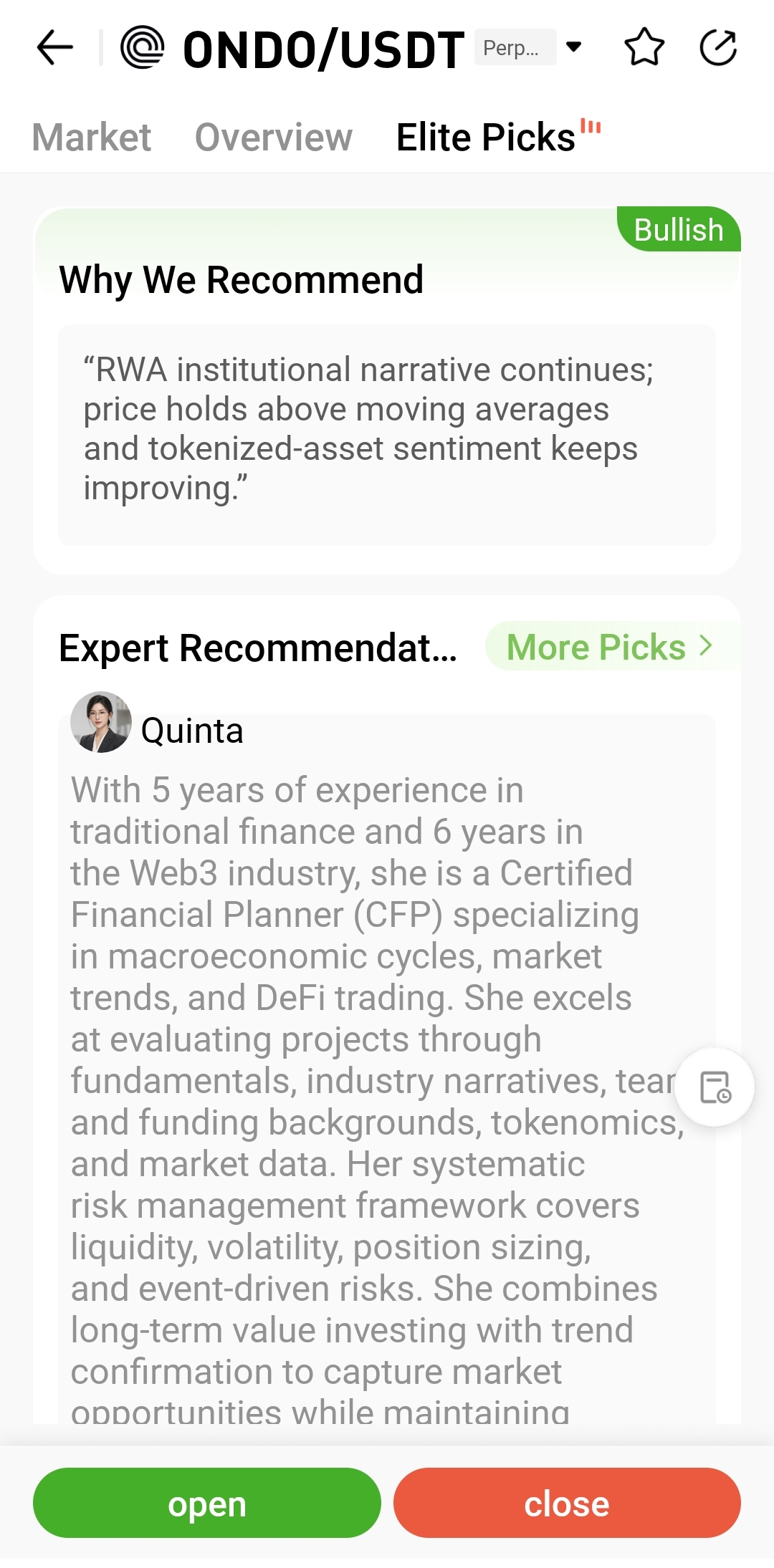
Select the asset name, price area, or market button on the Elite Picks page to open the corresponding market page. This page usually displays the current price, 24-hour high and low, volume, percentage change, candlestick chart, and trading pair so that you can examine the asset's market performance in more detail.
First verify both the base asset and the quote asset. The same cryptocurrency may have USDT, USDC, or other quoted pairs, and each pair can have different prices, volumes, and order-book depth.
5.1 What Data Should I Review on the Market Page?
Focus on the price trend, 24-hour volume, high, low, and order book. Volume indicates trading activity; the order book shows current bids, asks, and available quantities; and candlesticks record historical price changes across selected time intervals.
These figures describe present and past market conditions, not future direction. If an asset rises or falls sharply, volume suddenly expands, or the bid-ask spread widens, investigate the cause before acting rather than chasing it because its page has become popular.
6. How Do I Open the Trading Page?
If an Elite Picks asset is available for trading on Hotcoin, use its trading link to open the corresponding spot or futures page. Check the asset name, trading pair, and product type again before placing an order so that you do not select the wrong asset or mistake futures for spot trading.
Not every highlighted asset is offered in both spot and futures markets. Available pairs, order types, and products are determined by the current trading interface. An unavailable trading button may mean that trading has not opened, your region is restricted, or the system is under maintenance.
6.1 How Do I Use the Spot Trading Link?
The spot page provides a candlestick chart, order book, recent trades, and buy and sell controls. Before submitting an order, confirm whether it is a limit or market order, then check its price, amount, estimated value, and fee. A limit order may not fill immediately, while a market order may incur slippage if market depth is limited.
If this is your first spot trade, learn the differences among limit, market, and trigger orders, and consider using a small order to become familiar with the process.
6.2 What Should I Know Before Opening Futures?
Futures trading involves margin, leverage, funding rates, and liquidation. On the futures page, confirm the margin mode, leverage, position direction, and estimated liquidation price. Leverage can amplify even a small price movement, so an appearance in Elite Picks is not a reason to open a highly leveraged position.
If you do not understand isolated margin, cross margin, or liquidation rules, read the product documentation first. Elite Picks is an asset-discovery and information feature; it does not reduce the inherent risks of futures products.
7. How Can I Use Elite Picks to Find Market Opportunities?
Elite Picks is useful for finding leads that may deserve further research, but it should not be used as a standalone buy or sell signal. Start by asking why an asset is receiving attention, then review project progress, token supply, and market liquidity before deciding whether to keep watching it or move on.
Use the following process:
- Identify the reason for its popularity: Determine whether interest comes from product progress, listing news, sector rotation, or simply a short-term price surge.
- Check project progress: Verify the official website, product updates, on-chain data, and public partnerships to see whether the project summary is supported.
- Assess market liquidity: Review volume, order-book depth, and the bid-ask spread. Assets with weaker liquidity are more prone to slippage.
- Examine token supply: Understand the circulating percentage, team and investor allocations, and unlock schedule to identify potential future selling pressure.
- Compare time frames: Review daily, four-hour, and one-hour charts to distinguish long-term trends, medium-term moves, and short-term volatility.
- Record your findings: Write down the reason for monitoring the asset, its main risks, and the information still requiring verification. Do not decide based only on page labels.
8. What Are Common Elite Picks Mistakes?
8.1 Treating a Pick as a Profit Guarantee
Elite Picks highlights relevant assets and market information; it does not mean an asset must rise. Prices remain sensitive to market conditions, project progress, token unlocks, and changes in liquidity.
8.2 Watching Price Gains but Ignoring Volume
When an asset rises on low volume or shallow order-book depth, both buying and selling can incur significant slippage. Review volume and the bid-ask spread whenever you assess a price move.
8.3 Trading Without Reviewing the Project
A popularity label reflects market attention, not research quality. Before trading, at minimum understand the project's purpose, token supply, circulating market capitalization, unlock schedule, and major risks.
8.4 Failing to Distinguish Spot from Futures
Spot trading exchanges assets directly, while futures involve margin, leverage, and liquidation. Confirm the product type after opening the trading page and before taking any further action.
9. Frequently Asked Questions
What Is Hotcoin Elite Picks?
Elite Picks is Hotcoin's aggregated asset-information feature for trending cryptocurrencies, project summaries, market data, and trading links. It can help users identify research leads, but it is not a promise of returns.
How Do I Open Elite Picks?
On the web, use Elite Picks in the Services section at the bottom of the Hotcoin website or open the official page directly. In the app, look in the home-screen shortcuts or the More feature list.
Can I Buy Assets Shown in Elite Picks?
If an asset is open for trading, its trading link can take you to the relevant spot or futures page. Whether trading is supported, and which pairs and products are available, depends on what the trading page currently displays.
Are Assets Recommended by Elite Picks Guaranteed to Rise?
No. Popularity labels, project descriptions, and historical prices are informational only and cannot guarantee future performance. Prices can change quickly because of market sentiment, liquidity, and project events.
How Is Elite Picks Different from a Market Page?
Elite Picks focuses on discovering and learning about trending assets. A market page focuses on price, volume, charts, and trading pairs. You can identify a project lead in Elite Picks and then verify its market data on the market page.
Usage Tips
Use Elite Picks to narrow your research scope, not as your only basis for a trade. Before taking or sharing screenshots, cover your UID, account balance, positions, order history, and contact details, and make sure the button locations match the current app version.
Risk Warning
Crypto assets are highly volatile. Trending assets may experience rapid gains, losses, and changes in liquidity. Elite Picks and related project materials are provided for education and information only. They do not constitute investment advice or a guarantee by the platform regarding price or project performance.
読書をお勧めします
もっと見る
service hotcoin.com
producthotcoin.com
businesshotcoin.com
casecnhotcoin.com