
How to Use Hotcoin Alpha to Discover New Projects
Hotcoin Alpha is a project discovery hub that combines on-chain asset information with trading features. You can buy and sell Alpha tokens directly with USDT in your spot account without withdrawing funds to an external wallet. However, trades are still affected by on-chain liquidity, slippage, and network confirmation times.
Contents
- Overview: What Hotcoin Alpha is and how it differs from regular spot trading.
- Access: How to open the Alpha page on the website and in the app.
- Project listings: How to search for a token and open its project page.
- Research: What to review in project descriptions, contract addresses, and market data.
- Trading: How to buy and sell Alpha tokens with USDT.
- Screening: How to find early projects that may deserve further research.
- Risks: What risks may affect Alpha trading.
What Is Hotcoin Alpha?
Hotcoin Alpha is an on-chain trading feature integrated into the exchange. According to the Hotcoin Alpha Trading Guide, users can buy and sell supported on-chain tokens directly with USDT in their spot accounts. They do not need to withdraw funds, create an external wallet, or connect to a decentralized trading platform first.
Regular spot trades are mainly matched through an exchange order book. Alpha connects on-chain assets and execution to the platform, so actual results depend on on-chain prices, liquidity, slippage, and network conditions. The feature makes on-chain trading easier to access, but it does not remove the risks inherent in on-chain tokens.
Some Alpha projects may still be at an early stage and may not be listed on the exchange's regular spot market. Appearance on the Alpha page only means that the project can currently be viewed or traded through this feature. It does not guarantee a future spot listing or any price performance.
How Do You Access Hotcoin Alpha?
How Do You Open Alpha in the App?
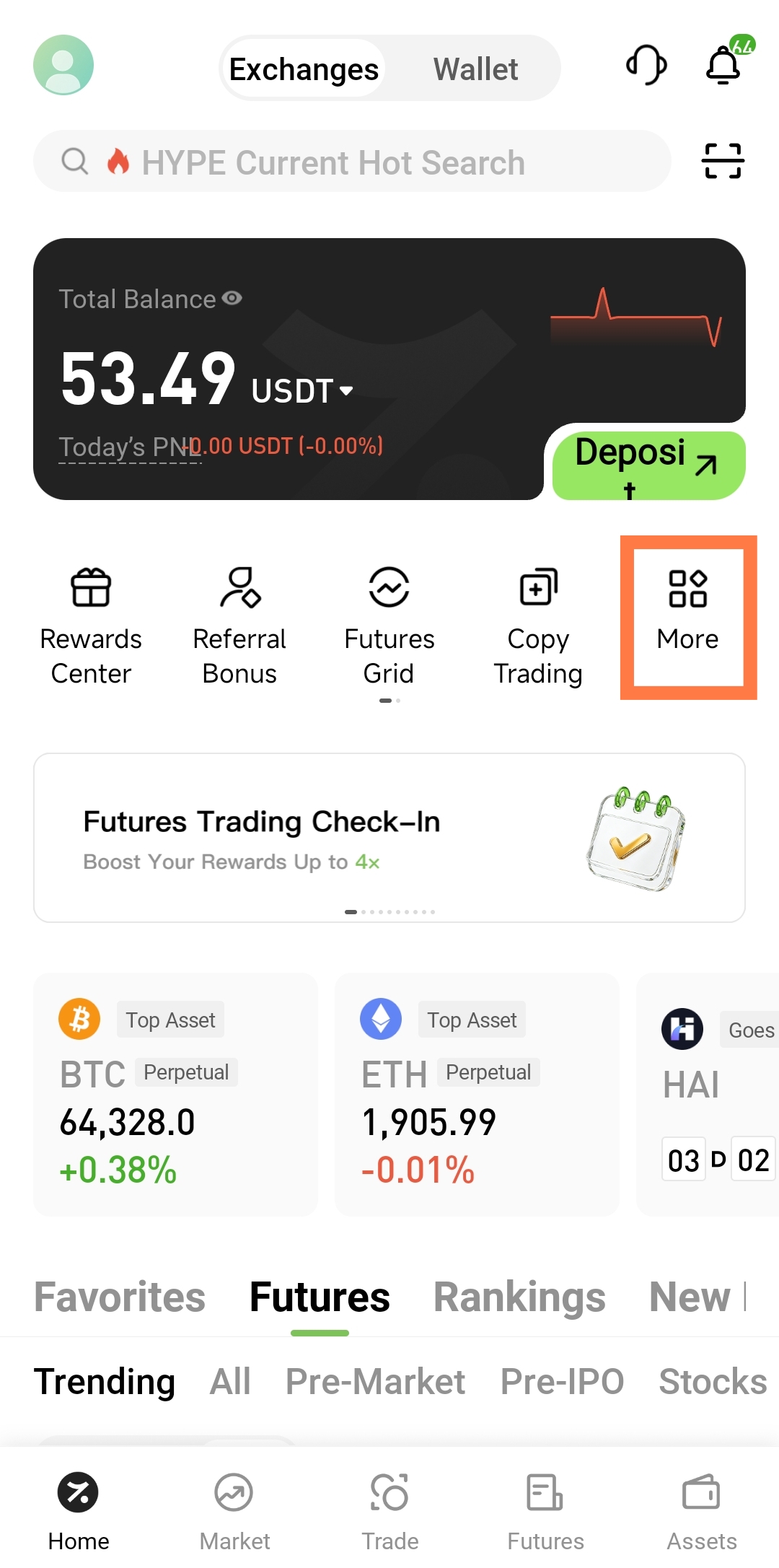
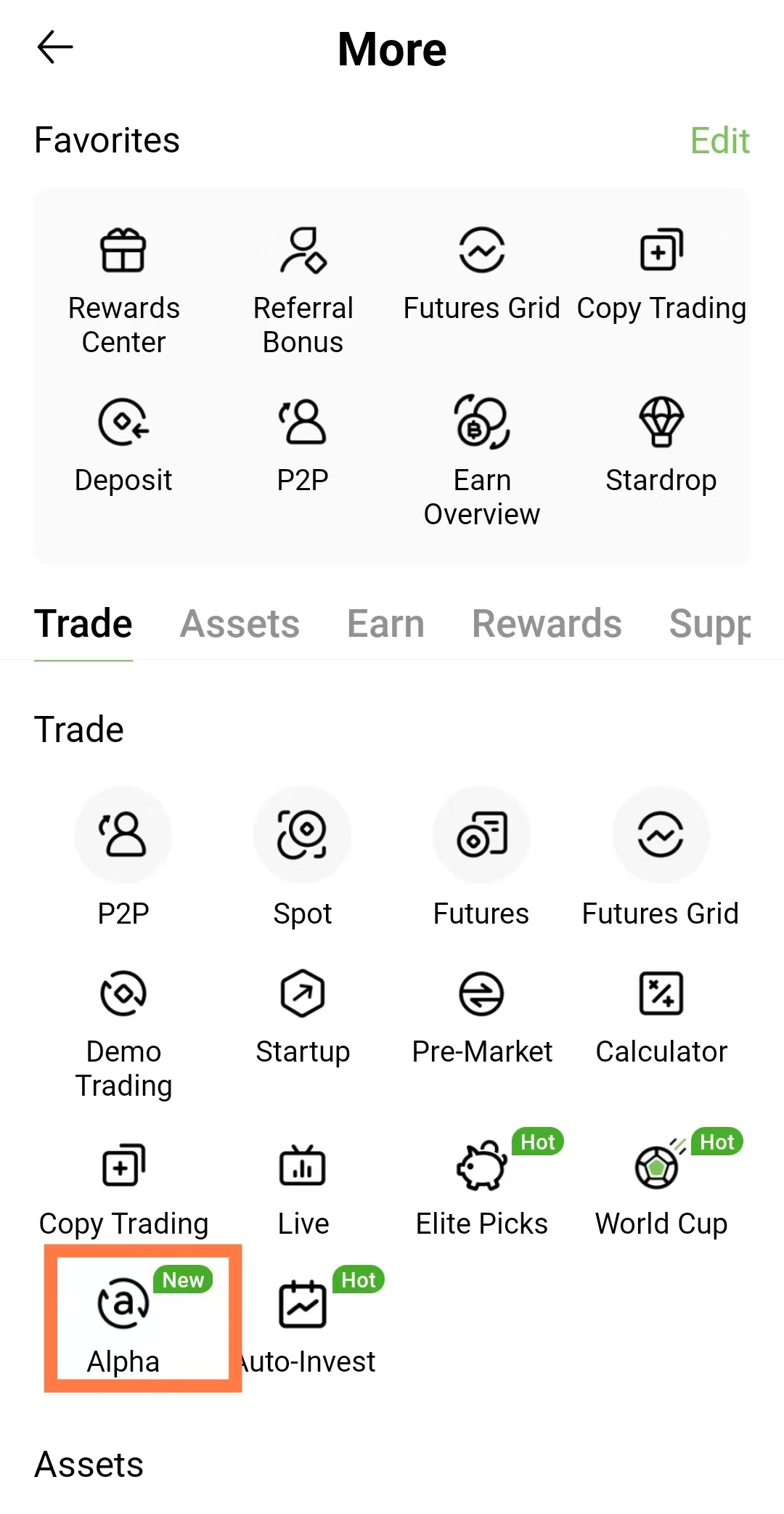
Open the Hotcoin app, tap Trade in the bottom navigation, and select Alpha at the top of the trading page. Some app versions may also show an Alpha entry under Home — More. Use the location shown in your current app version.
The page displays the supported Alpha tokens and trading area. If you cannot see the Alpha option, check whether the app is up to date or consult the Help Center to confirm whether the feature is available for your region and account.
How Do You Open Alpha on the Website?
After signing in to the Hotcoin website, click Trade in the top navigation and select Alpha Trading from the menu. Some site versions may display Alpha directly in the top navigation; selecting it opens the project list or trading page.
If you arrive through a search engine, verify that the domain belongs to the official Hotcoin website before signing in. Never enter your password, verification code, or two-factor authentication code on an unfamiliar site, and do not connect an unknown wallet.
How Do You View Alpha Project Listings?
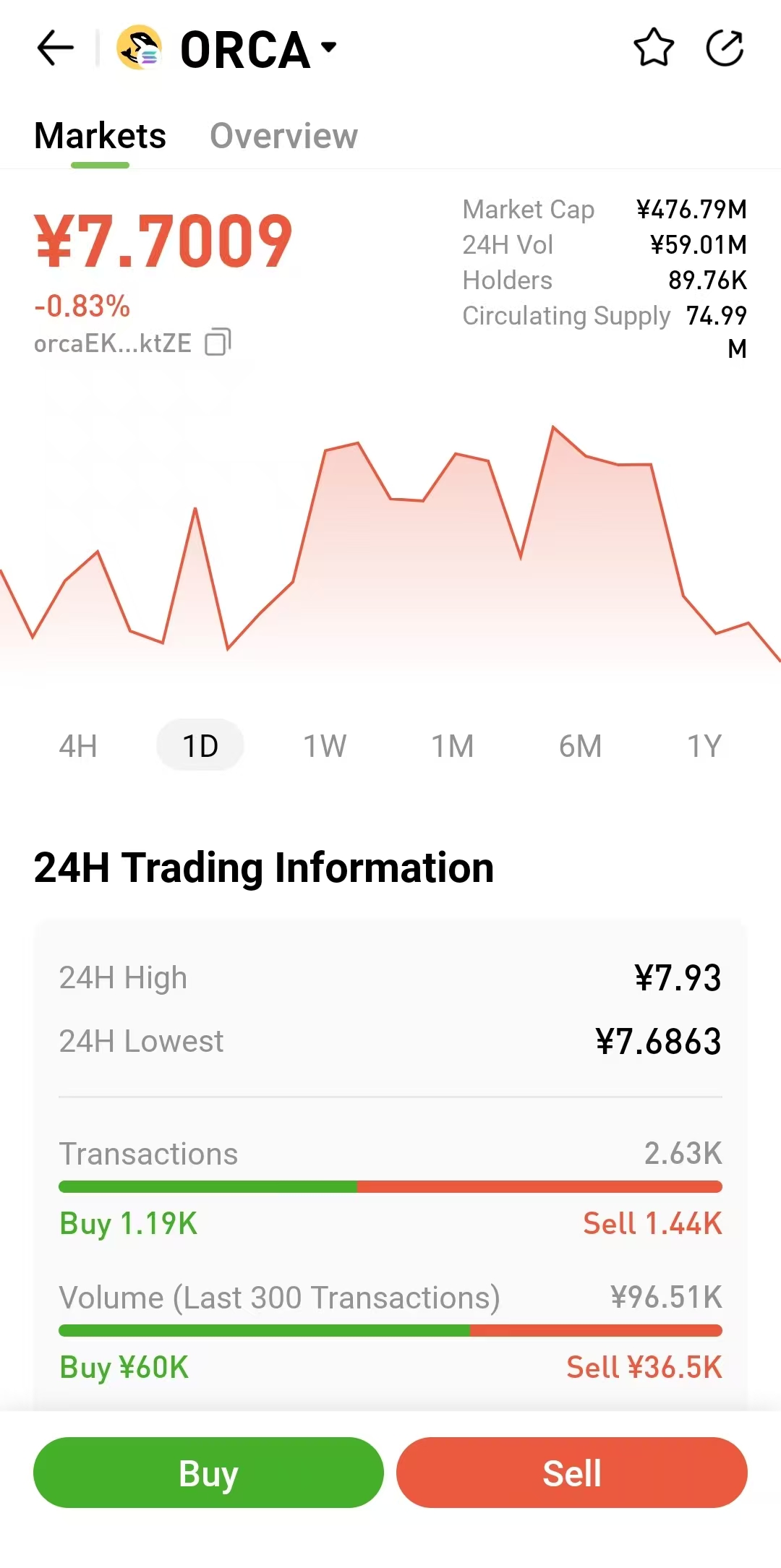
The Alpha page shows the on-chain tokens currently supported by the feature. Projects may appear in a list or on a trading page with fields such as token name, ticker, network, current price, price change, and market data. The exact fields may vary by product version and project.
In the app, tap the menu beside the current token name and enter a name or ticker in the search box. On the website, use the search field on the left side of the Alpha page. When several tokens share a similar name, do not rely only on the name or icon. Always verify the network and contract address.
Project order may be influenced by launch date, trading activity, price performance, or platform display rules. A high position only indicates greater current visibility; it does not prove stronger technology, a better valuation, or deeper future liquidity.
How Do You Review an Alpha Project?
Select the token name, project card, or information entry to view the information currently provided by the platform. The page may include a project summary, token utility, blockchain network, contract address, market data, and related links. Available information depends on the project page.
The description can help you understand a project's basic positioning, but it is not a substitute for independent research. Check the project's official website, white paper, official social accounts, blockchain explorer records, and smart contract information. Make sure the name and contract address match the project's official sources.
What Should You Look for in the Project Summary?
First determine what problem the project addresses, whether its product is live, and whether the token has a genuine role in that product. For projects built around artificial intelligence, decentralized finance, gaming, or meme culture, check whether the actual functionality supports the marketing theme.
Treat claims such as “leading,” “high growth,” or “huge potential” with caution when they are not supported by a product, users, code, or on-chain data. Early-stage roadmaps can also be delayed or changed, so plans should not be treated as completed work.
Why Must You Verify the Contract Address?
Different projects can use identical or similar token names, and counterfeit tokens may copy a project's icon and description. The contract address is a key identifier for an on-chain token. Before trading, compare the address on the Alpha page with the address published through the project's official channels.
Also confirm the blockchain on which the token is issued, such as Ethereum, BNB Chain, or Solana. A single project may deploy assets on multiple networks. Selecting the wrong network or contract can result in buying the wrong token.
How Do You Screen Early Projects?
The Alpha page can help you discover projects, but it cannot replace project research. A more disciplined approach is to identify recently added or actively traded projects, then examine their product, token structure, on-chain data, and market liquidity.
Find Out Why the Project Is Attracting Attention
Interest may come from a product launch, funding announcement, ecosystem event, listing expectations, sector rotation, or a short-term price increase. Identify the source of attention, then decide whether it reflects ongoing product progress or one-off marketing and market sentiment.
Be more cautious if you cannot find a public source for the news or if attention comes mainly from anonymous accounts and concentrated short-term promotion. A high volume of social media discussion does not necessarily indicate real users.
Review the Product and Team
Check whether the project has a usable product, public code, development history, and credible user data. A public team is not the only measure of quality, but risk is generally higher when an anonymous team is combined with hidden code, an inaccessible product, and a roadmap that has not been updated for a long time.
Review any disclosed security audits, investors, and partnerships. Partnership or funding claims should be verifiable through the relevant organization's official channels, not only through promotional images published by the project.
Review Token Supply and Holder Concentration
Check total supply, circulating supply, circulating market capitalization, fully diluted valuation, and future unlock schedules. If the current circulating ratio is low and many team or investor tokens will unlock later, the additional supply may put pressure on the price.
You can also use a blockchain explorer to review the distribution of token holders. If a small number of addresses control most circulating tokens, concentrated selling may cause rapid changes in price and liquidity.
Review Liquidity and Trading Costs
Alpha trades depend on on-chain liquidity. Before placing a trade, review the estimated amount received, price impact, fees, and slippage. If even a small order moves the price significantly, the liquidity pool may be shallow.
Low liquidity can increase the cost of buying and make selling difficult. When evaluating an early project, the ability to exit at a reasonable price matters just as much as the ability to buy.
How Do You Trade on Hotcoin Alpha?
How Do You Buy an Alpha Token?
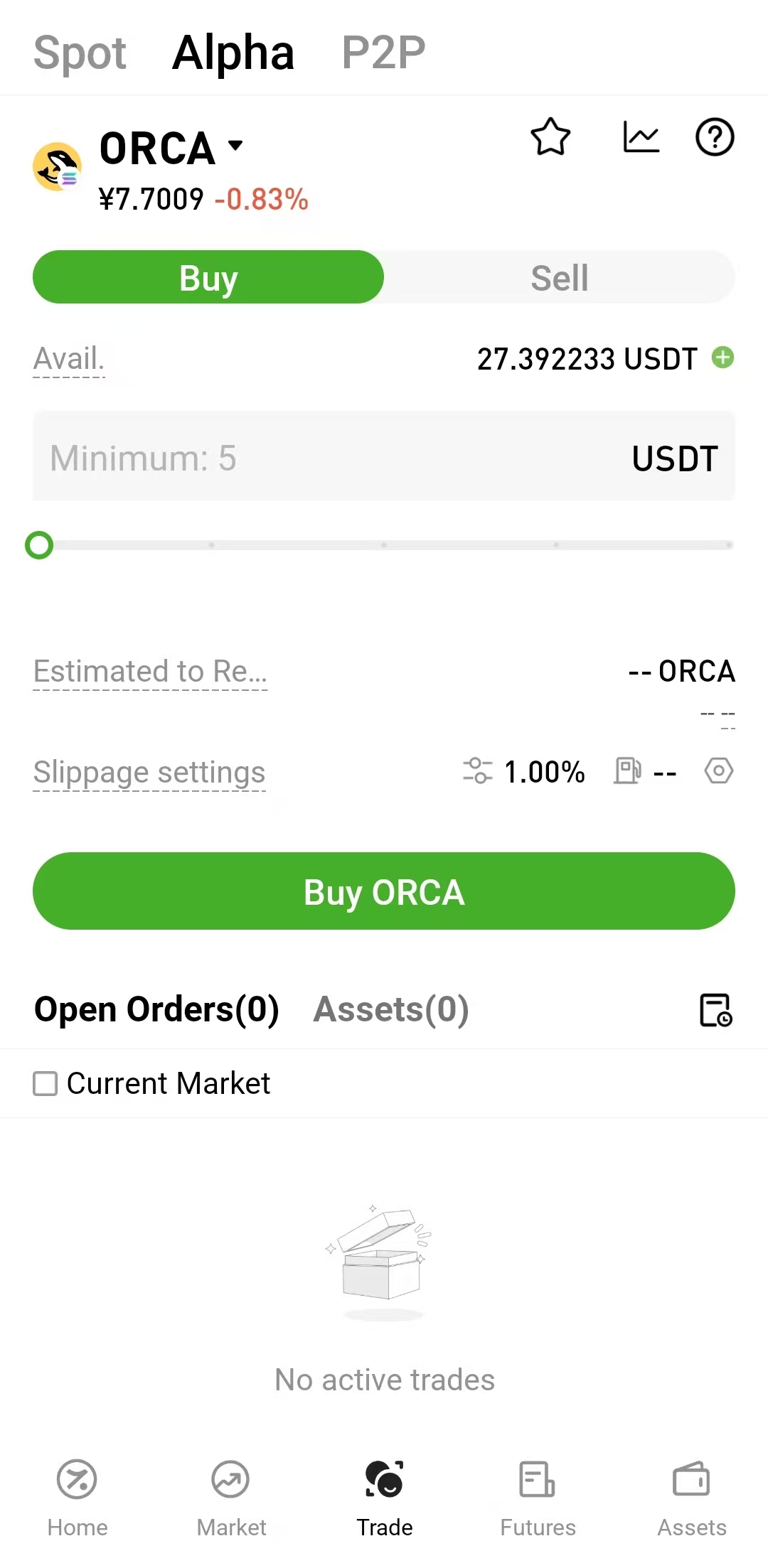
Open the Alpha page, search for and select the target token, choose Buy, and enter the amount of USDT you want to spend. The system estimates the number of tokens you may receive based on the current on-chain price, liquidity, and fees.
Before submitting, verify the token name, network, contract address, estimated amount received, fees, and slippage. According to Hotcoin's official guidance, Alpha currently supports market orders only. The final execution price and amount received depend on the actual on-chain transaction.
How Do You Sell an Alpha Token?
Select the Alpha token you want to sell, switch to Sell, and enter the token amount. The system displays the estimated USDT proceeds. Review the details, submit the trade, and wait for the blockchain network to process it.
The price may change between submission and on-chain execution, so the USDT received can differ from the estimate. A trade may also fail when liquidity is low or market volatility is high.
How Should You Set Slippage?
Slippage is the permitted difference between the expected execution price and the actual execution price. A lower tolerance limits price deviation but makes failure more likely when the market moves. A higher tolerance may improve the chance of execution but can accept a worse price.
New users should not raise slippage carelessly just to complete a trade. For a larger transaction, consider testing the actual execution with a small amount before proceeding.
How Do You View Alpha Assets and Orders?
After submitting a trade, you can review balances, order status, and execution results. In the app, open Assets — Alpha to view holdings, then Assets — Alpha — Alpha Orders to view records. On the website, use Assets — Alpha Account for holdings and Trading Orders — Alpha Orders for transaction status.
An order may appear as processing, completed, failed, or another status. On-chain trades require block confirmations, and network congestion can delay settlement. If a trade fails, first review the on-screen explanation and confirm whether the funds were returned. Do not immediately submit the same trade several times.
What Are the Risks of Using Hotcoin Alpha?
Early-Stage Project Risk
Some Alpha tokens may represent early-stage projects whose products, teams, token economics, and communities are still changing. Development may stop, roadmaps may be delayed, teams may become unreachable, or market attention may decline quickly.
Price and Liquidity Risk
Early-token liquidity pools may be small, so large orders can have a significant price impact. Concentrated selling may follow a rapid price increase and make it difficult to exit at the displayed price.
Smart Contract Risk
On-chain tokens may include minting, freezing, blacklisting, transfer restrictions, or other privileged contract controls. The ability to buy a token does not guarantee that it can be sold. Review contract permissions and available security audits before trading.
Slippage and Fee Risk
Alpha transactions are affected by on-chain price changes, network fees, and liquidity. The page provides an estimate; the actual execution price, fees, and amount received may differ.
Irreversible Transaction Risk
Alpha trades are executed through a blockchain. Once an on-chain transaction is confirmed, it generally cannot be reversed. Verify the token, direction, amount, fees, and slippage before submitting.
Alpha Availability Does Not Mean a Spot Listing
Inclusion in the Alpha section does not guarantee a listing on Hotcoin's regular spot market. It also does not mean that the project has completed exactly the same review process as a conventional spot listing. Do not trade solely on expectations of a future listing.
Frequently Asked Questions
What Is Hotcoin Alpha?
Hotcoin Alpha is an on-chain asset trading feature integrated into the exchange. Users can buy and sell supported on-chain tokens with USDT from their spot accounts without withdrawing funds or connecting an external wallet.
How Do I Access Hotcoin Alpha?
In the app, use Trade — Alpha; some versions also provide Home — More — Alpha. On the website, open the Trade menu and select Alpha Trading.
Do Alpha Trades Require a Web3 Wallet?
No. You can trade with USDT from your Hotcoin spot account. Execution still takes place on-chain and remains subject to network conditions and liquidity.
Does Alpha Support Limit Orders?
According to Hotcoin's official trading guide, Alpha currently supports market orders only. The final execution price and amount received depend on actual on-chain execution.
Will an Alpha Project Be Listed on the Spot Market?
Not necessarily. Display or trading support in Alpha does not guarantee a future listing on the regular spot market and is not a listing commitment.
Why Is My Alpha Order Still Processing?
The order must wait for blockchain confirmation. Network congestion, liquidity changes, or an execution issue can extend processing time. Check the status on the Alpha Orders page.
Practical Tip
When using Alpha for the first time, consider testing the process with a small trade. Confirm the token, network, contract address, slippage, and actual amount received. Do not make a trading decision based only on popularity or a short-term price increase.
Risk Notice
Alpha tokens may involve high volatility, low liquidity, smart contract vulnerabilities, project failure, and an inability to sell promptly. This article explains product features and general research methods only and does not constitute investment advice.
読書をお勧めします
もっと見る

Service@hotcoin.com
Product@hotcoin.com
Business@hotcoin.com
Casecn@hotcoin.com