
Detecting Abnormal Account Logins: How to Tell If Your Account Has Been Compromised
Abnormal logins are not limited to unfamiliar IP addresses. A combination of new devices, changed email rules, 2FA resets, newly created APIs, allowlist changes, and small test withdrawals is a stronger sign that someone is taking over your account.
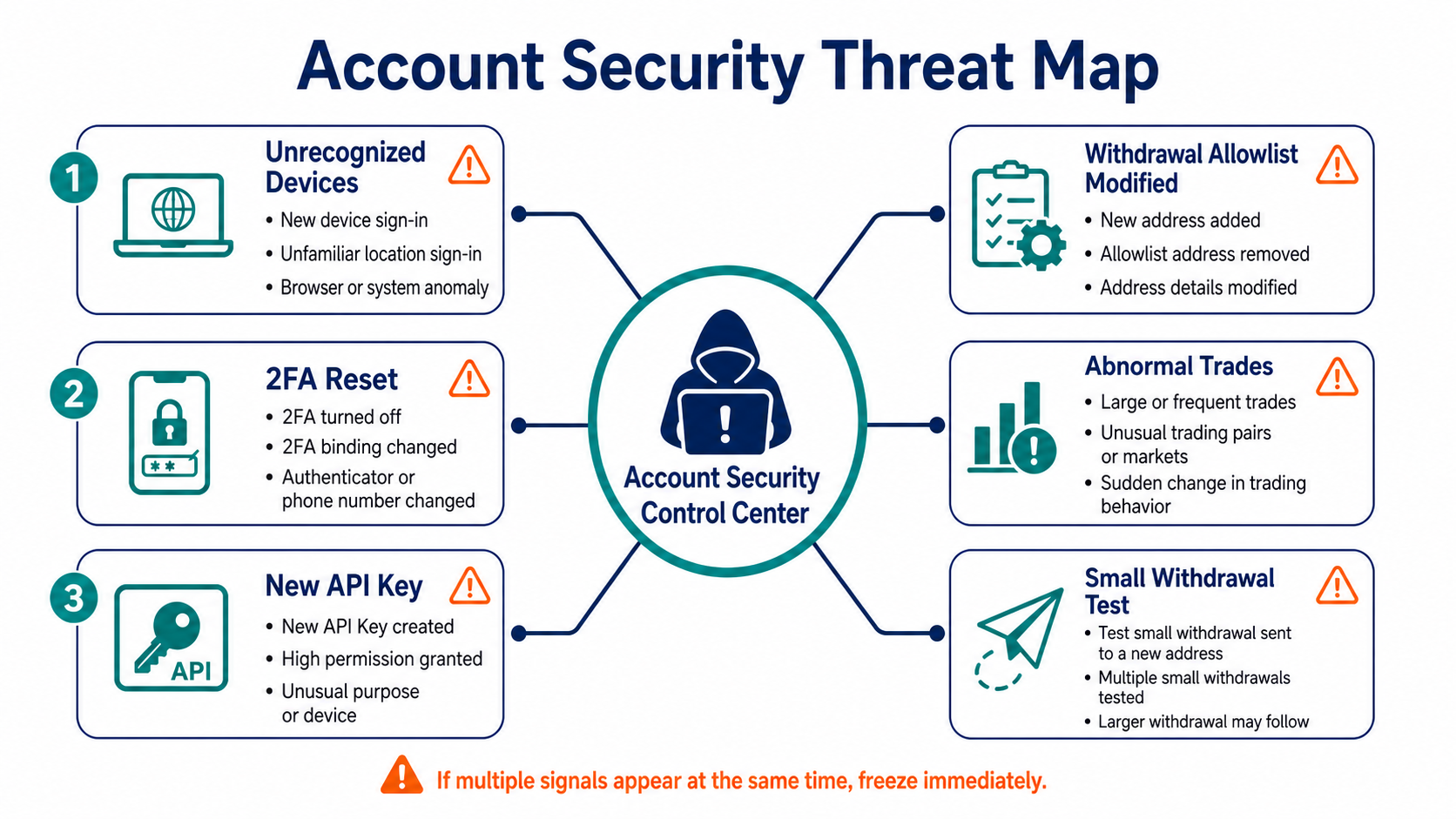
Which Signals Have the Highest Priority?
Password or 2FA resets you did not initiate, unfamiliar API keys, newly added withdrawal addresses, device confirmations, and fund movements are high-priority signals. If you see any of them, do not respond to the contact details in the notification. Use an official bookmark to open your account and investigate.
An unfamiliar location or IP address by itself may result from a mobile network, VPN, or change in your carrier's internet gateway. Evaluate it together with the device model, browser, login time, subsequent activity, and email security records. The real danger is when several control surfaces change at once.
What Order Should You Follow When Investigating?
First, review active sessions and confirmed devices, then revoke every entry you do not recognize. Next, check whether your security settings, recovery email, phone number, passkeys, authenticator, or password were recently changed.
Then review API keys, subaccounts, withdrawal allowlists, address books, orders, trades, deposits, withdrawals, and internal transfers. Do not look only at the total balance. An attacker may first alter positions, convert assets, or create permissions in preparation for moving funds later.
Finally, inspect your primary email account's login history, automatic forwarding, filter rules, authorized applications, and trash. Attackers often use rules to hide platform alerts, making the account appear normal.
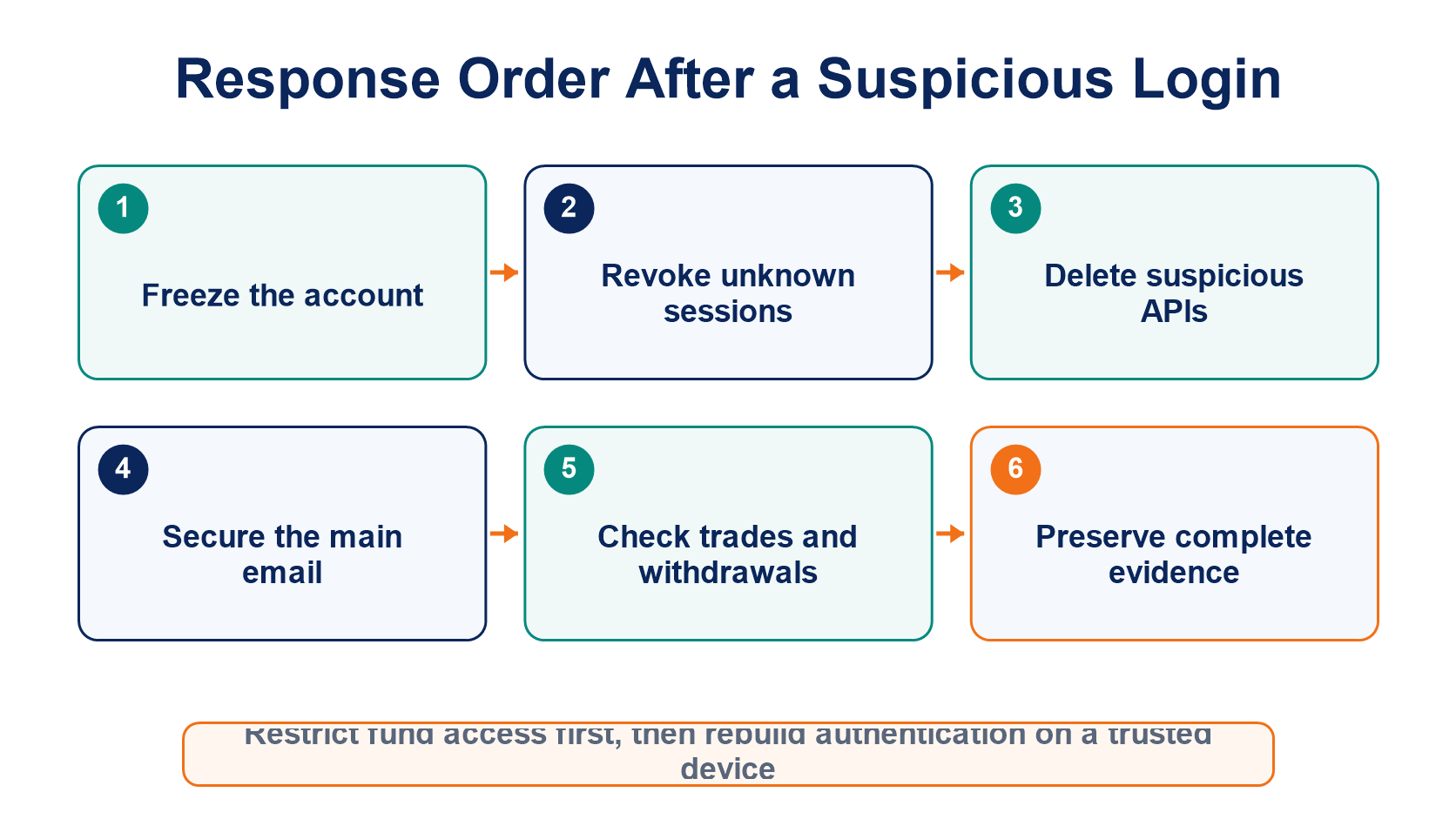
What Should You Do First After Confirming an Intrusion?
If the platform offers a one-click freeze or account lock, restrict trading and withdrawals first. Then use a trusted device to change the passwords for your email and platform account, revoke sessions, passkeys, API keys, and suspicious addresses, and reconfigure 2FA.
Do not change every password in succession on a device that may be infected. If you find remote-control software, unknown extensions, or signs of token theft, disconnect the device from the network and switch to a clean device first. Preserve alert emails, IP addresses, device details, order IDs, transaction hashes, and a timeline, then contact the platform through a separate official channel.
For responding to API exposure, read API Key Security Management. For a broader assessment of platform security evidence, continue with Exchange Security Ratings. For complete protection guidance, return to Cryptocurrency Security Fundamentals.
How Can You Reduce Detection Delays?
Enable alerts for logins, devices, security-setting changes, and withdrawals, and have those notifications delivered to an email account that also uses strong authentication. Review activity records and APIs every month, even when your balance has not changed.
Use withdrawal allowlists, waiting periods, and a separate wallet for large holdings. Monitoring only tells you what happened; permission limits and asset separation reduce the scope of damage after abnormal activity occurs.
Frequently Asked Questions
I Received an Unfamiliar Login Email, but the Account Has No Record of It. Is the Email Fake?
It may be a phishing email, or the activity record may not have updated yet. Do not click links in the email. Use an official entry point to check sessions and the security center, and inspect the full sender information.
Does an Unchanged Balance Mean My Account Has Not Been Compromised?
No. An attacker may be creating API access, changing an allowlist, converting assets, or waiting for a security lock to expire.
Does Changing My Password Automatically Sign Out Every Logged-in Device?
Platforms handle this differently. After changing it, you should still actively use the "sign out all sessions" option and revoke devices, tokens, and APIs.
Does a Suspicious IP Address in Another City Always Belong to an Attacker?
Not necessarily. Mobile networks, VPNs, and IP geolocation databases can produce inaccuracies, so you should assess the device and actual account activity together.
読書をお勧めします
もっと見る


Service@hotcoin.com
Product@hotcoin.com
Business@hotcoin.com
Casecn@hotcoin.com