HOTCOIN Logo
comprare monete
Mercati
Trading
Futures
Finanza
Ricompense
Altro
Portafoglio Web3
Assistenza Clienti

service(at)hotcoin.com

feedback sul prodotto

product(at)hotcoin.com

cooperazione commerciale

business(at)hotcoin.com

Forze dell'ordine

casecn(at)hotcoin.com

Contattaci
Assistenza Clienti

service(at)hotcoin.com

feedback sul prodotto

product(at)hotcoin.com

cooperazione commerciale

business(at)hotcoin.com

Forze dell'ordine

casecn(at)hotcoin.com

Chi siamo
Chi siamo
Centro annunci
Accademia Hotcoin
Blog di Hotcoin
Prova di Riserve
Stato del sistema
Kit media
Accordo utente
Privacy degli asset
Note legali
prodotto
Futures
Spot
Trading TradFi
Copy Trading
Guadagnare
Trading C2C
Acquista con carta
Portafoglio Web3
Servizi
Hotcoin Live
Hotcoin Elite Picks
Centro Bonus
Invito amici
Vantaggi VIP
Scarica
Programma Commercianti C2C
Supporto
Centro assistenza
Documentazione API
Commissioni
Applicazione per l'elenco delle monete
Chat dal vivo
Feedback e suggerimenti
Verifica Hotcoin
Fondo di Protezione Hotcoin
Informativa sui rischi
Aree di servizio
Trading
Informazioni cripto
BTC USDC
ETH USDC
BTC USDT
ETH USDT
PI USDT
SOL USDT
XRP USDT
© 2017-2026 Australian Hotcoin Global Exchange Pty Ltd
Centro assistenza
/Deposit & Withdrawal/Withdrawal/
How to Add and Manage Withdrawal Addresses on the Web?
Centro assistenza
/Deposit & Withdrawal/Withdrawal/
How to Add and Manage Withdrawal Addresses on the Web?

How to Add and Manage Withdrawal Addresses on the Web?

Hotcoin
Condividi l'app


A withdrawal address is a blockchain address used to receive digital assets during a withdrawal. To enhance asset security, you can save frequently used withdrawal addresses for quick selection during future withdrawals. This article explains how to add and manage (edit or delete) withdrawal addresses on the web and introduces related security settings.


How to Add a Withdrawal Address
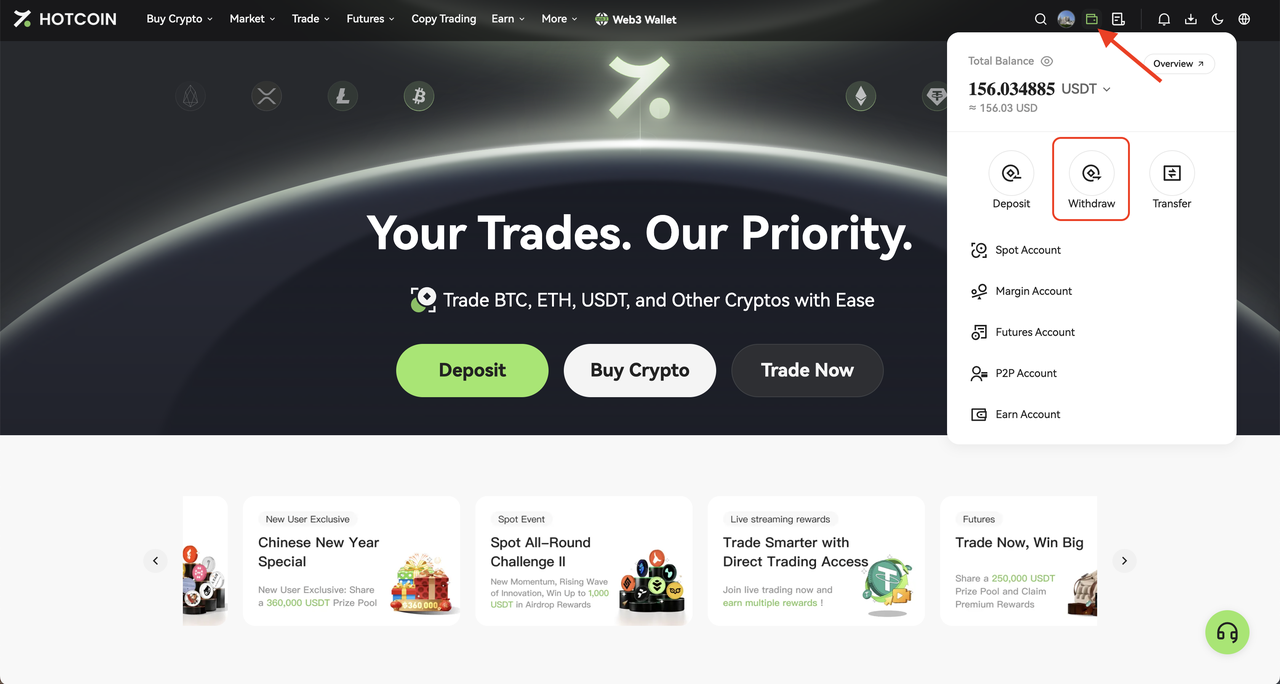
  

1. Log in to Hotcoin website and go to Assets → Withdraw


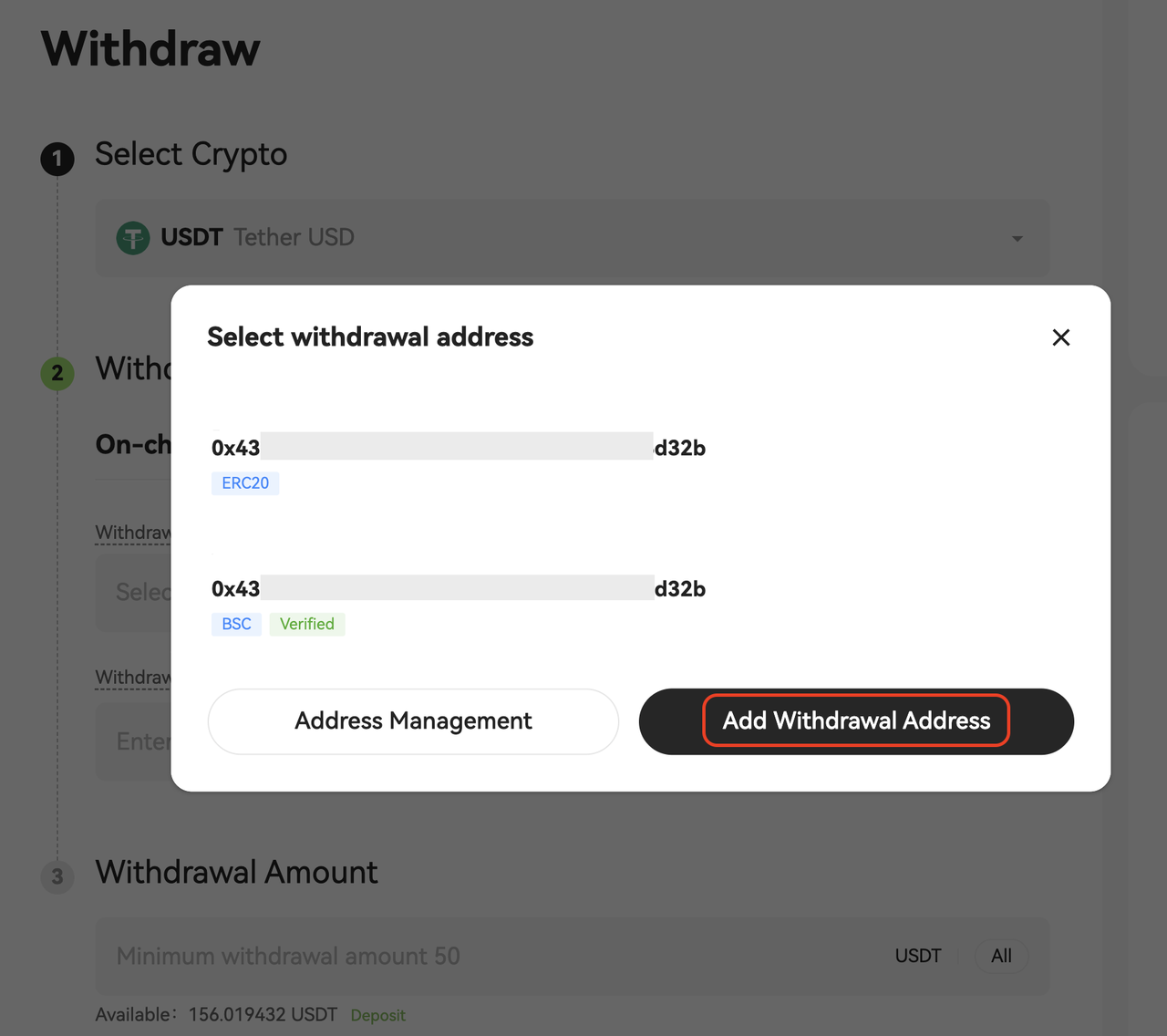
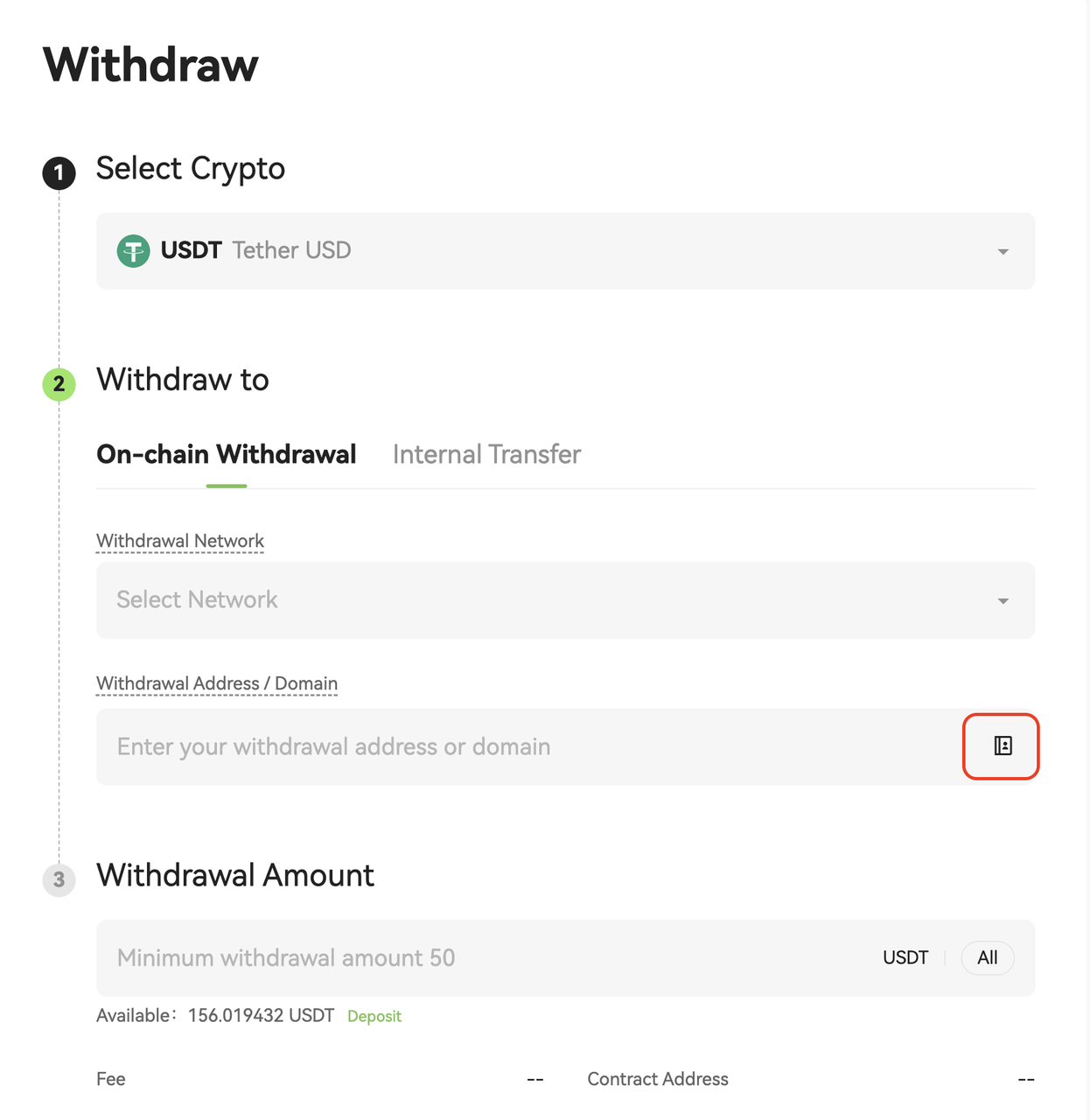
2. On the Withdraw page, click the Address Book icon to the right of the address field


3. In the Select Withdrawal Address pop-up window, click Add Withdrawal Address


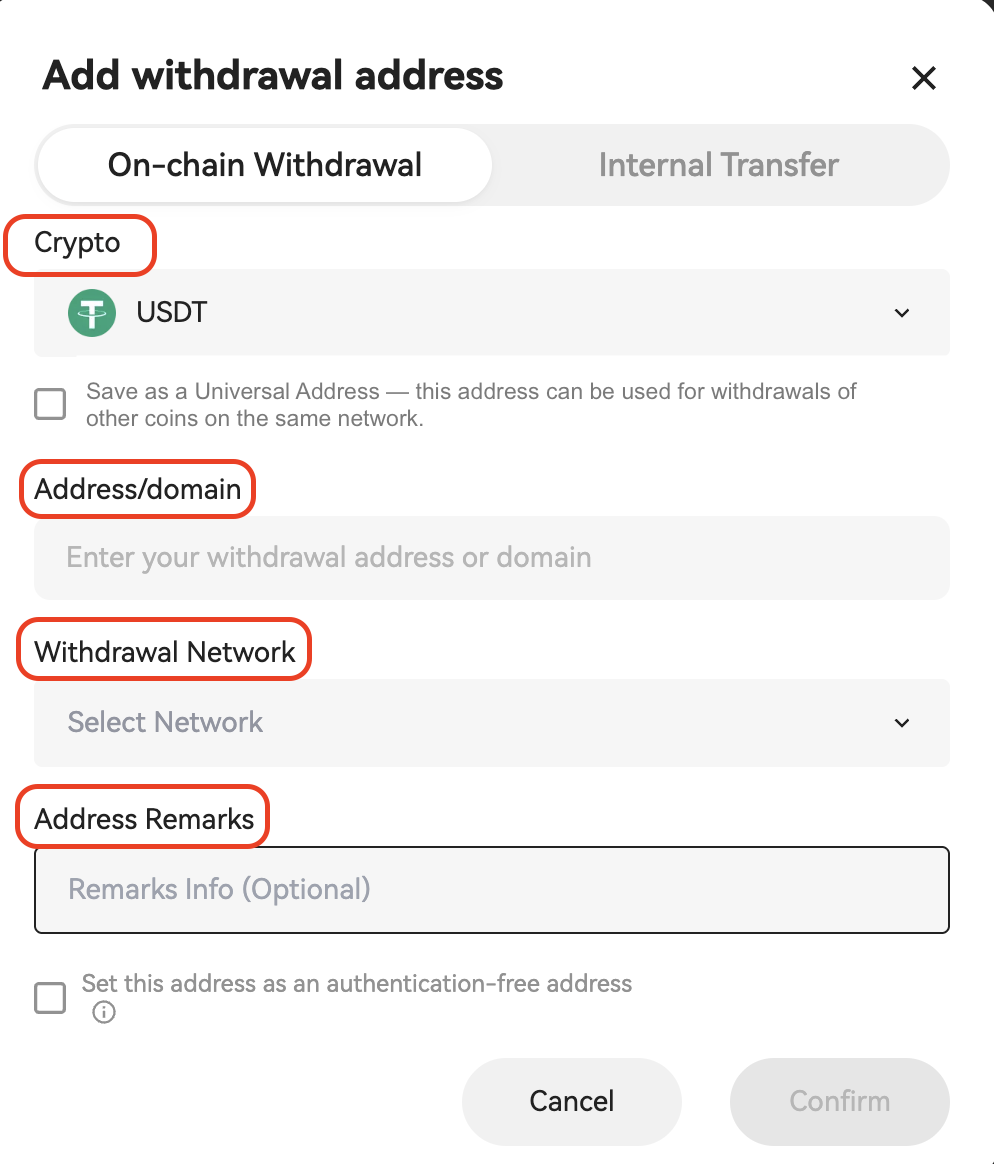
4. In the Add Withdrawal Address window, fill in the following information:
  
  • Crypto / Asset
  • Address or Domain
  • Network
  • Address Label (Optional)


Option Notes


  • Universal Address: The address is saved by the network and can be reused for withdrawals of supported coins on the same network. For details, see What Is a Universal Address
  • Set as Verification-Free Address: Withdrawals to this address may require fewer secondary verification steps, depending on on-page prompts
 
 
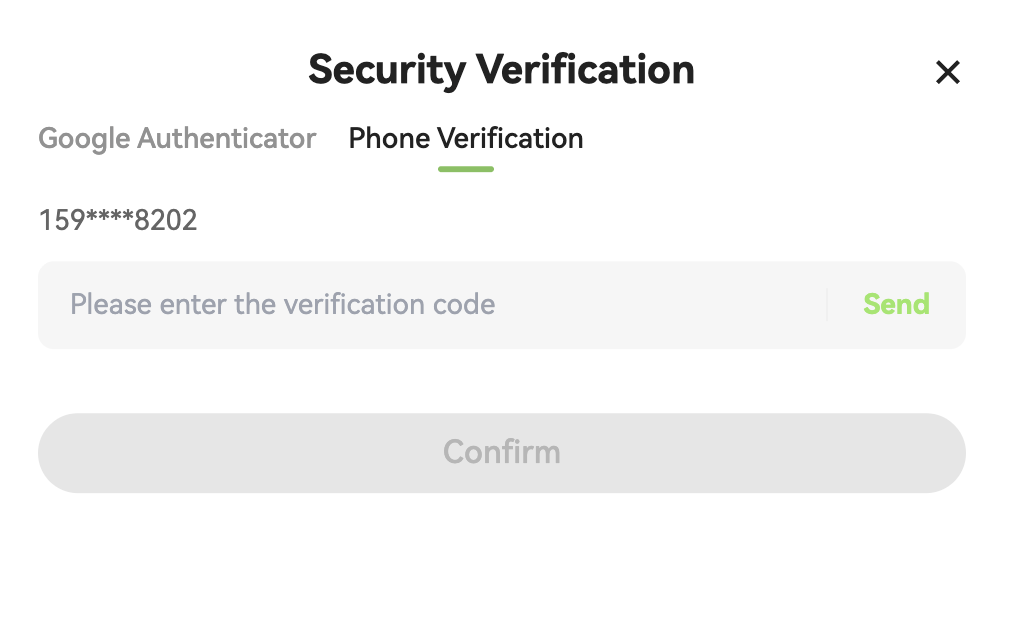
5. Complete the required security verification as prompted (for example: SMS, Email, or Google Authenticator)


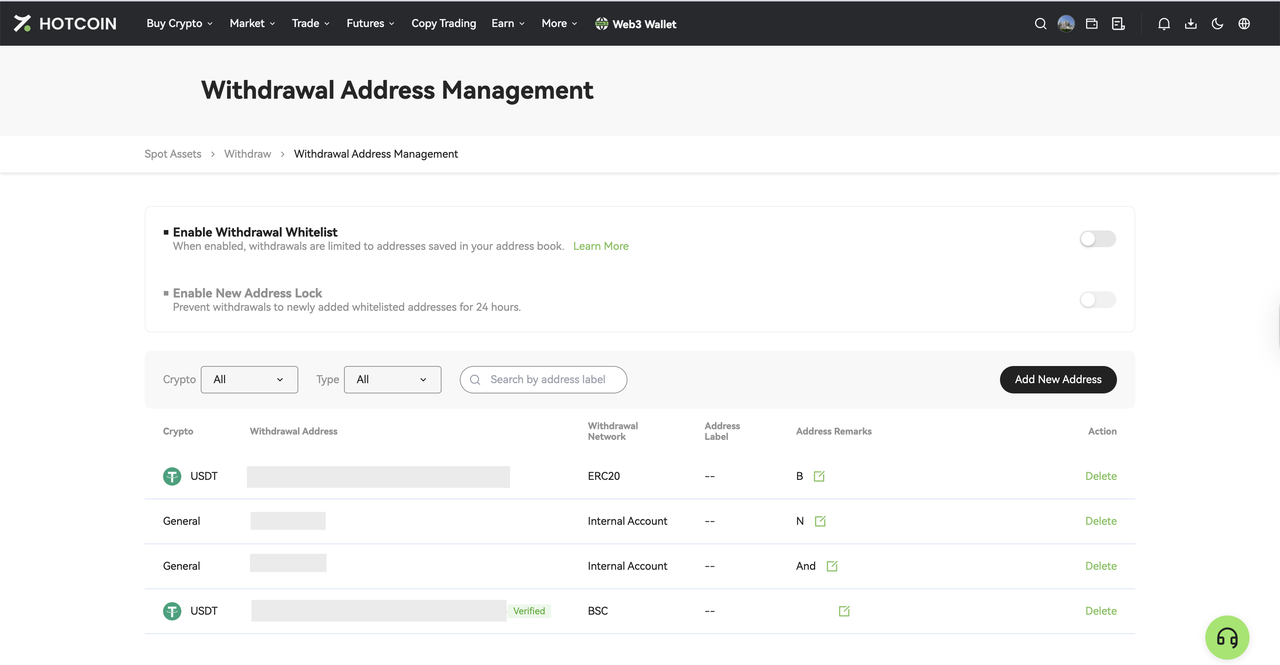
6. After submission, the new address will be saved in your Address Book. You can view and manage it on the Manage Withdrawal Addresses page


How to Manage Withdrawal Addresses


On the Withdrawal Address Management page, you can:

  • View saved withdrawal addresses
  • Edit address labels
  • Delete addresses you no longer use
  • Add a new address
  • Adjust security settings


Security Settings:

  • Withdrawal Address Whitelist Mode: After enabling, withdrawals can only be made to addresses saved in the Address Book. For details, see How to Use the Withdrawal Whitelist
  • New Address Withdrawal Lock: After enabling, newly added addresses will be subject to a 24-hour withdrawal restriction to reduce the risk of abnormal withdrawals, depending on on-page prompts


Tips

  • Ensure the withdrawal network matches the receiving platform’s network
  • Blockchain transfers are irreversible. Double-check the address, network, and other details before submitting
  • Enabling Withdrawal Address Whitelist is recommended to further enhance account security

Quick Start Guide
Cryptocurrency Basics
Beginner’s Guide
App Guide
Start Trading
VIP Program
Rewards Center
Account Security & KYC
Asset Security
Security Settings
KYC Verification
Deposit & Withdrawal
Deposit
Withdrawal
P2P
P2P Trading Guide
P2P Merchant Management
P2P Rules & Agreements
Friend Referral
Spot Trading
Spot Trading Guide
Pre-market trading
Derivatives
Advanced Trading
Grid Trading
Trend Trading
Fundamentals of Technical Analysis (Candlesticks / MACD / RSI)
Prediction Market
Futures Grid
Futures Trading
Getting Started
Contract Type
Trading Mechanics
Risk Management
FAQ
Copy Trading
Getting Started
Follower Guide
Lead Trader Guide
Terms of Service
Web3 Wallet
Getting Started
Swap
Hotcoin Card
Hotcoin Earn
TradFi
Alpha
Startup
Platform Support
Agreements & Rules