HOTCOIN Logo
comprare monete
Citazioni
Trading
Futures
gestione finanziaria
Centro premi
Altro
Portafoglio Web3
E-mail del servizio clienti

Service@hotcoin.com

feedback sul prodotto

Product@hotcoin.com

cooperazione commerciale

Business@hotcoin.com

Casella di posta giudiziaria

Casecn@hotcoin.com

Contattaci
E-mail del servizio clienti

Service@hotcoin.com

feedback sul prodotto

Product@hotcoin.com

cooperazione commerciale

Business@hotcoin.com

Casella di posta giudiziaria

Casecn@hotcoin.com

chi siamo
Introduzione alla piattaforma
Centro annunci
Stato del sistema
Contratto d'uso
politica sulla riservatezza
Note legali
prodotto
negoziazione a contratto
commercio a pronti
Trading TradFi
Copia contratto
Trading con leva
Guadagnare denaro attraverso la gestione finanziaria
Acquisto di valuta P2P
Acquista criptovalute con carta
Portafoglio Web3
Servire
Streaming in diretta
Selezione rigorosa di monete calde
Centro Benessere
Invito degli amici
Vantaggi VIP
scaricamento
Richiedi un commerciante P2P
supporto
Accademia Hotcoin
Centro assistenza
Documentazione dell'API
Commissioni
Informazioni sulla valuta
Applicazione per l'elenco delle monete
Servizio clienti in linea
Feedback degli utenti
Verifica ufficiale
Trading
BTC USDC
ETH USDC
BTC USDT
ETH USDT
PI USDT
SOL USDT
XRP USDT
©2017-2026
Centro assistenza
/Account Security & KYC/Security Settings/
How to Log In Using QR Code on Hotcoin
Centro assistenza
/Account Security & KYC/Security Settings/
How to Log In Using QR Code on Hotcoin

How to Log In Using QR Code on Hotcoin

Hotcoin
Condividi l'app


Hotcoin provides a QR code login feature that allows you to log in to the web version quickly and securely using the Hotcoin App — without entering your username or password. This improves login efficiency while further enhancing account security.


How It Works:


1. Ensure that you are logged in to the Hotcoin App on your mobile device


2. On your computer, visit the Hotcoin official website, go to the Log In page, and select QR Code Log In
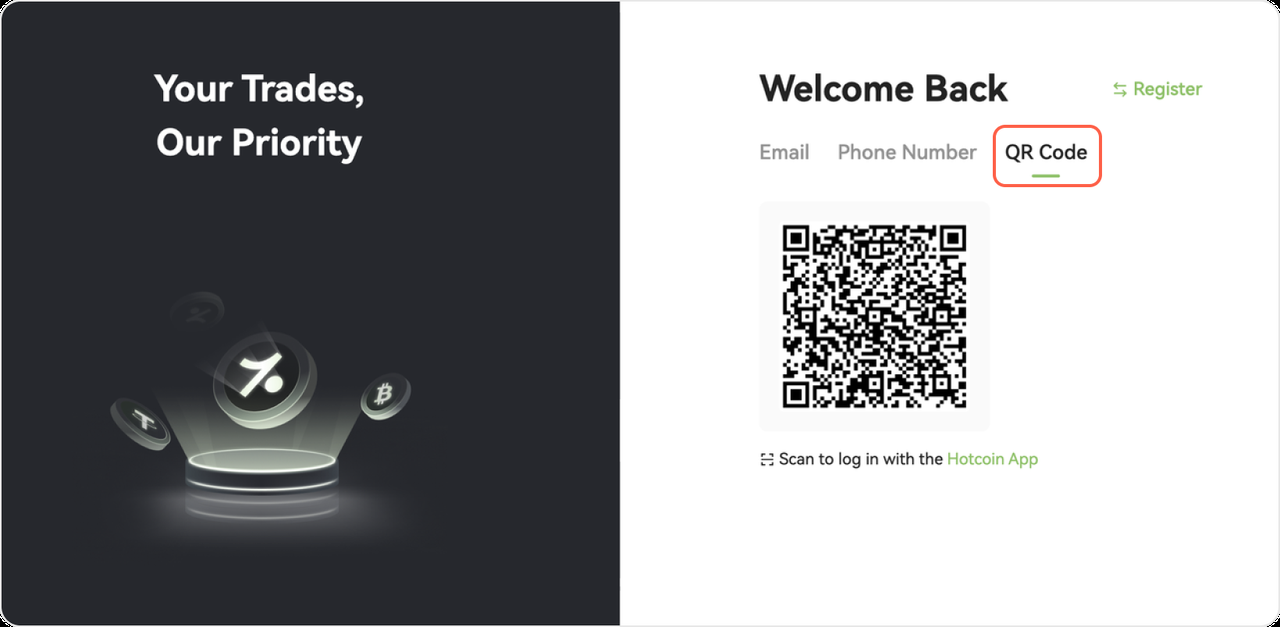


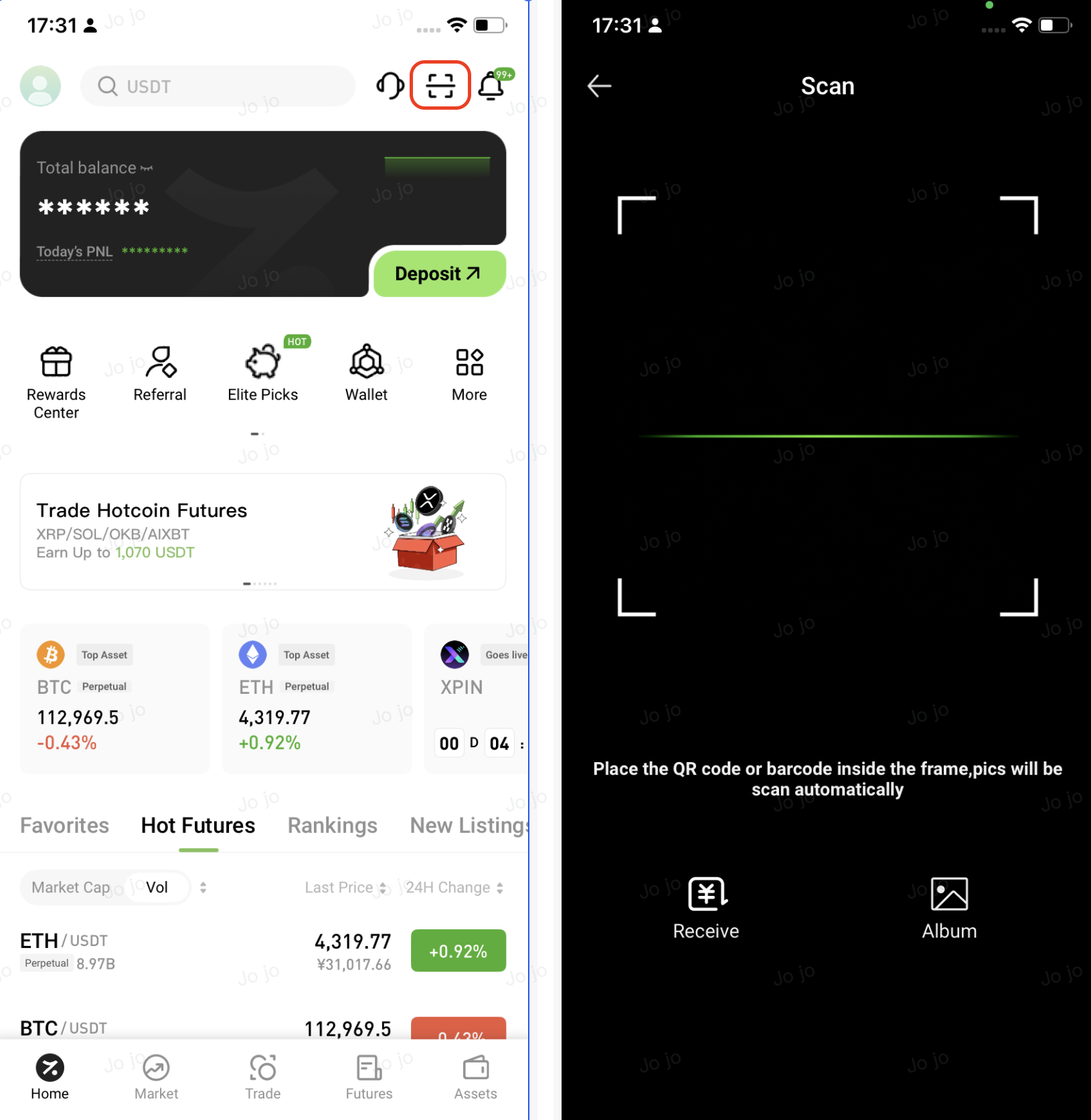
3. In the Hotcoin App, tap the Scan icon in the upper-right corner of the home page, then scan the QR code displayed on the webpage to log in securely


4. Review the login details shown in the App pop-up. If everything is correct, tap Authorize to continue
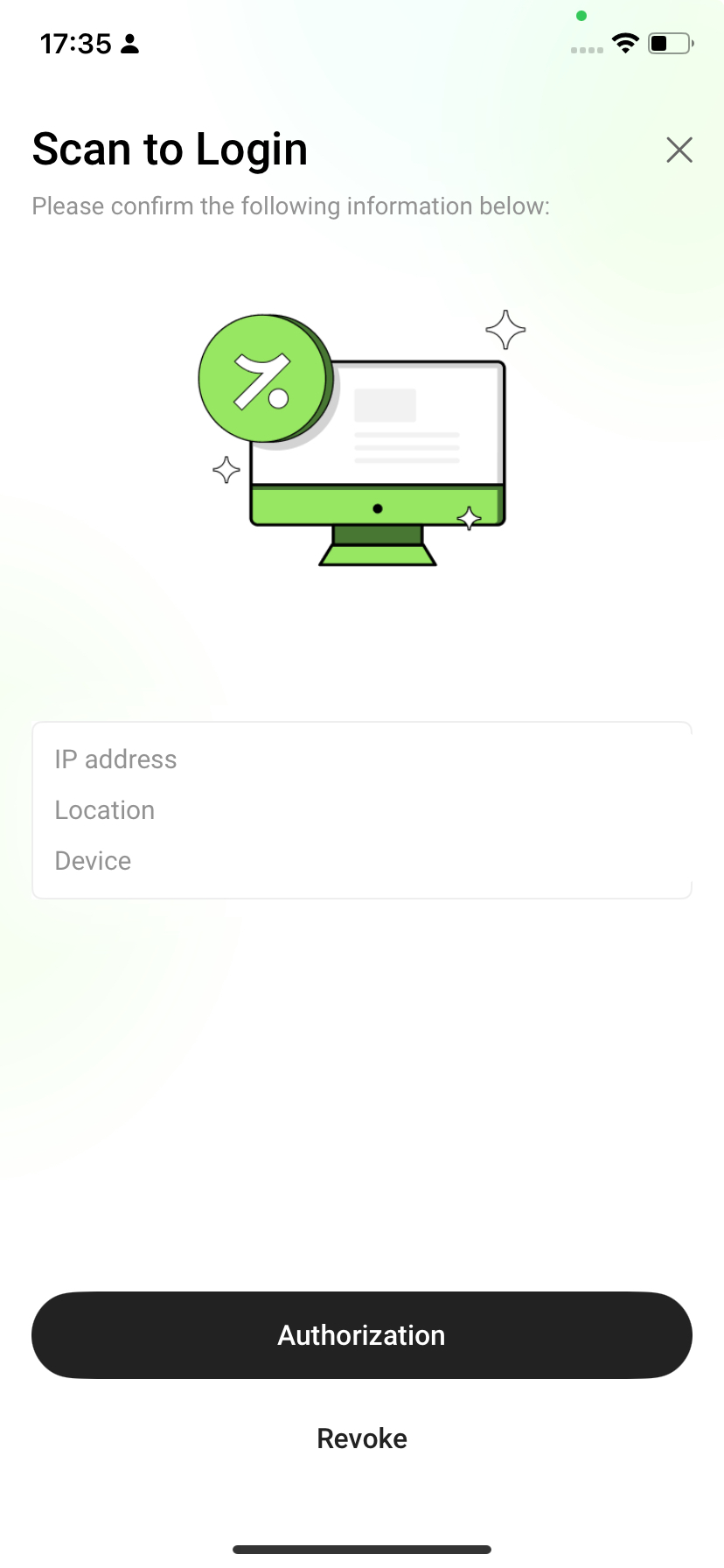


5. Once authorized, the webpage will automatically log you in and redirect you to your account dashboard


Security Tips


  • Use QR code login only on trusted networks and personal devices, and avoid using it on public Wi-Fi or other unsecured networks
  • Do not take screenshots of, share, or forward QR codes, login requests, or any one-time credentials
  • Hotcoin staff will never ask for verification codes or QR codes via phone calls, private messages, or community channels. 
  • If you encounter any suspicious requests, verify them through the official website or the in-app customer support channels


FAQs


Q1: The webpage does not redirect after scanning the QR code. What should I do?


  • Ensure your mobile network connection is stable and that you have completed the Authorize step in the App
  • If the issue persists, refresh the webpage to generate a new QR code and try again


Q2: The QR code has expired or is invalid. What should I do?


  • QR codes are time-limited. Refresh the login page to generate a new QR code, then scan again

Quick Start Guide
Cryptocurrency Basics
Beginner’s Guide
App Guide
Start Trading
VIP Program
Rewards Center
Account Security & KYC
Asset Security
Security Settings
KYC Verification
Deposit & Withdrawal
Deposit
Withdrawal
P2P
P2P Trading Guide
P2P Merchant Management
P2P Rules & Agreements
Friend Referral
Spot Trading
Spot Trading Guide
Pre-market trading
Derivatives
Advanced Trading
Grid Trading
Trend Trading
Fundamentals of Technical Analysis (Candlesticks / MACD / RSI)
Prediction Market
Futures Grid
Futures Trading
Getting Started
Contract Type
Trading Mechanics
Risk Management
FAQ
Copy Trading
Getting Started
Follower Guide
Lead Trader Guide
Terms of Service
Web3 Wallet
Getting Started
Swap
Hotcoin Card
Hotcoin Earn
TradFi
Alpha
Startup
Platform Support
Agreements & Rules