HOTCOIN Logo
comprare monete
Citazioni
Trading
Futures
gestione finanziaria
Centro premi
Altro
Portafoglio Web3
E-mail del servizio clienti

Service@hotcoin.com

feedback sul prodotto

Product@hotcoin.com

cooperazione commerciale

Business@hotcoin.com

Casella di posta giudiziaria

Casecn@hotcoin.com

Contattaci
E-mail del servizio clienti

Service@hotcoin.com

feedback sul prodotto

Product@hotcoin.com

cooperazione commerciale

Business@hotcoin.com

Casella di posta giudiziaria

Casecn@hotcoin.com

chi siamo
Introduzione alla piattaforma
Centro annunci
Stato del sistema
Contratto d'uso
politica sulla riservatezza
Note legali
prodotto
negoziazione a contratto
commercio a pronti
Trading TradFi
Copia contratto
Trading con leva
Guadagnare denaro attraverso la gestione finanziaria
Acquisto di valuta P2P
Acquista criptovalute con carta
Portafoglio Web3
Servire
Streaming in diretta
Selezione rigorosa di monete calde
Centro Benessere
Invito degli amici
Vantaggi VIP
scaricamento
Richiedi un commerciante P2P
supporto
Accademia Hotcoin
Centro assistenza
Documentazione dell'API
Commissioni
Informazioni sulla valuta
Applicazione per l'elenco delle monete
Servizio clienti in linea
Feedback degli utenti
Verifica ufficiale
Trading
BTC USDC
ETH USDC
BTC USDT
ETH USDT
PI USDT
SOL USDT
XRP USDT
©2017-2026
Centro assistenza
/Derivatives/Futures Trading/Getting Started/
How to Trade Futures
Centro assistenza
/Derivatives/Futures Trading/Getting Started/
How to Trade Futures

How to Trade Futures

Hotcoin
Condividi l'app


Before you start trading futures, transfer funds to your Futures Account first. Once the transfer is complete, you can start trading.

👉 How to Transfer Funds


The following guide uses Perpetual Futures as an example to walk you through the basic futures trading process.


1. Open the Futures Trading Page and Place Your Order


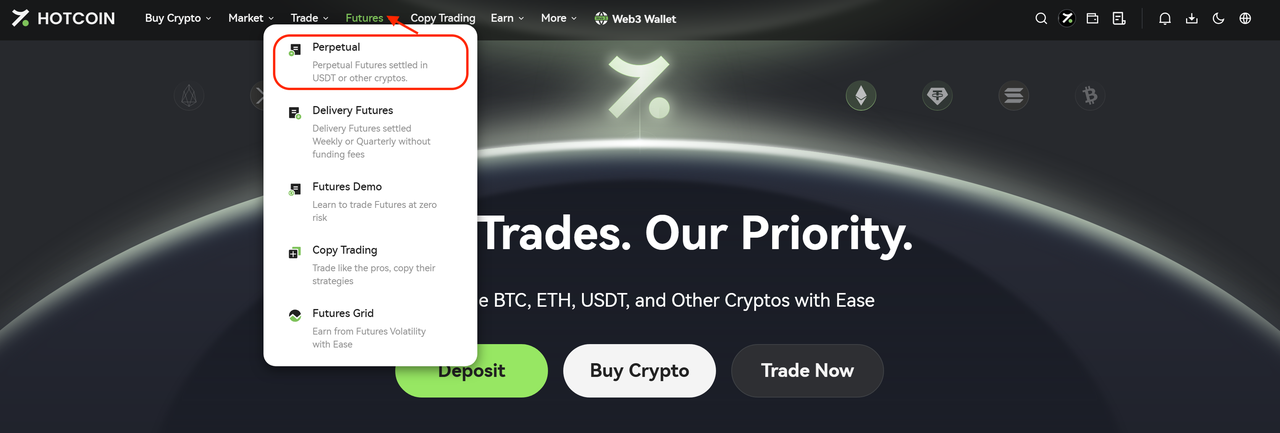
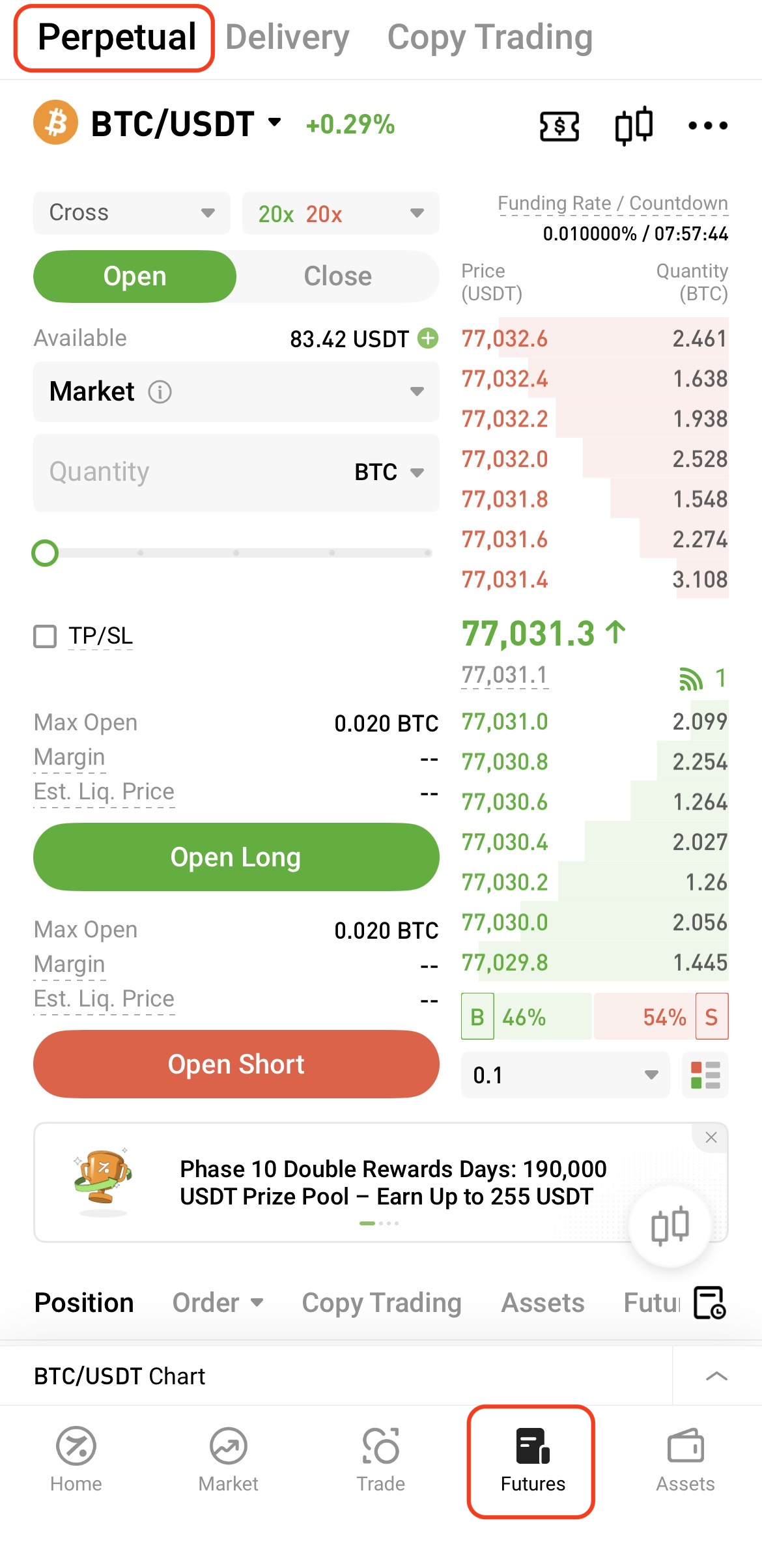
To access the trading page:


Web: Go to Futures → Perpetual Futures from the navigation bar


App: Tap Futures at the bottom of the home screen


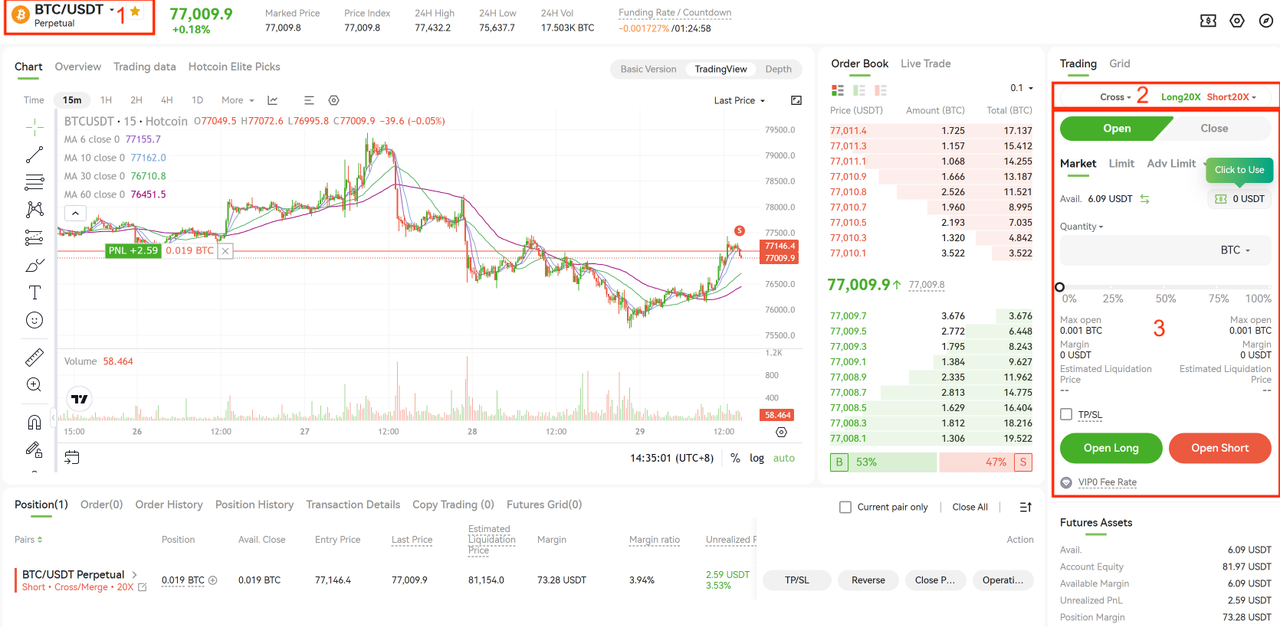
Follow these steps to place an order:

  • In section “1”, select the futures trading pair you want to trade
  • In section “2”, choose the trading mode and set the leverage
  • In section “3”, select the order type and enter the order quantity, then click Open Long or Open Short to place the order

After completing the above steps, the system will automatically display details such as the required margin and estimated liquidation price.


2. View Positions and Open Orders


Once the order is placed, you can view your current positions and open orders at the bottom of the trading page.



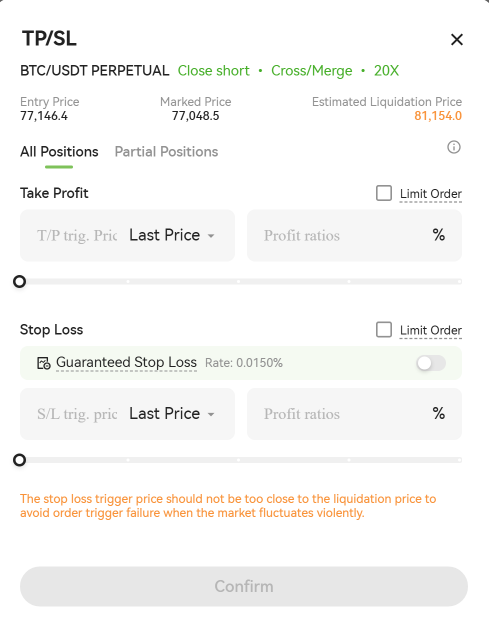
3. Set TP/SL


To set Take Profit or Stop Loss, tap the TP/SL button on the right side of the position panel.

You can configure TP/SL conditions based on the trigger price or profit ratio. Once your preset conditions are met, the system will automatically place a closing order.


4. Close Positions


You can close your positions in full or partially.


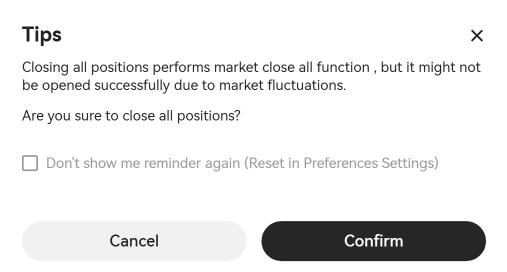
One-Click Close

Click One-Click Close to close all current positions at the market price.


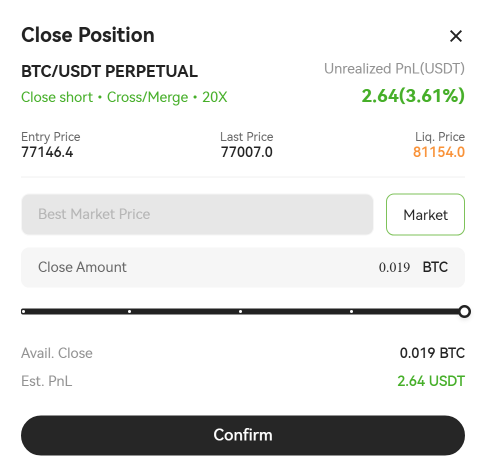
Partial Close

Click Close Position to partially close a position using either a market or limit order.


By following the steps above, you can complete a basic futures trade. Before getting started, make sure you understand the trading rules, leverage mechanisms, and related risks. Always manage your positions according to your own risk tolerance.


Visit the Help Center for more futures trading guides and tutorials.

Quick Start Guide
Cryptocurrency Basics
Beginner’s Guide
App Guide
Start Trading
VIP Program
Rewards Center
Account Security & KYC
Asset Security
Security Settings
KYC Verification
Deposit & Withdrawal
Deposit
Withdrawal
P2P
P2P Trading Guide
P2P Merchant Management
P2P Rules & Agreements
Friend Referral
Spot Trading
Spot Trading Guide
Pre-market trading
Derivatives
Advanced Trading
Grid Trading
Trend Trading
Fundamentals of Technical Analysis (Candlesticks / MACD / RSI)
Prediction Market
Futures Grid
Futures Trading
Getting Started
Contract Type
Trading Mechanics
Risk Management
FAQ
Copy Trading
Getting Started
Follower Guide
Lead Trader Guide
Terms of Service
Web3 Wallet
Getting Started
Swap
Hotcoin Card
Hotcoin Earn
TradFi
Alpha
Startup
Platform Support
Agreements & Rules