
Token Approval Management: Protect Your Wallet with revoke.cash
Token approval management is the security practice of reviewing and limiting the permissions that smart contracts have to use ERC-20 tokens or NFTs in a wallet.
When users interact with a DEX, lending protocol, staking app, NFT marketplace, or cross-chain bridge, they often approve a spender contract first. As long as an allowance or NFT operator permission remains active, that contract may move the relevant assets without asking the user to sign an ordinary transfer again.
Approval-checking tools such as revoke.cash can read public on-chain permissions and help users submit revocation transactions. Revocation is not a universal remedy, however. A wallet whose private key has leaked must be migrated, while unused Permit signatures and marketplace orders may need to be canceled separately. This guide explains the approval model, the complete revocation process, and incident response.
To first understand how wallets, explorers, gas, signatures, and multisig tools form a complete on-chain security toolkit, read Essential Web3 On-Chain Tools and Skills.
What Is a Token Approval?
An ERC-20 token contract records account balances. A user can call Transfer to send an asset directly, or call Approve first to set the amount another address or contract may use. The authorized party is called the spender.
The spender can later call TransferFrom to move tokens from the owner's account. The token contract checks the current allowance, balance, and token rules before updating state when the transaction succeeds.
This mechanism lets DEX routers, lending markets, and staking contracts pull assets as part of a business transaction. Without an approval, an application often cannot deposit a user's tokens into a pool or exchange them on the user's behalf.
An approval does not immediately transfer the asset. The balance normally remains in the wallet after the Approve transaction succeeds, but a permission that can be exercised later has been created. Its risk depends on the scope and duration of the approval and the security of the spender.
What Are the Owner, Token, and Spender?
The owner is the wallet that holds the tokens and grants the approval. The token is the token contract on a specific network. The spender is the address allowed to call TransferFrom, commonly a DEX router, lending pool, bridge, or another smart contract.
An approval is uniquely determined by the network, owner, token, and spender. Permissions for the same wallet on Ethereum, Arbitrum, and Base are independent. Revoking an approval on one chain does not clean up the others.
The DApp website itself is not normally the spender. Its interface asks the wallet to approve a contract address. Even if the website later shuts down, an on-chain allowance may remain active and the spender contract may continue to operate according to its code and permissions.
A spender may also be an upgradeable proxy. Code that appears safe today can behave differently if an administrator changes the implementation, so proxy administrators and timelocks also matter.
How Does an Allowance Relate to a Wallet Balance?
An allowance is the maximum amount a spender may use, while the balance is the amount currently held. If a wallet approves 1,000 USDT but holds only 100 USDT, the spender can currently move no more than the balance and allowance permit.
If the approval stays active, tokens deposited later may still be exposed to the remaining allowance. This is especially important for unlimited approvals: a zero balance today does not mean the permission is harmless.
An ERC-20 allowance does not let a spender directly move native assets such as ETH. Native assets do not use ERC-20 Approve, although a malicious transaction, smart-account permission, or transfer deliberately signed by the user can still send them.
Some tokens implement transfer taxes, blacklists, pauses, or nonstandard behavior. Their actual TransferFrom behavior may differ from a typical ERC-20, so the allowance shown by a checking tool is only the first part of an assessment.
What Is an Unlimited Approval?
An unlimited approval sets the allowance to a very large integer so repeated interactions with the same protocol do not require another Approve transaction. It reduces steps and gas costs but leaves a long-lived permission.
If the spender contract is exploited, its administrator performs a malicious upgrade, privileged keys are compromised, or the user approves an impersonating contract, an attacker may move all corresponding tokens within the approved limit.
An unlimited approval does not by itself prove that a project is malicious. Many established protocols use it for convenience. Users should choose between an exact allowance and an unlimited one based on wallet purpose, protocol trust, and the value at risk.
High-value wallets are better suited to exact allowances or revocation after a transaction. A small, isolated wallet used frequently may accept more convenience, but stale permissions should still be reviewed regularly.
How Do NFT Approvals Differ from ERC-20 Approvals?
ERC-721 supports Approve for one token ID and SetApprovalForAll, which makes an operator able to manage every NFT owned by the user in a collection.
A single-token approval is normally cleared when that NFT is transferred. ApprovalForAll remains active, so the operator may also gain control over NFTs from the same collection that the wallet receives later.
ERC-1155 is commonly used for semi-fungible assets and game items and generally relies on global operator approval. One permission may affect several token IDs under the same contract.
NFT marketplaces often request operator permission for listings and settlement. Revoking it may prevent pending listings from executing, but off-chain orders may still exist and should also be canceled through the marketplace.
What Is the Difference Between Connecting a DApp and Granting an On-Chain Approval?
Connecting a wallet usually lets a website read the public address, display balances, and request signatures. A normal connection does not automatically write an allowance or let the website transfer tokens.
Approve and SetApprovalForAll are on-chain transactions that require a wallet signature and gas. Once confirmed, the permission is recorded in the token or NFT contract and does not depend on whether the webpage remains connected.
Disconnecting only ends the front-end session. Clearing site data, switching RPC providers, hiding a token, uninstalling a wallet extension, or changing a local password does not revoke an on-chain approval.
Users should review “connect,” “approve,” and the actual business transaction as separate actions. A page may request all three in sequence, and one legitimate step does not make every later request safe.
What Is a Permit?
A Permit lets a user authorize token spending through an EIP-712 structured-data signature, which another party can submit on-chain. It can establish an allowance without requiring the user to send a separate Approve transaction first.
An EIP-2612 Permit commonly contains the owner, spender, value, nonce, and deadline. The nonce prevents the same signature from being used repeatedly, while the deadline limits its validity; exact behavior depends on the token contract.
Signing a Permit normally costs no gas at the time of signature, but it can create authority comparable to an Approve transaction. Attackers may disguise a malicious spender and high limit as a “login” or “airdrop verification.”
A valid Permit that has not yet been submitted may not appear in a conventional on-chain allowance list. Checking only existing Approve records therefore cannot prove that no dangerous signature remains usable.
Why Does Permit2 Require a Two-Layer Review?
Permit2 is a general-purpose token approval and signature-transfer system. A user first grants an ERC-20 allowance from the token to the Permit2 contract, then uses signatures to give individual applications narrower amounts, expiration times, or one-time transfer permissions.
The first layer is the ERC-20 allowance from the token to Permit2. The second layer is the permission recorded or signed within Permit2 for a particular spender. Revoking the second layer does not necessarily remove the first.
Permit2 can improve the experience across protocols and reduce repeated approvals, but it also becomes an important security boundary. A signature must be checked for its token, amount, spender, nonce, expiration, and signature deadline.
For a token that is no longer used, users can consider clearing both the downstream Permit2 permission and the upstream allowance from the token to Permit2. Exact steps depend on the current support provided by Permit2 and the approval tool.
What Is revoke.cash?
revoke.cash is a third-party tool that reads token, NFT, and some Permit2 permissions across multiple networks. It can query approvals for a public address and construct a revocation transaction after the user connects a wallet.
Looking up a public address normally does not require a wallet connection. Users can paste an address for a read-only review, decide what needs action, and connect the relevant wallet and network only when submitting a revocation.
Revoking an ERC-20 approval normally sets the spender allowance to zero. An NFT revocation may clear a single-token approval or switch ApprovalForAll to false.
No tool can guarantee that it lists every off-chain signature, account-abstraction session key, protocol module, or nonstandard contract permission. Results should be interpreted together with blockchain explorers, protocol documentation, and the wallet's current features.
How Can You Access revoke.cash Safely?
Type and bookmark the official domain manually or follow a trusted official reference. Be wary of search ads, look-alike domains, direct-message “support,” and urgent approval-scanning links.
A legitimate approval lookup never requires a seed phrase or private key. Leave immediately if a page asks you to import a recovery phrase, install remote-control software, or send gas funds to a private address.
On a first visit, review the public address without connecting a wallet. Public-chain data does not require a signature to “sync” or “unlock” the balance.
When you are ready to revoke, verify the browser address bar, wallet account, network, and spender again. Hardware-wallet users should also confirm the transaction target on the device screen.
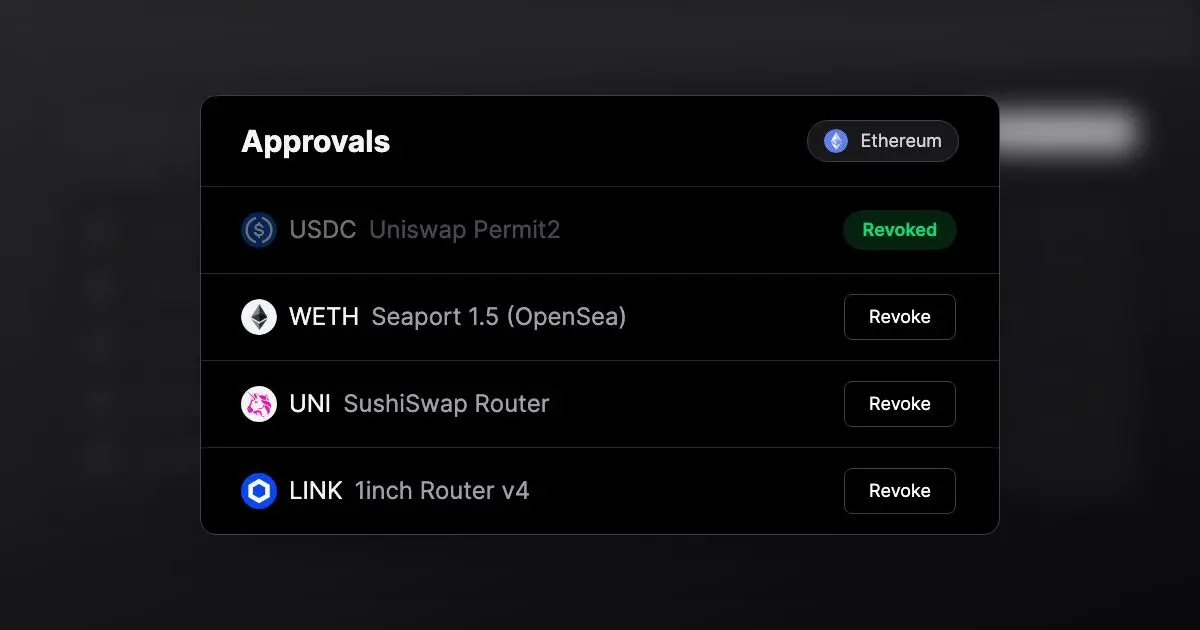
How Do You Revoke a Token Approval with revoke.cash?
First, open the official page and enter a public address. Confirm the current network and review the token, spender, allowance, and associated protocol for every item.
Second, identify the spender. Look up its contract in a blockchain explorer and determine whether it belongs to a DEX, bridge, lending protocol, or fake contract you interacted with. An unknown label is not automatically malicious, and a familiar label is not a guarantee of safety.
Third, prioritize the cleanup. Start with unfamiliar, unlimited, old, incident-related, or excessively privileged upgradeable spenders.
Fourth, connect the wallet that must perform the action. Check the address and network again, and never enter a recovery phrase during the lookup.
Fifth, select Revoke and inspect the target, method, and gas details in the wallet. A legitimate revocation calls the token or NFT contract; it is not a transfer to a personal address.
Sixth, save the transaction hash after submission. Wait for confirmation, refresh the permissions list, or read the allowance through an explorer to verify that it is zero or that the operator is disabled.
Seventh, repeat the review on other networks. Approvals are separate on each chain, and each chain requires its native asset for gas.
Does Revoking an Approval Cost Gas?
Yes. Revoking a traditional allowance, NFT operator permission, or on-chain Permit2 state is a transaction and consumes the native gas asset of that network.
The fee depends on network congestion, contract implementation, and revocation type. Ethereum mainnet can cost more than some L2 networks, but users should not expose assets or private keys to an unfamiliar bridge or relayer merely to save fees.
When there is no active emergency, it may be reasonable to wait for a lower-fee period. Batch revocation features must still be checked to make sure a trusted contract executes them. During an active attack, a delay may cost more than the gas saved.
If the wallet lacks native gas, transfer a small amount from a trusted platform or secure wallet. Ignore direct messages promising an “approval refund” or “free revocation.” For more detail, read Gas Fee Optimization: Cost-Saving Techniques and Gas Tracking.
Which Approvals Should Be Revoked First?
First, revoke spenders you do not recognize, especially permissions created around a fake airdrop, unknown mint, phishing site, or suspicious transaction.
Second, review unlimited approvals. Even when the current balance is small, they may affect tokens deposited later.
Third, remove permissions for protocols you no longer use. There is no reason to preserve convenience that is no longer needed.
Fourth, prioritize protocols affected by a contract exploit, front-end compromise, or administrator breach. Rely on the project's public security notices and verified on-chain addresses, and beware of fake compensation pages.
Fifth, review ApprovalForAll permissions covering valuable NFT collections. The potential impact is usually larger than that of one token approval.
Sixth, check Permit2 permissions with a long expiration, excessive value, or unknown spender, as well as the upstream token allowance granted to Permit2.
Which Approvals May Not Need Immediate Revocation?
Active DeFi positions, automated tasks, limit orders, and recurring purchases may rely on existing approvals. Revocation does not automatically lose the assets, but later execution may fail or require a new Approve transaction.
A reasonable allowance for a well-known protocol is neither risk-free nor necessarily an emergency. Users can decide based on the value involved, interaction frequency, audits, upgrade authority, and separation between wallets.
A low-value interaction wallet may retain limited permissions for frequently used apps, while a high-value cold wallet should minimize DApp approvals. The policy should match the wallet's purpose.
Record the spender and its purpose before revoking so a team or family knows why a permission existed. Multisig wallets should submit revocations through their normal approval process.
Are Assets Safe After an Approval Is Revoked?
After a successful revocation, the spender cannot continue using the ERC-20 allowance that was set to zero or the NFT operator permission that was disabled. This reduces risk through that particular authorization path.
It does not fix a vulnerability in the token contract, assets already deposited in a bridge, an open staking position, a malicious proxy upgrade, permissions granted to other spenders, or transfers that have already executed.
It may also leave off-chain orders, signed listings, unused Permits, smart-account modules, and session keys intact. Their protocols may require separate order cancellation, nonce invalidation, or module removal.
If the seed phrase or private key has leaked, an attacker can sign new approvals and transfers. Revocation may buy time, but the actual remedy is to create a new wallet and migrate the assets.
What Should You Do After a Private Key Leak?
Use a clean device to create a wallet with a new seed phrase and prepare the gas needed for migration. Do not generate the new wallet or type its recovery phrase on a compromised device.
Move native assets, tokens, and NFTs that you still control to the new address. Valuable assets can be handled in stages, but when a sweeper bot is active, gas deposited into the old wallet may be stolen immediately.
Revoking permissions does not make the old private key safe again. Stop using the compromised address after migration and update exchange withdrawal allowlists, payroll details, airdrop destinations, and protocol contact addresses.
Preserve suspicious transaction hashes, phishing domains, conversations, and a timeline. For significant losses, contact the relevant platforms, law enforcement, or qualified professionals, and do not prepay anyone who guarantees recovery.
How Can You Recognize Approval Phishing?
Fake airdrops often ask users to sign an unlimited Approve, NFT ApprovalForAll, Permit, or Permit2 message, after which the attacker moves the assets. A claim page may closely copy the visual identity and social accounts of a real project.
Warning signs include a spender that differs from the official contract, an excessive amount, an unusually long expiration, or an asset unrelated to the page's stated action. Reject requests that show only raw hex data when reliable simulation is unavailable.
“Verify wallet,” “remove account restrictions,” “sync nodes,” and “repair approvals” do not require a seed phrase. Official support will not privately send users a secret recovery link.
For a complete explanation of login signatures, Permit messages, and on-chain transactions, read How to Interact Safely On-Chain: Signatures vs. Transactions. For attack paths involving airdrops, read Airdrop Scams and Contract Approval Traps: Keep Your Wallet from Being Drained.
How Can You Build a Routine for Approval Management?
First, separate wallets by purpose. Keep long-term holdings, routine DeFi activity, and new-project experiments apart so one malicious approval has a smaller impact.
Second, prefer exact allowances. Approve only the needed amount for infrequent protocols; even for trusted apps used often, evaluate an unlimited approval against the wallet balance.
Third, check after every new-project interaction. Once a claim, mint, bridge, or swap is complete, review which approvals and signatures were created.
Fourth, scan across chains regularly. Review common networks monthly or quarterly and immediately after a major exploit, front-end compromise, or wallet warning.
Fifth, keep official bookmarks. Enter approval tools, explorers, and protocol sites through bookmarks rather than search ads or chat-room links.
Sixth, retain a small amount of gas. A wallet with no native asset may be unable to revoke or migrate quickly, although an interaction wallet should not hold an unnecessarily large gas balance.
18.1 Managing DEX Approvals
A DEX usually asks users to approve its router or Permit2 rather than the liquidity pool itself. When an aggregator is used, the actual spender may be an aggregation router. Confirm the real spender from wallet transaction data instead of remembering only the front-end brand.
Frequent traders may retain a reasonable allowance, while occasional users can prefer exact approvals or revoke after a trade. A new router version does not automatically clear the old router's approval.
18.2 Managing Lending and Staking Approvals
An approval before a lending deposit only lets the contract pull tokens. After the deposit, the assets may already be part of a protocol position. Revoking the allowance does not withdraw a deposit or cancel debt and liquidation risk.
Automated repayment, looping positions, or reward compounding may depend on additional contracts. Read the protocol instructions before cleanup so an automated task does not silently stop.
18.3 Managing Cross-Chain Bridge Approvals
A bridge normally requests an approval on the source chain and then locks or burns the token. Revocation only affects future pulls; assets already in the bridge must follow the cross-chain message and destination-chain process.
The same brand may use different routers, versions, and proxies across networks. After bridging, review the source-chain approval, the token contract received on the destination chain, and the future return path.
18.4 Managing NFT Marketplace Approvals
A marketplace listing may combine ApprovalForAll with an off-chain order signature. Disabling the operator can block some settlements, but signed orders should also be canceled at the marketplace or protocol layer and their nonce invalidation confirmed.
A falling floor price or an empty wallet does not make a global approval harmless. If the wallet later receives another NFT from the same collection, the old operator permission may still apply.
18.5 Managing Airdrop and New-Project Approvals
New projects have shorter histories for their front ends, contracts, and teams. Use a wallet with limited funds and exact allowances. Stop if a claim that should only receive assets requests an unlimited stablecoin approval or global NFT permission.
After the task, review Approve, Permit, Permit2, and operator permissions. Failing to receive an airdrop does not end an approval automatically, and even an eligibility-check page can be a phishing entry point.
The Hotcoin REVOKE Six-Dimension Checklist
Use the six-part REVOKE checklist to decide quickly whether a permission should remain. It is an approval-management framework, not a guarantee about the safety of any tool or contract.
19.1 R: Resource — Which Assets Are Affected?
Determine whether the permission covers an ERC-20 token, one NFT, an entire collection, Permit2, or a smart-account capability. Consider both assets held now and assets the wallet may receive later.
19.2 E: Environment — On Which Chain Does the Approval Exist?
Check the network, owner, token, and spender. Permissions for the same address on different chains are independent and must be handled, with gas paid, separately.
19.3 V: Verify — Is the Spender Genuine?
Use official project documentation and a blockchain explorer to compare the complete address, proxy implementation, administrator, and interaction history. Do not rely only on a name or logo.
19.4 O: Observe — Are the Scope and Expiration Reasonable?
Review the allowance, ApprovalForAll status, Permit amount, expiration, deadline, and nonce to identify unlimited, long-lived, or unusual permissions.
19.5 K: Key — Is the Private Key Still Trustworthy?
If the seed phrase or private key has leaked, revocation is insufficient: create a new wallet on a secure device and migrate. If only one malicious approval was granted, targeted cleanup may be enough.
19.6 E: Execute — Was the Revocation Actually Confirmed?
Check the revocation target and gas, save the transaction hash, and use an explorer or read-only query to confirm that the allowance is zero or the operator has been disabled.
Standard Safe revoke.cash Workflow
Before taking action, enter through the official domain and paste a public address without connecting a wallet. Identify the network and high-risk spenders first.
When revoking, connect the correct account with a limited balance and verify the token, spender, and transaction method for every item. Confirm on the hardware-wallet screen and avoid blind signing.
After submission, verify success in a blockchain explorer and refresh the list. An item disappearing from one interface does not prove that every chain and permission is clean.
Finally, check Permit2, NFT permissions, marketplace orders, and other networks, and record permissions that intentionally remain. If key security is in doubt, proceed with wallet migration instead.
Frequently Asked Questions
21.1 Does Disconnecting a DApp Revoke Its Approval?
No. Disconnecting only ends the front-end connection. ERC-20 allowances, NFT operator approvals, and other on-chain permissions may remain active.
21.2 Does Revoking an Approval Transfer Tokens?
A normal revocation sets an allowance to zero or disables an operator and does not transfer tokens to a third party. Always verify the contract and method before signing.
21.3 Must a Wallet Be Connected to Look Up an Address on revoke.cash?
A read-only lookup of a public address normally needs no connection. The relevant wallet is required only to sign a revocation transaction and pay gas.
21.4 Is Every Unlimited Approval a Scam?
No. Many protocols use unlimited approvals to avoid repeated Approve transactions, but they increase the potential impact of a contract vulnerability or compromised permission.
21.5 Should an Approval Be Revoked When the Wallet Balance Is Zero?
A long-lived unlimited approval can still affect tokens deposited later. If the spender is no longer needed, removing the permission reduces future risk.
21.6 Does Revoking Permit2 Remove Every Permission?
Not necessarily. Review both permissions for individual spenders and the upstream ERC-20 allowance granted to the Permit2 contract, as well as unused signatures.
21.7 Is Revocation Useful After a Private Key Leak?
It can temporarily reduce some attack paths, but the attacker can still sign new transactions. Create a new wallet on a secure device and migrate as soon as possible.
Conclusion: An Approval Is a Long-Term Permission, Not a One-Time Popup
Token approvals let DEXs, lending protocols, bridges, and NFT marketplaces call asset contracts on a user's behalf. They are fundamental to Web3 composability and also form a long-term security boundary.
Safe management requires distinguishing a connection, Approve, NFT operator permission, Permit, and Permit2, while understanding the owner, token, spender, amount, duration, and network involved.
revoke.cash can centralize approval review and revocation, but it does not replace private-key security, contract assessment, or off-chain signature management. Wallet separation, minimum permissions, periodic review, and knowing when migration is required are the strongest defenses.
Treat every approval as a key that can continue to affect future balances, not as a one-time fee popup. This makes the permission boundary after every DApp interaction easier to understand and control.
Review whether that key is still necessary after every significant interaction.
Return to Essential Web3 On-Chain Tools and Skills to continue learning about explorers, MetaMask, gas, DeFi dashboards, airdrops, and multisig management.
To connect an independent wallet to Web3 applications, consider Hotcoin Web3 Wallet. For mobile market and trading tools, visit the Hotcoin App. Browse more educational content on Hotcoin.
Risk notice: This article is for education and information only and does not constitute investment, trading, cybersecurity, legal, or tax advice. Token and NFT approvals involve risks including malicious spenders, unlimited allowances, Permit phishing, Permit2's two-layer permissions, proxy upgrades, fake revocation tools, gas costs, smart-contract vulnerabilities, and private-key compromise. Before acting, verify the latest official documentation, network, complete contract address, permission scope, and transaction simulation, and use only assets you can afford to lose.
Lettura consigliata
Visualizza altro