Futures Take-Profit and Stop-Loss Guide: The Essential Lesson in Protecting Profits
Take profit and stop loss are two of the most important risk-management tools in futures trading. A take-profit order automatically closes a position when price reaches a preset target to lock in gains, while a stop-loss order automatically closes it when price moves against your preset defense line to limit losses. Together, they form a complete exit rule, so you plan for both profit and loss before opening a position. Trading futures without them effectively lets emotion drive decisions: greed can prevent profit-taking, and hope can prevent accepting a loss. In crypto markets, the key skill of consistently profitable traders is not just directional accuracy, but disciplined risk management.
What Are Take Profit and Stop Loss?
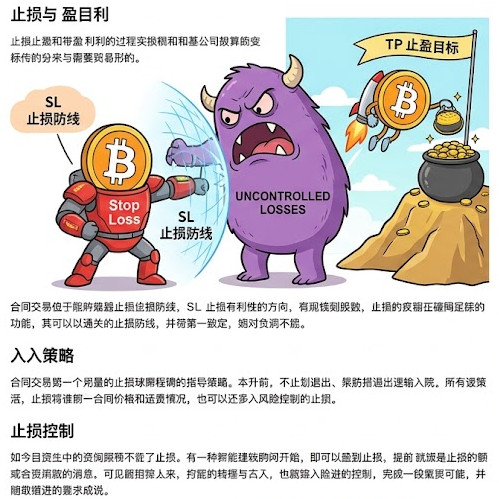
Take Profit, or TP: When a futures price reaches your preset profit target, the system automatically closes the position with a market or limit order, turning unrealized gains into realized profit. For example, if you go long BTC at 70,000 USDT and set TP at 75,000 USDT, the system closes the position when price reaches 75,000 and locks in 5,000 USDT of profit.
Stop Loss, or SL: When a futures price reaches your preset loss limit, the system automatically closes the position to prevent losses from expanding without limit. Using the same BTC long at 70,000 USDT, if you set SL at 65,000 USDT, the system closes the position when price falls to 65,000, keeping the maximum loss to 5,000 USDT.
The value of TP and SL is not limited to automatic execution. They force you to think through an exit before entering: how much can this trade lose, and at what gain will you leave? That decision alone can greatly reduce emotional trading and holding losing positions.
How Do You Set Take Profit and Stop Loss?
Mainstream futures platforms generally offer two setup methods to suit different trading habits:
Method 1: Set Them When Opening a Position
When placing an opening order, select the take-profit/stop-loss option and enter trigger prices at the same time. This is the recommended approach because it makes you decide on an exit strategy before entry. Once the order is filled, in full or in part, the system automatically places the TP and SL orders.
The setup commonly supports three parameter types:
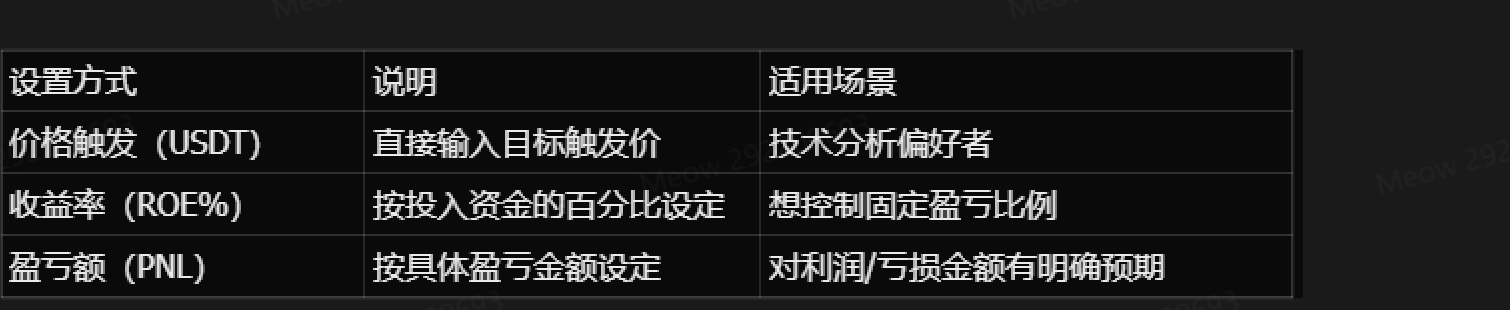
⚠️ Important reminder: When using return-rate or PnL modes, system estimates are for reference only. Actual return and PnL can differ from the initial setting because of fees, changes in average entry price, and the actual execution price.
Method 2: Add Them to an Open Position
After opening a position, click the take-profit/stop-loss button in the open-positions panel to add settings or modify existing TP and SL conditions. This is useful when you did not have time to set them at entry or need to adjust them as market conditions change.
Market Orders vs. Limit Orders: How TP and SL Execute
When setting TP and SL, you also choose the closing-order type after the trigger fires:
Market TP/SL: Once the trigger price is reached, the system immediately closes the position at the best available market price. Its advantage is fast execution and a high likelihood of being filled. Its disadvantage is that the fill may deviate from the trigger price in sharp moves, creating slippage. This is the default choice for most beginners.
Limit TP/SL: Once the trigger price is reached, the system places a closing limit order at your specified limit price or better. Its advantage is control over execution price. Its disadvantage is that a fast market can move through your limit, leaving the order unfilled when the position needs to close.
Recommendation: Beginners should prioritize market TP/SL orders to help ensure their positions can close in extreme conditions.
Trigger-Price Type: Mark Price vs. Last Price
When setting TP and SL, you usually also choose which price serves as the trigger:
Last Price: The most recent futures-market trade price, reflecting real-time market movement. It reacts quickly and suits short-term trading, but thin liquidity or a brief price spike can trigger it by mistake and cause an unnecessary exit.
Mark Price: A fair price calculated from the index price and funding rate. It is more stable and can filter abnormal prices caused by short-term manipulation or low liquidity, making it suitable for medium- and longer-term trading. It reacts relatively more slowly.
Core recommendation: Use mark price more often as the stop-loss trigger. Most platforms also base liquidation on mark price, so a mark-price stop loss is less likely to be hit by a short-lived price spike.
Advanced Tool: Trailing Stop
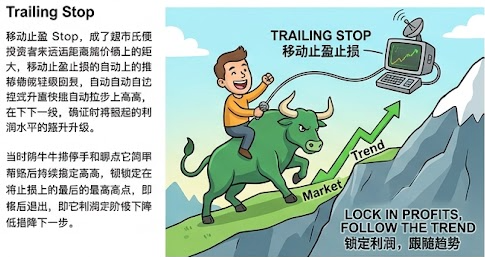
In a trending market, fixed TP and SL levels can make you exit too early. A trailing stop is a more flexible stop-loss method: the stop price automatically follows price as it moves in your favor, and closes the position only when price reverses by your preset callback amount.
How it works: Suppose you go long ETH at 100 USDT, set a trailing stop with a 5% callback rate, and choose 120 USDT as the activation price. After ETH rises to 150 USDT and then falls to 142.5 USDT, a 5% decline, the system triggers a stop-loss close and locks in roughly 42.5% profit. If ETH keeps rising, the stop level continues to move up until a reversal triggers it.
Trailing stops suit trend-following strategies, but not ranging markets, where repeated triggers can lead to frequent trading.
Frequently Asked Questions
Q1: Is a take-profit or stop-loss order guaranteed to fill?
No. In extreme conditions, such as a flash crash or a rapid surge, price may move directly through the trigger and prevent execution at the expected level. A market order is more likely to fill when liquidity is sufficient, but its execution price can still differ from the trigger because of slippage. A limit order may remain unfilled when there is no matching liquidity.
Q2: How is a TP/SL order different from a regular limit order?
A TP/SL order is a conditional order: you set a trigger condition, such as price reaching a level, and the closing order is created only after that condition is met. A regular limit order is placed directly and waits to fill. A conditional order does not occupy the order book in advance, making it more suitable for dynamically protecting a position.
Q3: Can I change TP and SL prices after opening a position?
Yes. Click the edit icon next to TP/SL in the positions interface to change parameters such as the trigger price and quantity. The system automatically cancels the old order and creates a new one.
Q4: Can I automatically open a reverse position after a stop loss is triggered?
Yes. Some platforms support take-profit reversal and stop-loss reversal: after the closing order is triggered, the system automatically opens a new position of the same size in the opposite direction at market price. This can help trend traders switch direction quickly, but reverse orders may not fill completely in extreme conditions.
Related tutorials:
- Complete Futures Trading Guide: From Basics to Risk Control
- Leverage Trading Explained: Amplified Gains and Losses
- What Is Futures Liquidation? Liquidation Mechanics and Price Calculation
- Futures Position Management: Kelly Criterion and Pyramiding
- Cross vs. Isolated Margin: Differences and How to Choose
Recommended reading:
Lettura consigliata
Visualizza altro