
What Is Permit Signature Phishing? Off-Chain Signing, Wallet Drain Mechanics, and Prevention
A Permit signature is like a power of attorney: once you sign it, someone else can use it to move your tokens. Signing costs nothing and leaves no visible record, so scammers love to disguise it as a "login," "free airdrop," or "identity verification."
Just remember three things:
- No gas ≠ safe. Paying nothing only means the signature has not been sent on-chain yet. It does not mean the signature has no effect.
- If you don't understand it, don't sign. Before signing, check clearly: who is being authorized, which token, how much allowance, and when it expires.
- If you signed by mistake, closing the webpage does nothing. Use a trusted tool to revoke the approval as soon as possible (set the allowance to 0).
What Is Permit? Think of It as a Power of Attorney
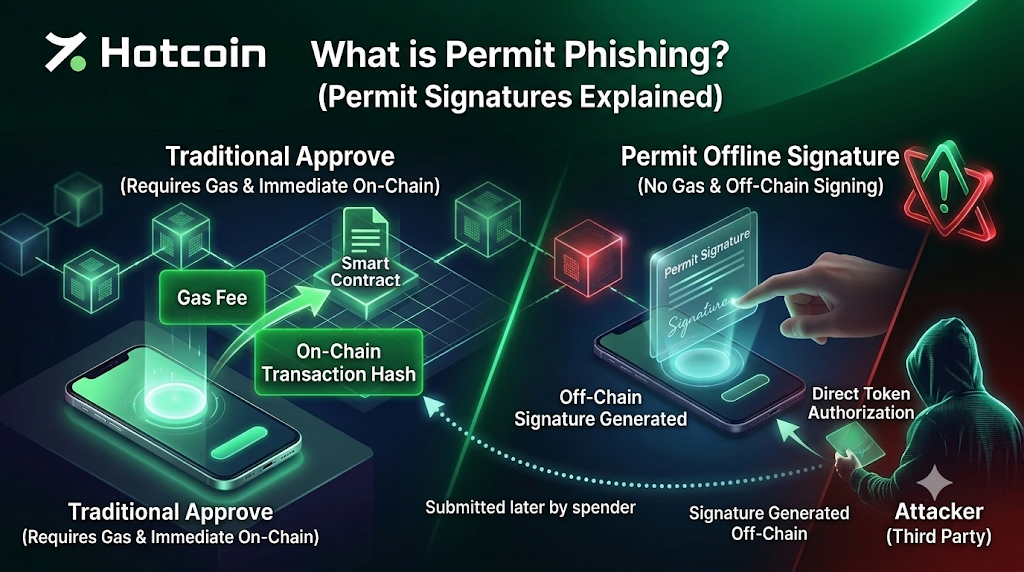
To let an app (such as a token swap site) move your tokens, you first need to "authorize" it. There are two ways to authorize:
| Traditional approve | Permit signature | |
|---|---|---|
| Analogy | You go to the bank in person to authorize it | You sign a power of attorney at home and give it to someone else to take to the bank |
| Gas required? | Yes, you pay it | Not at the moment of signing |
| Record visible immediately? | Yes, with a transaction hash | No, you have to wait for someone to submit it |
| Who can submit it to take effect? | Only you | Anyone who has the signature |
Permit is defined by Ethereum's ERC-2612 standard. The benefit is that you send one fewer transaction, and sometimes someone else can pay the gas for you. The cost is that what you confirm is not a transaction you can look up immediately, but a power of attorney that "can be used at any time later."
A Permit authorization usually contains five things:
- Owner: you
- Spender: the address that can move your tokens
- Value: the maximum amount it can move
- Nonce: prevents the same authorization from being reused
- Deadline: it becomes invalid after this date
Wallet pop-ups usually display these fields in a fairly neat format (EIP-712). But a neat format does not mean it is safe; it just makes it easier for careful readers to spot something wrong.
Why Can Tokens Be Moved Without Paying Gas?
"Off-chain signing" means the signature has not been sent on-chain at the moment you sign, so you do not pay gas. But that does not mean it has no effect; it just means no one has taken it to use yet.
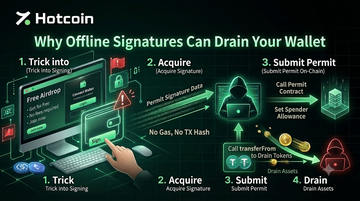
A typical theft process:
- You enter a fake website and click "claim," "log in," or "verify."
- Your wallet pops up a signature request, and the webpage may only say "continue" or "free."
- In fact, the spender on the authorization is the scammer, the allowance is large, and the deadline is set far in the future.
- You press confirm; the scammer gets the signature, pays gas to submit it on-chain, and the approval takes effect.
- The scammer then moves your tokens away, sometimes completing the approval and the transfer in a single transaction.
So the first record you see on-chain may well be "the tokens are already gone."
Another point: if the deadline is set extremely far away, the scammer does not have to act immediately and can wait until your wallet holds more money before submitting.
Simply put: whether a signature is dangerous does not depend on whether the pop-up charges gas, but on who this authorization gives power to. Calling Permit "just a login" is a lie.
What Should You Check in the Pop-Up Before Signing?
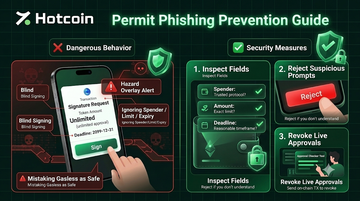
Every time a signature pop-up appears, treat it as a new authorization, and do not just click "confirm" along with the webpage. Compare against this checklist (actual field names depend on your wallet):
- Is the URL correct? It should be an official URL you saved yourself, not an ad, short link, or look-alike fake URL.
- What kind of request is this? Is it a simple login, a Permit approval, or a transaction that will transfer funds immediately?
- Which token is it? It should be the token you intend to use, not a fake token with a similar name.
- Who is being authorized? Is the spender the protocol you are actually trying to use?
- How much is the allowance? Is it the exact amount you need, or an unreasonably large number?
- When does it expire? Does it expire soon, or is it so far away that it is effectively permanent?
- Is the network correct? The chain ID should match the chain you are currently operating on.
For a more complete explanation of signatures versus transactions, read How to Interact Safely On-Chain.
What If You Already Signed by Mistake?
First, determine two things: has this signature already been submitted, and have your assets already been transferred away?
Proceed in this order:
- Leave the current website, and do not continue to "re-sign," "re-authorize," or "upgrade the allowance" as the other party asks.
- Use the official entry point you saved yourself or a trusted approval-checking tool to inspect this address's token approvals, NFT operator permissions, and other permissions on the relevant network.
- For any spender you do not recognize, whose allowance is abnormal, or that has just appeared, initiate a revocation or set the allowance to zero. Revocation itself is an on-chain transaction, requires gas on that network, and the old approval may still be used before the transaction is confirmed.
- Also check approvals for the same address on other commonly used networks, because approvals on different networks are separate.
- Save the website URL, signing time, transaction hash, token contract, and spender address, so you can explain the situation to a platform or law enforcement.
If the approval check shows the allowance is still there but no large transfer has occurred yet, revoking as soon as possible is still worthwhile. If the assets have already been transferred away, revocation cannot undo a completed transfer, but you should still clean up remaining approvals to prevent the same spender from moving other tokens.
Revoking an approval, disconnecting from a website, and deleting browser records are not the same thing. Disconnecting only ends the current session and does not automatically clear an allowance that is already in effect on-chain. For specific checking and cancellation methods, refer to Wallet Approval Management.
If you entered your seed phrase or private key on that website, or let the other party remotely control your device, this is no longer just a Permit problem. You should create a new wallet on a clean device and move remaining assets there; the old address should no longer be used for long-term storage. The new wallet's seed phrase should be backed up offline and in full, and you should never enter it again on the website you just used or on any page asking you to "verify the seed phrase." For backup methods, refer to the Complete Seed Phrase Backup Guide.
In addition, the deadline and nonce in the signature determine whether this Permit can still be submitted. While the deadline has not passed and the corresponding nonce has not yet changed due to a successful permit or a later signature, an attacker may still submit it. This is why merely "stop clicking that website for now" is not enough; you must also revoke any approval that has been formed or may be formed on-chain as soon as possible.
Common misconceptions
- "A signature that costs no gas is safe." Gas only relates to whether something goes on-chain immediately. The very purpose of Permit is to let a signature produce an approval when it is submitted later.
- "Closing the phishing site invalidates the signature I just made." A signature can usually still be submitted before its deadline and before its nonce is used. Invalidating it depends on the approval being revoked, used, or expiring, not on closing the tab.
- "I was just logging in; it is impossible for my tokens to be moved." Login signatures and Permits may both appear as a "signature" in the wallet. You must read the message type and fields, not just the webpage copy.
- "The wallet has already connected to this site, so I can just confirm all later pop-ups." Every request is a separate authorization. Connecting a wallet usually only lets the site read your address and does not mean an unlimited allowance has already been approved.
- "Revoking an approval means the tokens that were moved have been recovered." Revocation only affects future transfers under that approval and cannot automatically restore completed transactions.
- "Signing a Permit by mistake means the seed phrase is leaked and the whole wallet must be abandoned." These two must be judged separately. If you only signed an approval, first revoke it and check for outgoing transfers; only when the seed phrase, private key, or device control may have been exposed should the whole wallet be considered compromised.
FAQ
Q1: What is the difference between Permit and a normal approve? A normal approve is an on-chain transaction you send yourself; you can usually see the hash in a block explorer immediately, and it requires gas. Permit first generates a signature off-chain, and then any party can submit it to the contract, achieving an effect similar to setting an allowance. For whether tokens can subsequently be moved via transferFrom, both can form a valid authorization.
Q2: There is no transaction hash when I sign; does that mean nothing has happened? At that moment there may indeed be no new transaction on-chain, but you have handed over an authorization message that can be submitted. Once an attacker submits it successfully later, an approval or transfer record will appear. Do not interpret "no hash can be found right now" as "the signature has no effect."
Q3: Does Permit always require an unlimited approval? No. The standard allows the signature to specify a concrete allowance, and extremely large values can also appear. Phishing requests more often come with high allowances or terms that almost never expire, but that is not a technical necessity. Even if the allowance looks small, if the spender is not the entity you want to interact with, you should refuse.
Q4: I already signed but the tokens have not been moved yet; what is the most important step? Check and revoke the relevant approvals on the correct network as soon as possible, and also check whether there are other token or NFT permissions. Do not keep returning to the original website to "check progress," and do not sign any new messages.
Q5: Does revoking an approval require entering the seed phrase on a revocation website? No. A trusted tool should only connect to your wallet and have you confirm a revocation transaction in the wallet. Any page that asks you to fill in the seed phrase or private key on a webpage, or to export a QR code by screenshot, should be treated as high risk.
Q6: If I sign with a hardware wallet, will I avoid Permit phishing? No. A hardware wallet helps protect the private key from being copied, but it will still sign messages according to your confirmation. If you confirm a malicious Permit on the device, the signature is still valid. A hardware wallet cannot replace reading the spender, allowance, and deadline. Before confirming, it is worth comparing the address and allowance on the device screen with the protocol you intend to use; if they do not match, refuse, and do not worry that "signing one fewer time" will cause any loss.
Conclusion
Permit changes token authorization from a transaction that goes on-chain immediately into an off-chain signature that can be submitted later. It saves a step in interactions, and it also makes phishing easier to disguise as "free," "login," or "verification." The way to protect yourself is not to refuse all signatures, but to clearly check the authorized party, allowance, token, and validity period before confirming, and to refuse if you do not understand it; once you sign by mistake, immediately check and revoke any approvals that are still valid, rather than thinking that closing the website means it is over.
If you want to go further on approval checking and cancellation steps, read Wallet Approval Management first.
Risk warning: This article is for educational and informational purposes only and does not constitute investment, legal, or security commitments, nor does it guarantee that assets can definitely be recovered after a mistaken signature. On-chain transactions and submitted signatures usually cannot be revoked by themselves, and revoking an approval cannot restore a completed transfer. Please check permissions only through official entry points you saved yourself and trusted tools, and do not provide your seed phrase, private key, or verification codes to anyone. Wallet pop-ups and protocol rules may be updated; please refer to the current interface and official documentation.
What If You Accidentally Signed?
First figure out two things: has this signature already been submitted on-chain? Have the tokens already been moved away? Then handle it in this order:
- Leave that website immediately. Do not follow the other party's instructions to "re-sign," "re-authorize," or "upgrade the allowance."
- Use trusted tools to check approvals. Enter through the official entry point you saved yourself, and check this address's token approvals, NFT permissions, and other permissions.
- Revoke suspicious approvals. If you see a spender you do not recognize, with an odd allowance, or that has just appeared, set the allowance to 0. Note: revocation itself is an on-chain transaction and requires gas; before it is confirmed, the old approval may still be used.
- Check other chains too. Approvals on different networks are separate; check every chain you commonly use.
- Keep evidence. Save the URL, signing time, transaction hash, token contract, and spender address; you will need them when explaining the situation to a platform or the police.
How to view several situations:
| Your situation | What to do |
|---|---|
| The approval is still there, and the tokens have not been moved yet | Revoke as soon as possible; there is still time |
| The tokens have already been moved | Revocation cannot get the money back, but you should still clear the remaining approvals so other tokens are not moved too |
| You once entered the seed phrase, private key, or let the other party remotely control your computer | This is no longer just a Permit problem. Create a new wallet on a clean device, move the remaining assets there, and do not keep long-term assets in the old address |
When creating a new wallet, the seed phrase should be backed up offline and in full, and you should not enter it again on any webpage asking you to "verify the seed phrase."
Why is "not going to that website anymore" not enough? As long as it has not expired and the nonce has not been used, the scammer can submit this authorization at any time. So you must cancel the approval on-chain.
In addition, "disconnecting the wallet," "deleting browser history," and "revoking the approval" are three different things. Disconnecting only ends this connection; the approval already in effect on-chain remains.
Common Misunderstandings
| Wrong idea | Reality |
|---|---|
| A signature that costs no gas is safe | Gas is only related to "whether it goes on-chain immediately." Permit is designed to "sign first, submit later" |
| Closing the phishing website invalidates the signature | It remains valid before it expires and before it is used. It can only be invalidated by revocation, use, or expiry |
| I was just logging in; it is impossible for me to be drained | Login and Permit may both show only "signature" in the wallet; read the pop-up content, not what the webpage says |
| I have already connected to this website, so I can just click through later pop-ups | Connecting usually only lets the website see your address. Every request is a new authorization |
| Revoking an approval equals getting the tokens back | Revocation can only block "the future"; what has already been moved cannot be recovered |
| Signing a Permit by mistake means the seed phrase leaked and the whole wallet must be abandoned | Judge the two separately. If you only signed an approval, first revoke it and check for outgoing transfers; only if the seed phrase, private key, or computer control may have leaked do you need to move the whole wallet |
FAQ
Q1: What is the difference between Permit and a normal approve? approve is a transaction you send yourself; it requires gas and can be looked up immediately. Permit is signed first and then submitted by anyone. But for "whether the tokens can be moved," the effect is the same: both are valid authorizations.
Q2: After signing, I cannot find a transaction hash; did nothing happen? There may indeed be no record on-chain yet, but you have already handed over the authorization. Once the scammer submits it, the record will appear. "Cannot find it right now" does not equal "no effect."
Q3: Is Permit always unlimited? Not necessarily; the allowance can be any number. Phishing commonly uses high allowances or settings that almost never expire, but not every time. Even if the allowance is not large, as long as the spender is not the entity you want to use, you should refuse.
Q4: I signed but the tokens are still there; what is the most important step? Check and revoke the approval on the correct network as soon as possible, and also see whether there are other token or NFT permissions. Do not go back to the original website to "check progress," and do not sign anything else.
Q5: Does revoking an approval require entering the seed phrase? No. A trusted tool will only ask you to connect your wallet and then confirm a revocation transaction in the wallet. Anything asking you to fill in the seed phrase or private key on a webpage, or to export a QR code by screenshot, is a scam.
Q6: With a hardware wallet, I will not be phished by Permit, right? You can be. A hardware wallet can prevent the private key from being stolen, but if you press confirm on the device, the signature is still valid. Before pressing, compare the address and allowance on the screen with the protocol you intend to use; if they do not match, refuse. Signing one fewer time will not cause any loss.
Final Reminder
Permit turns an "authorization transaction that goes on-chain immediately" into "a signature submitted later." It is convenient, and it also makes it easier for scammers to disguise it as "free," "login," or "verification." You do not need to refuse all signatures; just do two things:
- Before signing: clearly check who is being authorized, which token, how much allowance, and when it expires; refuse if you do not understand.
- After signing by mistake: immediately check and revoke approvals that are still valid; do not think that closing the webpage is enough.
Risk warning: This article is for educational and informational purposes only and does not constitute investment, legal, or security commitments, nor does it guarantee that assets can definitely be recovered after a mistaken signature. On-chain transactions and submitted signatures usually cannot be revoked by themselves, and revoking an approval cannot restore a completed transfer. Please check permissions only through official entry points you saved yourself and trusted tools, and do not give your seed phrase, private key, or verification codes to anyone. Wallet pop-ups and protocol rules may be updated; please refer to the current interface and official documentation.
Inirerekumendang pagbabasa
Tingnan ang higit pa