Hotcoin Recharge Did Not Arrive and Withdrawal Is Stuck: Is There a System Problem?
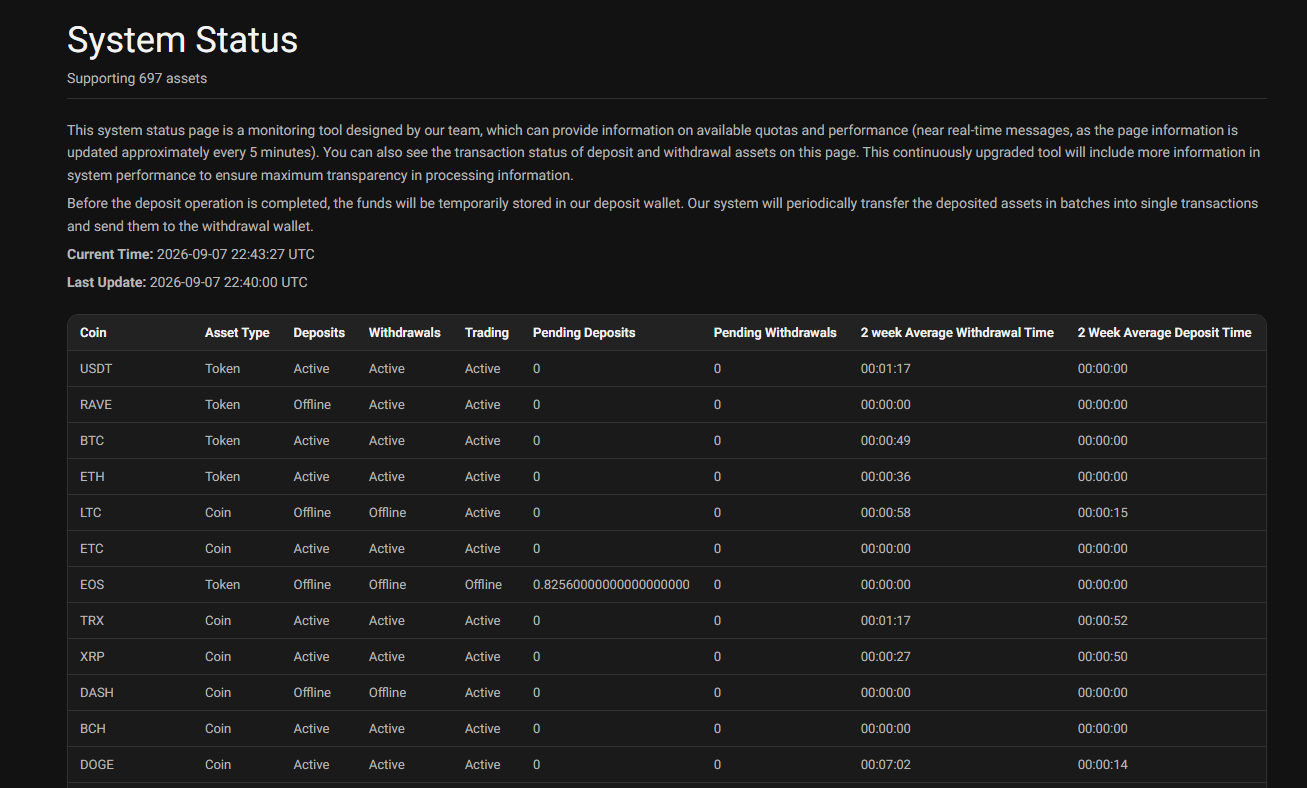
A missing recharge or a stuck withdrawal does not necessarily mean that Hotcoin is experiencing a system failure. The delay may come from blockchain confirmation times, network congestion, wallet maintenance, an unsupported network or memo/tag issue, account-level restrictions, or a temporary platform processing delay. Hotcoin provides a System Status page that shows deposit and withdrawal conditions for supported assets and can help determine whether an issue is platform-wide or specific to a transaction.
How to determine whether it is a system event or a personal account issue?
The first step is to compare the transaction status with Hotcoin's system information. If deposits or withdrawals for the same asset or network are shown as suspended, under maintenance, or experiencing pending transactions, the problem may be related to a platform or network event. Hotcoin's status page displays deposit, withdrawal, trading, pending-deposit and pending-withdrawal information, together with maintenance notes and average processing times.
If other services are operating normally and only one transaction is delayed, investigate the individual transaction before assuming that the entire system is affected. For a recharge, check the transaction hash, network, destination address, amount and any required memo or tag; if the address and network mapping is unfamiliar, start with What Is a Wallet Address? A Guide to Sending and Receiving Crypto. For a withdrawal, check the withdrawal status, destination address, selected network and whether a transaction hash has already been generated.
A blockchain transaction can also remain pending even when Hotcoin itself is operating normally. Hotcoin explains that withdrawal confirmation depends on blockchain nodes and that actual arrival times can vary according to the asset and network.
Hotcoin system status and affected services where to see?
Hotcoin's System Status page is the primary place to check the current operating condition of deposits and withdrawals. The page is designed to provide near-real-time information and is updated approximately every five minutes. It also shows pending deposit and withdrawal information and maintenance notes for supported assets.
Users should also check Hotcoin's official announcements for scheduled wallet maintenance, network upgrades and temporary service suspensions. Recent Hotcoin announcements demonstrate that individual networks can have deposits and withdrawals suspended while trading remains available. For example, Hotcoin has announced temporary deposit and withdrawal suspensions for networks undergoing wallet maintenance or upgrades.
This distinction is important because a network-specific suspension does not necessarily indicate that the entire Hotcoin platform is unavailable.
What should I check first when encountering blockchain congestion?
When a recharge has not arrived, first locate the transaction ID (TxID) and check it on the relevant blockchain explorer. The confirmation status can show whether the transaction has actually been broadcast and whether it has received enough network confirmations.
The next check should be the selected blockchain network. The sending network must correspond to the network supported by the Hotcoin deposit address. Hotcoin similarly warns for withdrawals that the selected withdrawal network must match the receiving network.
For assets that require a memo or tag, verify that the correct information was included. A missing or incorrect memo or tag can prevent an otherwise valid blockchain transaction from being automatically credited. This is also identified as a common cause of uncredited deposits in the Bitget troubleshooting guidance used as a reference for this page.
For withdrawals, check whether the transaction has already been recorded on-chain. If Hotcoin shows the withdrawal as successful but the receiving wallet or exchange has not credited the funds, the issue may be related to blockchain confirmations or processing on the receiving side rather than a Hotcoin system failure. Hotcoin specifically identifies network congestion and confirmation delays as possible causes.
What records should be kept during problem handling?
Keep the transaction information together until the issue is resolved. The most useful records are the cryptocurrency, amount, date and time, transaction ID, deposit or withdrawal address, blockchain network, transaction status and any applicable memo or tag.
For a withdrawal that is stuck inside Hotcoin, also record the withdrawal status displayed in the account and any security or risk-control message shown during the process. Hotcoin states that withdrawals can be delayed or restricted because of KYC requirements, withdrawal limits, security controls, unusual account activity, wallet maintenance or network upgrades. Users operating in the app can cross-check every step against Fast App Deposits and Withdrawals: Mobile Differences to see where each status is displayed.
Do not send passwords, authentication codes, private keys or other sensitive security credentials to anyone claiming to provide support. Transaction information should be sufficient for investigating the transfer without exposing account-security information.
The account has not arrived after the system is restored. What should I do next?
If a network or wallet maintenance period has ended but the recharge or withdrawal is still missing, return to the transaction history and determine whether the transaction has an on-chain TxID. If a TxID exists, compare its blockchain status with the status displayed by Hotcoin and the receiving wallet or platform.
If the blockchain confirms the transaction but the balance has not been credited, the issue may require Hotcoin or the receiving platform to reconcile the transaction manually. If there is no blockchain transaction yet, the request may still be waiting for Hotcoin's internal processing or wallet service to resume. Anyone still unsure how to self-check can work through Deposit Not Arrived? Checklist and Solutions item by item, or, before starting a deposit at all, review How to Deposit USDT: Comparing Three Funding Methods to pick the right network and method.
Hotcoin's own guidance states that a delayed withdrawal or internal transfer does not necessarily mean that funds are lost and that processing time, network conditions or temporary display delays can prevent funds from appearing immediately.
When contacting Hotcoin Support, provide the TxID, asset, amount, network, transaction time, relevant address and current status. These details allow support to identify the transaction without requiring unnecessary sensitive account information. If the issue is connected to a known maintenance event, also mention the relevant network and the approximate time the transaction was submitted.
The key point is that a missing recharge or stuck withdrawal alone is not enough to conclude that Hotcoin's system has failed. Check the system-status page, official maintenance announcements, blockchain confirmation status and transaction details in that order. This separates a platform-wide incident from blockchain congestion, maintenance, processing delays and transaction-specific problems before further action is taken.
Inirerekumendang pagbabasa
Tingnan ang higit pa