
How to Use the Hotcoin Rewards Center
What Is the Hotcoin Rewards Center?
The Hotcoin Rewards Center is a central page for platform campaigns, user tasks, and claimable rewards. It lets users review task requirements, completion progress, reward status, and historical records.
Rewards Center campaigns may include new-user tasks, deposit tasks, trading tasks, referral campaigns, and limited-time promotions. Eligibility, participation periods, and reward conditions vary by campaign. Review the rules before participating to confirm that your account is eligible.
Where Can You Access the Hotcoin Rewards Center?
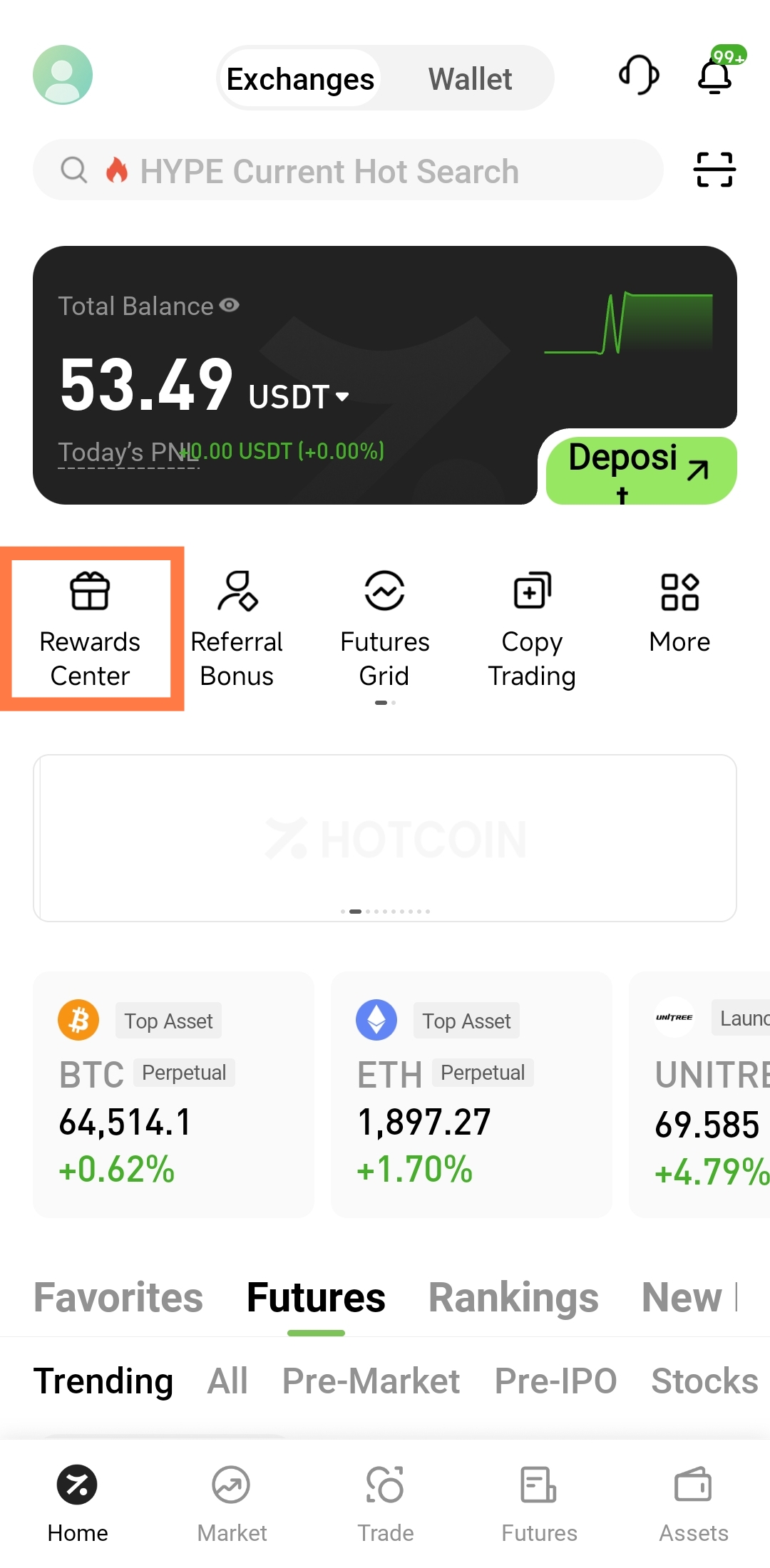
After logging in to Hotcoin, you can look for the Rewards Center through a campaign entry on the homepage, the profile area, or the More features page. Layouts may differ by device and app version, and the entry may be labeled “Rewards Center,” “Task Center,” or “Campaign Center.”
2.1 How to Access the Rewards Center in the App
Follow these steps in the app:
Open the Hotcoin App: Sign in to the account you intend to use for the campaign.
Open your profile: Tap the avatar in the upper-left corner of the homepage or the profile entry in the bottom navigation.
Find the rewards feature: Look for “Rewards Center,” “Task Center,” or a related campaign icon in your profile.
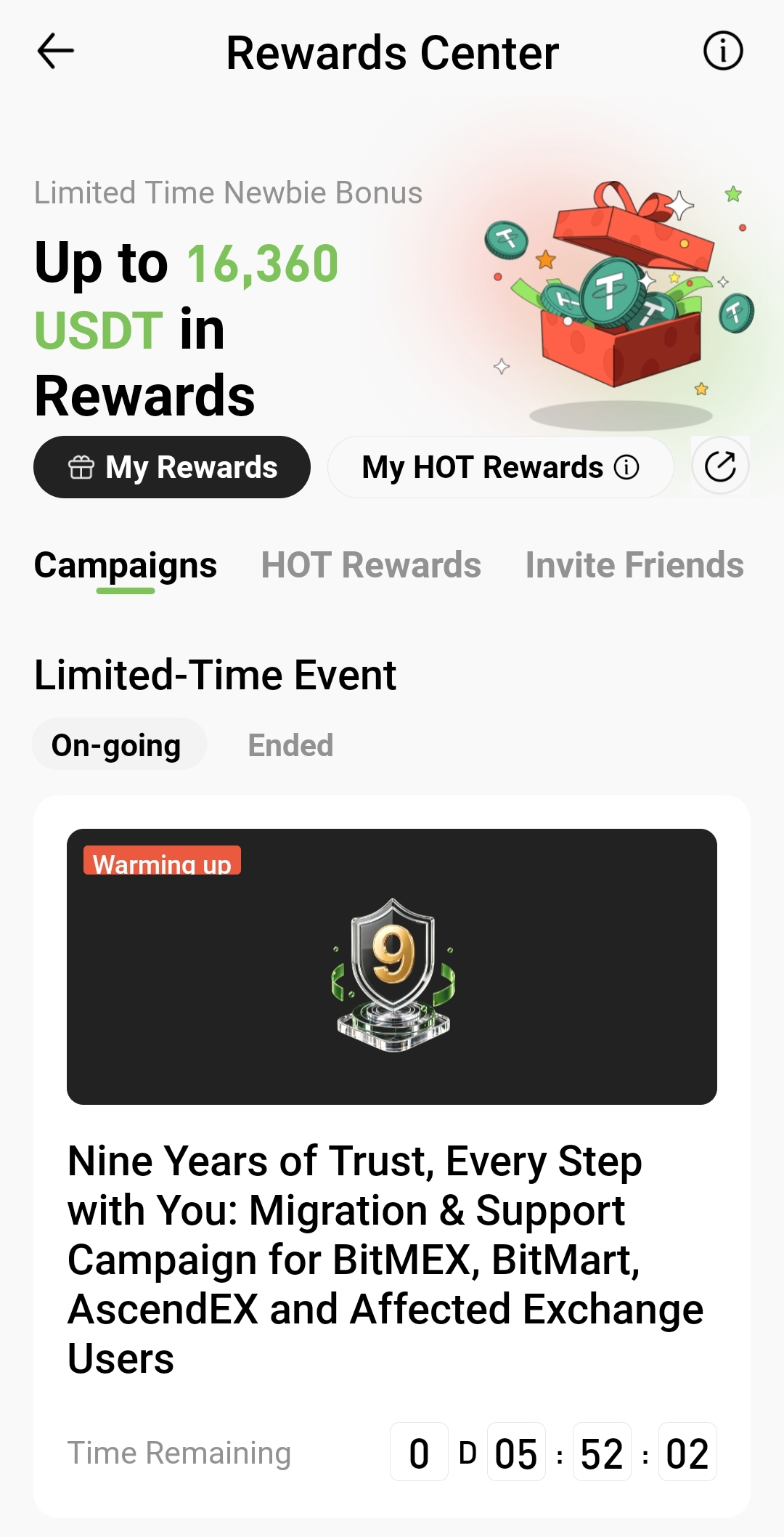
Open the campaign page: Review campaigns that are currently active or ending soon.
Some limited-time campaigns may also appear in homepage banners, pop-ups, or dedicated campaign sections. After tapping a campaign image, confirm that it opens an official Hotcoin page. Do not sign in through third-party links from unknown sources.
2.2 How to Access the Rewards Center on the Website
On the web, first open the Hotcoin website and sign in. Then check the top navigation, the avatar menu, or the campaign section. Select the Rewards Center or Campaign Center entry to open the task page.
If an app-exclusive campaign does not appear on the website, you may need to participate on a mobile device. Follow the participation channel specified on the campaign details page rather than assuming that the website and app support identical tasks.
How Do You Review Campaign Tasks?
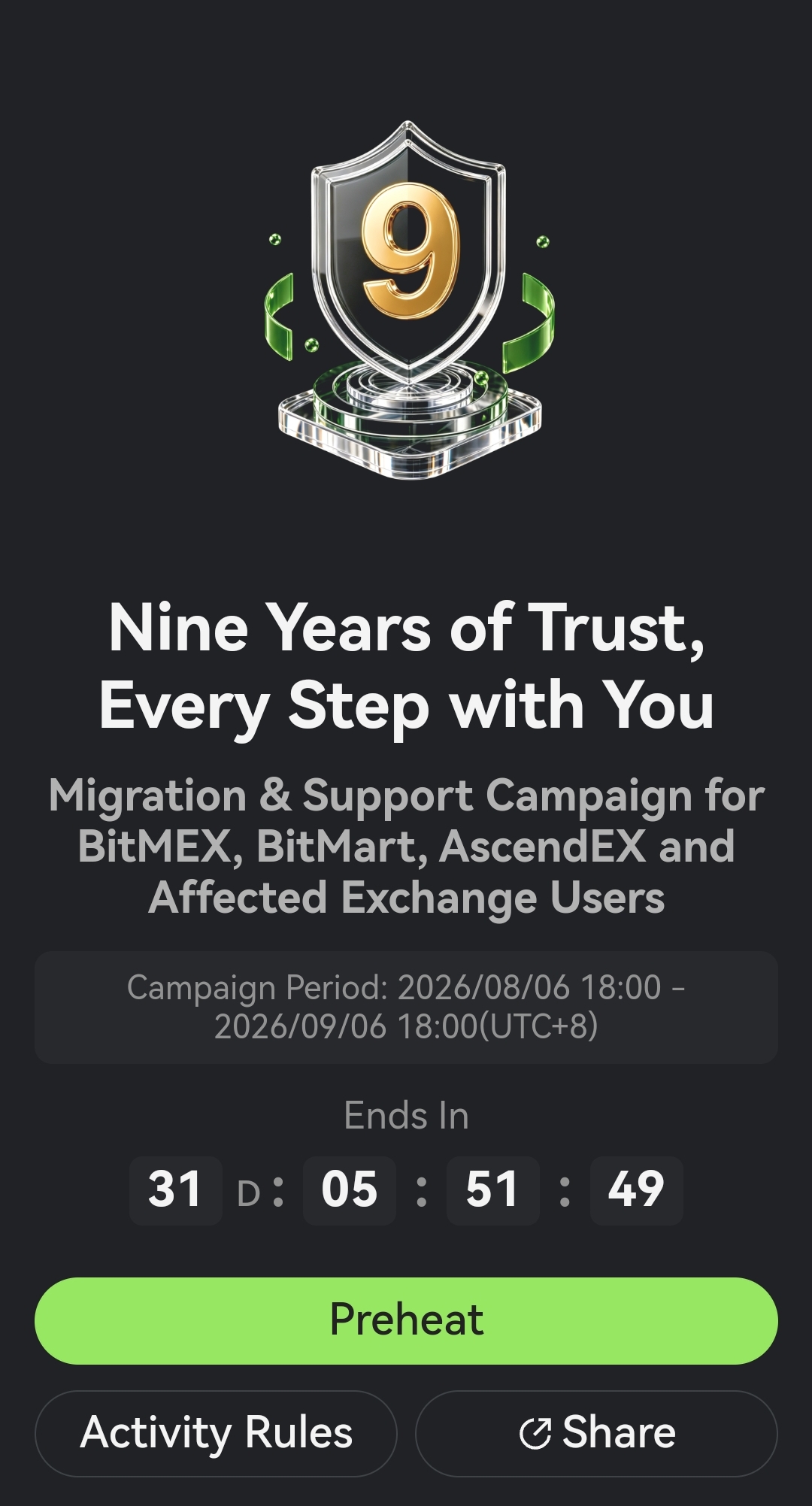
After entering the Rewards Center, you will typically see campaign cards, task names, reward details, completion conditions, and remaining time. Open the campaign details before making a deposit or placing a trade based only on the advertised reward.
Pay particular attention to the following information:
Eligible participants: Check whether the campaign is for new users, existing users, invited users, or users in specific regions.
Campaign period: Review the start time, end time, and reward claim deadline.
Task conditions: Confirm whether you need to register, complete identity verification, deposit, trade, refer users, or perform another action.
Amount threshold: Check whether the requirement is based on a single transaction, a cumulative amount, or net deposits.
Eligible trading scope: Confirm whether spot, futures, or only specified trading pairs count toward the campaign.
Reward type: Check whether the reward is a digital asset, trial fund, position-opening voucher, coupon, or another benefit.
Distribution method: Determine whether the reward must be claimed manually or will be distributed automatically by the system.
How Do You Participate in a Rewards Center Campaign?
After confirming the campaign rules, tap “Join Now,” “Go,” or a similar button. The system will usually take you to the relevant feature page. Enter through the task button in the Rewards Center to avoid using the wrong product or trading area.
A typical campaign process is as follows:
Register for the campaign: If the page includes a registration button, register before completing the task.
Complete prerequisites: Some campaigns require identity verification or account security settings first.
Tap the task action: Use the task button to open the deposit, trading, earn, or referral page.
Follow the rules: Complete the required amount, number of actions, or consecutive check-ins within the specified period.
Return to check progress: After completing the action, return to the Rewards Center and confirm that the system has recorded it.
For example, if a task requires a specified cumulative trading volume, verify which orders qualify. Unfilled orders, canceled orders, abnormal trades, or transaction types excluded by the rules may not count toward valid task volume.
How Do You Claim Campaign Rewards?
Once a task meets its requirements, the page may show a status such as “Claim,” “Ready to Claim,” or “Completed.” Rewards that require manual claiming must be claimed before the deadline, while automatically distributed rewards require you to wait for system settlement.
The claim process usually includes these steps:
Check the task status: Confirm that the task is marked as completed.
Claim the reward: Tap the claim button beside the relevant task.
Confirm the result: Check whether the page reports a successful claim.
Check the receiving account: Depending on the reward type, look in your funding account, futures account, or voucher center.
Check the expiration date: Trial funds, coupons, and position-opening vouchers may have expiration dates and usage conditions.
If the reward status is “Under Review” or “Calculating,” it generally cannot be claimed yet. Wait for the campaign data to be settled. Repeating the same task simply to refresh its status is not recommended.
How Do You Check Reward Records?
Look for “Reward History,” “My Rewards,” or a similar entry in the Rewards Center to review the reward name, amount, status, claim time, and destination. These records help you determine whether a reward has been claimed, whether it remains under review, and which account to check.
Common reward statuses include:
Incomplete: The task requirements have not yet been met.
Calculating: You have taken action, but the system is still synchronizing or calculating the data.
Ready to Claim: The task qualifies and the reward must be claimed manually.
Claimed: You have claimed the reward, which is being distributed or has already arrived.
Distributed: The reward has been credited to the designated account or voucher page.
Expired: The reward was not claimed or used within its validity period.
Ineligible: The account or activity did not satisfy the campaign rules.
Why Does a Reward Not Appear After You Complete a Task?
If a reward does not appear immediately after an action, the task has not necessarily failed. Some campaigns must wait for deposit confirmation, order execution, trading-volume calculation, or risk review, so progress may not update in real time.
Common reasons include:
7.1 You Did Not Register in Advance
Some campaigns require you to register first. Deposits or trades completed before registration may not count toward campaign data.
7.2 The Required Amount Was Not Reached
You may have confused a single-transaction amount, cumulative amount, net deposit amount, or valid trading volume. Recheck the calculation method in the campaign rules.
7.3 The Action Was Outside the Campaign Period
Campaigns use the time specified by the platform. Actions taken before the start time or after the end time may not count toward task progress.
7.4 The Order Was Not Actually Filled
Successfully placing an order does not mean that a trade was completed. Unfilled, partially filled, or canceled orders may not satisfy the campaign requirement.
7.5 The Reward Is Still Under Review or Settlement
Some rewards are reviewed and distributed together after the campaign ends. Check the reward record for the current status and any estimated distribution information.
7.6 The Reward Has Expired
Some rewards must be manually claimed within a specified period and may also expire after they are claimed. A reward may not be recoverable after its validity period ends.
What Should You Keep in Mind When Using the Rewards Center?
Read the complete campaign rules before participating. Do not rely only on a promotional image on the homepage. Pay particular attention to the campaign period, eligible regions, identity-verification requirements, task calculation method, reward quantity, and distribution time.
Do not attempt to obtain rewards through bulk account registrations, self-referrals, wash trading, fake deposits, or other abnormal methods. The platform may conduct a risk review of campaign data. Tasks that violate the rules may be canceled, and restrictions may apply to rewards that have already been distributed.
The Rewards Center will not ask you to send your password, SMS verification code, or authenticator one-time code to another person. If anyone requests account security information under the pretext of “claiming a reward” or “reissuing a benefit,” stop and verify the request through official Hotcoin channels.
Frequently Asked Questions
9.1 Where Is the Hotcoin Rewards Center?
After logging in to the Hotcoin App, look in the profile area, the homepage campaign section, or More features. Depending on the version, it may be labeled Rewards Center, Task Center, or Campaign Center. Follow the labels shown in your current app.
9.2 Are Rewards Credited Automatically After I Complete a Task?
Distribution methods vary by campaign. Some rewards are distributed automatically, while others require you to tap a claim button after completing the task. The campaign details page usually explains the claim method and distribution time.
9.3 Why Has My Task Progress Not Updated?
Task progress may depend on deposit confirmations, order fills, data synchronization, or campaign review. First check whether the amount, action time, and trading type comply with the rules, then allow time for the system to update.
9.4 Where Can I Find Rewards I Have Claimed?
Start by checking the reward record in the Rewards Center for the distribution destination. Digital assets may be credited to the funding account, trial funds may appear in the futures account, and coupons or position-opening vouchers may appear in the voucher center.
9.5 Can an Expired Reward Be Reissued?
In general, a reward cannot be claimed after its claim or usage deadline. Whether a reissue is possible depends on the campaign rules and confirmation from official Hotcoin customer support.
Summary
To use the Hotcoin Rewards Center, first locate its entry, review the campaign period and task conditions, and then select “Go” to open the relevant feature page. After completing the task, return to the Rewards Center to check progress and either claim the reward manually or wait for automatic distribution, as instructed.
After a reward is credited, check the reward record, receiving account, and validity period. Campaign content and entry points may change with platform versions, so always rely on the current campaign details page for eligibility, reward amounts, and settlement times.
Get Started
Explore exclusive benefits for new users
Learn about referral rewards
Risk notice: This article only describes common procedures for using the Hotcoin Rewards Center. It is not investment advice or a promise of rewards. Eligibility, task requirements, calculation methods, reward amounts, distribution times, and supported regions vary by campaign. Always refer to the current Hotcoin campaign page and the latest platform rules.
Inirerekumendang pagbabasa
Tingnan ang higit pa
service hotcoin.com
producthotcoin.com
businesshotcoin.com
casecnhotcoin.com