
How to Use Hotcoin Referral Rewards
What Are Hotcoin Referral Rewards?
Hotcoin Referral Rewards lets users obtain a unique referral code or link and earn applicable rewards when invited friends register and complete specified tasks.
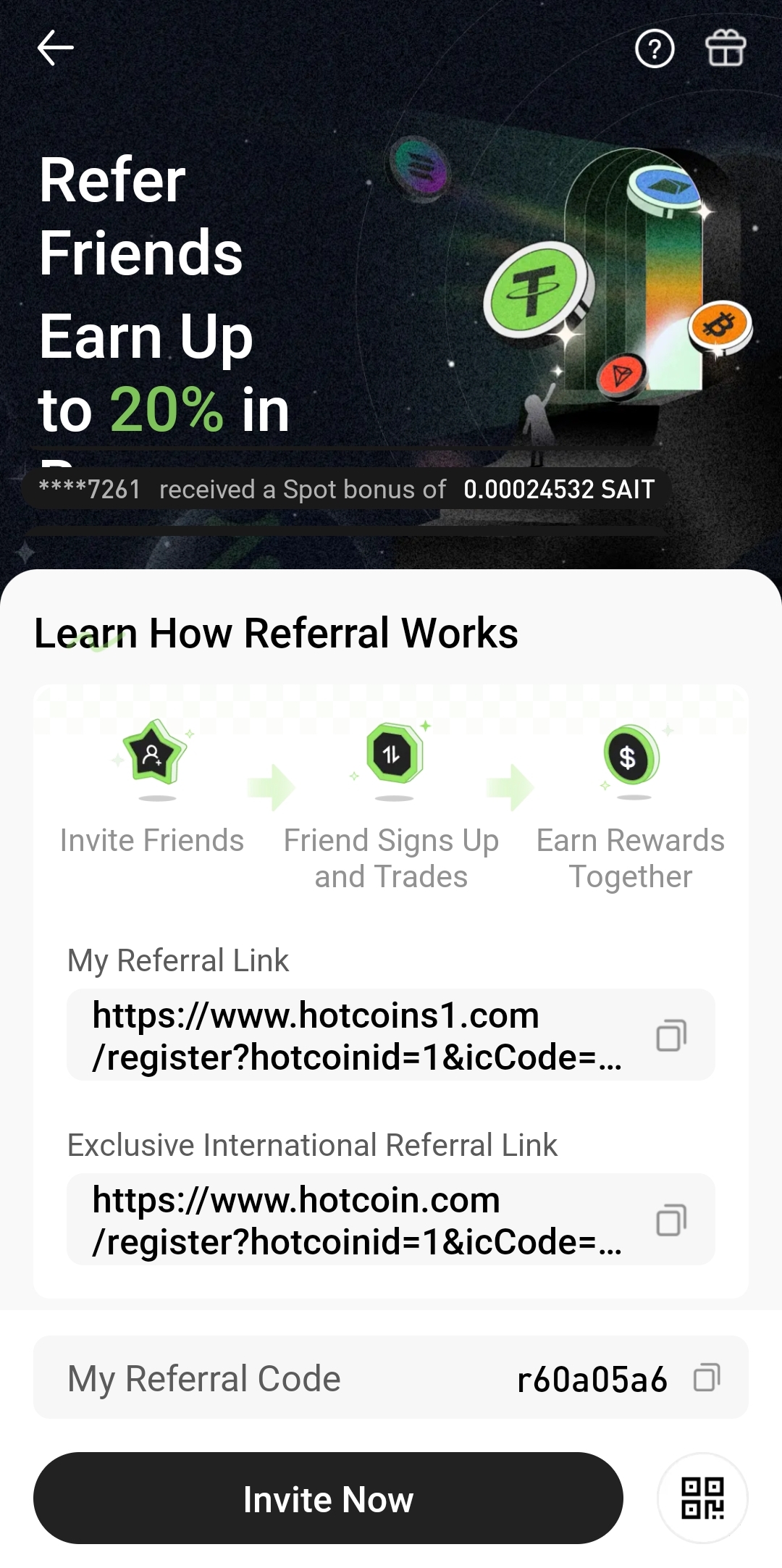
On the referral page, you can view your referral code, referral link, total number of invitees, and reward earnings. Whether an invitee counts as a valid referral, and whether either party qualifies for rewards, generally depends on the registration method, campaign period, identity verification, deposit requirements, trading tasks, and other applicable conditions.
Reward types vary by campaign and may include trading rebates, task rewards, trial funds, coupons, or other platform benefits. Refer to the rules displayed on the referral page for the current reward rate, validity period, and distribution requirements.
Where Can I Access the Referral Rewards Page?
You can access the Referral Rewards page through the Hotcoin website or app. After signing in, the feature is usually available from the profile center, avatar menu, campaign center, or an Invite Friends entry.
Website Entry
Follow these steps on the website:
- Sign in: Open the Hotcoin website and sign in.
- Find the referral feature: Select “Invite Friends,” “Referral Rewards,” or a similar menu item.
- Open the referral page: Review your referral code, referral link, and the current campaign rules.
App Entry
Follow these steps in the app:
- Open the Hotcoin app: Sign in to the account you want to use for the referral campaign.
- Find the referral entry: Tap “Invite Friends,” “Referral Rewards,” or the corresponding button in the campaign area.
- Open the referral page: Confirm the campaign period and participation requirements shown on the page.
How Do I Get My Referral Code and Link?
After you open the Referral Rewards page, the system usually generates a unique referral code and referral link for your account. A friend can enter the code during registration, while the link already contains the referral relationship so the system can identify the referrer when the friend registers through it.
To get and share them:
- Open the referral page: Confirm that you are signed in to your own account.
- Find your referral code: Locate the code in the referral code section.
- Copy the referral code: Use the adjacent copy button and send the code to the friend who plans to register.
- Copy the referral link: Select “Copy Link” to obtain the registration URL containing your referral details.
- Check the QR code: If the page provides one, save it so your friend can scan it to register.
Before sharing, verify that the copied content is complete. Do not manually change parameters in the referral URL, because doing so may prevent the system from establishing the referral relationship.
How Do I Share the Referral Link With Friends?
You can send the referral link through a messaging app, email, or QR code. Your friend should open the link directly, confirm that it leads to the official registration page, and follow the on-screen instructions to create an account.
Common sharing methods include:
- Send the link directly: Suitable for one-to-one sharing; your friend can open it to reach the registration page.
- Send the referral code: If your friend registers through another official entry, they can enter the code manually in the referral code field.
- Share the QR code: Useful for in-person sharing or scanning from another device.
- Explain the campaign requirements: Tell your friend which conditions are required for rewards, without promising benefits beyond those stated in the rules.
Before registering, your friend should confirm that the domain belongs to the official Hotcoin website. Do not use third-party shortened links, and never ask your friend to provide an account password, verification code, identity document image, or authenticator code.
How Do I View Referral Counts and Records?
The referral page may show total invitees, valid referrals, and friends’ task progress. Depending on the page version, it may also display registration times, referral status, and task completion details.
Pay attention to the following information:
- Total referrals: The number of accounts linked to you through your referral code or link.
- Valid referrals: Invitees who have met the campaign’s eligibility requirements.
- Registration status: Whether a friend has completed account registration.
- Task progress: Whether the invitee has completed verification, a deposit, trading, or another specified task.
- Statistics period: Whether the figures are lifetime totals or apply only to the current campaign period.
If your friend has registered but the page does not update immediately, allow time for the system to synchronize. If the record remains missing, check whether your friend used the correct link or entered the code during registration, and whether the account had already been registered.
How Do I View Referral Reward Earnings?
Referral earnings are usually available under “Reward Records,” “Rebate Records,” or “My Rewards” on the referral page. The page may show total rewards, pending rewards, distributed rewards, and detailed entries.
Common fields include:
- Total rewards: The rewards your account has accumulated through referrals.
- Pending rewards: Rewards that have met some conditions but have not yet been settled.
- Distributed rewards: Rewards that have been settled and credited to your account.
- Reward type: This may include rebates, trial funds, coupons, or campaign rewards.
- Distribution time: When the system completes review and settlement.
- Reward account: Rewards may be credited to a funding account, futures account, or coupon center.
The number of invitees does not necessarily equal the number of reward-eligible referrals. A reward may enter calculation or settlement only after the invited friend meets the current campaign’s valid referral requirements.
Why Haven’t I Received a Reward After Inviting a Friend?
If you do not see a reward after sending an invitation, the referral relationship or campaign tasks may not yet meet the required conditions; this does not necessarily indicate a system issue.
The Friend Did Not Register Through the Referral Link
If your friend registers directly on the website without entering the referral code, the system may be unable to recognize the referral relationship. After registration is complete, users generally cannot add or change a referrer at will.
The Friend Used an Existing Account
Referral campaigns are generally intended for new users. If your friend previously registered an account with a phone number or email address, opening your referral link again may not count as a new referral.
Required Tasks Are Incomplete
Some campaigns require invitees to complete identity verification, make a first deposit, reach a specified trading volume, or use a designated product. Registration alone may not trigger a reward immediately.
The Reward Is Still Being Settled
Rewards may be distributed only after data calculation, risk checks, and a settlement period. Check the current status in the reward details, and do not create duplicate accounts or conduct abnormal trades.
The Campaign Has Ended
A referral link may still work for registration after a particular bonus campaign has ended. Check the campaign start date, deadline, and reward-claim period before participating.
What Should I Know Before Using Referrals?
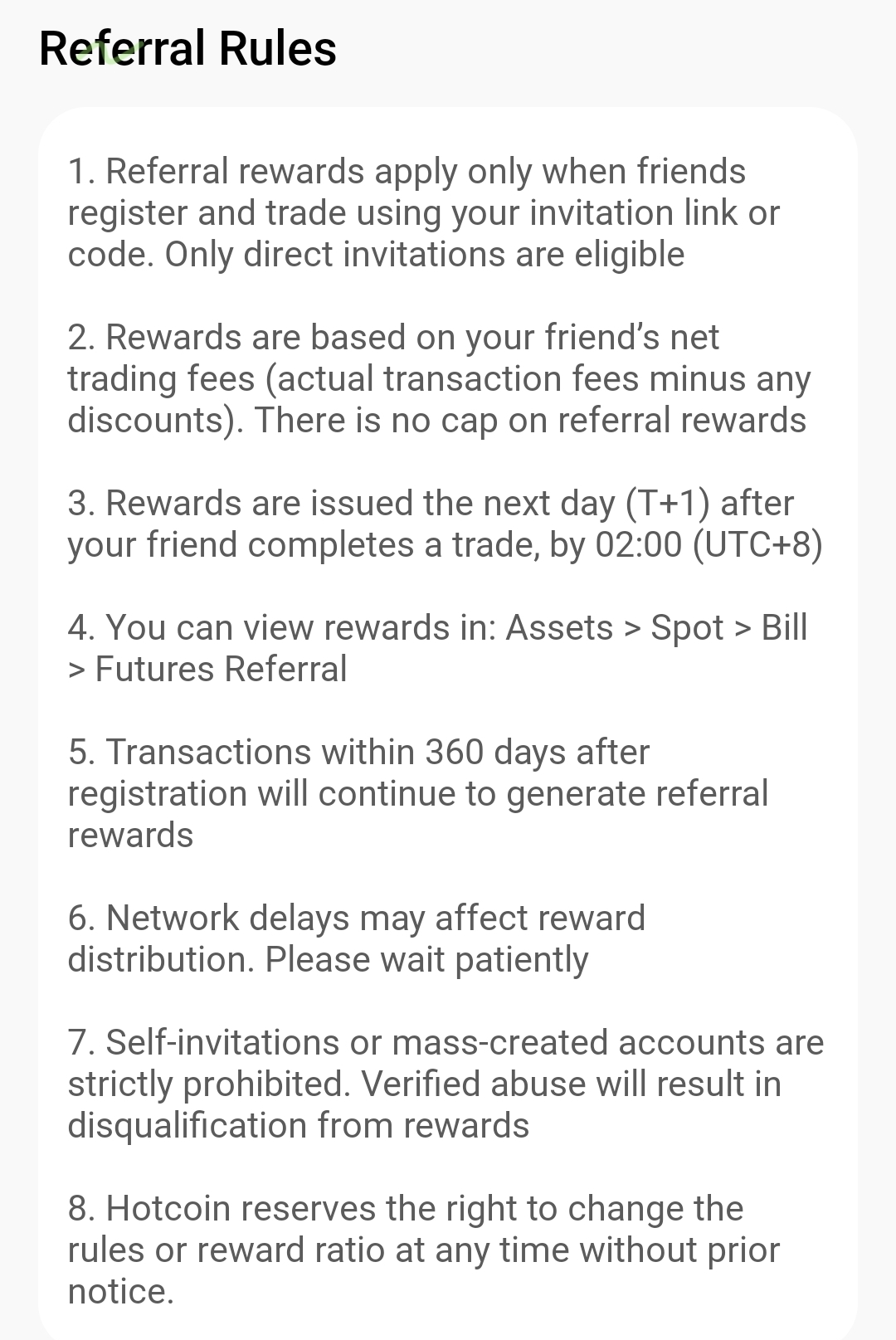
The referral feature should be used for legitimate recommendations between real users. Do not attempt to obtain rewards through bulk registration, false identities, self-referrals, or manipulated trading volume. Abnormal accounts or activity that does not comply with the rules may be excluded from valid referral totals.
Also remember to:
- Share only official links: Avoid registration links from unknown sources.
- Do not promise fixed returns: Reward rates and campaign conditions may change.
- Protect account information: Never give passwords or verification codes to friends or anyone claiming to be staff.
- Read the campaign rules: Pay particular attention to valid referral conditions, settlement periods, and restricted regions.
- Keep campaign records: Save screenshots of the campaign page and reward records when necessary.
For more information about how trading fees relate to rebates, see the guide to trading fee structures and ways to reduce fees.
Frequently Asked Questions
Where Can I Find My Hotcoin Referral Code?
After signing in on the Hotcoin website or app, open the profile center and select Invite Friends or Referral Rewards to view your unique code. The exact entry name may change with page updates.
Can a Friend Add My Referral Code After Registering?
Most referral relationships must be established during registration. After your friend completes registration, they may be unable to add or change the referral code. Refer to the registration page and current campaign rules for the applicable policy.
How Long Does It Take for Referral Rewards to Arrive?
Timing depends on whether the friend has completed the required tasks and on the platform’s calculation and settlement cycle. Check the reward records for pending, distributed, or under-review status.
Why Does My Referral Count Show Zero?
Possible reasons include registration without your unique link, an incorrect referral code, use of an existing account, or delayed data synchronization. If the information is correct but the count still does not update, contact official Hotcoin support.
Summary
To use Hotcoin Referral Rewards, open the referral page, obtain your unique code or link, and share it with friends who have not yet registered. After they register and complete the tasks required by the campaign, you can review referral counts, task status, and reward earnings in your referral records.
Referral rules, rates, and distribution times may change by campaign. Before participating, follow the conditions shown on the current Hotcoin referral page rather than relying only on historical screenshots or verbal descriptions.
Get Started
Risk notice: This article explains common steps for using Hotcoin Referral Rewards and does not promise returns or constitute investment advice. Referral entries, reward methods, eligibility requirements, settlement periods, and supported regions may change. Refer to Hotcoin’s current campaign page, user agreement, and latest platform rules.
Inirerekumendang pagbabasa
Tingnan ang higit pa

Service@hotcoin.com
Product@hotcoin.com
Business@hotcoin.com
Casecn@hotcoin.com