
Wallet Approval Management: How to Review and Revoke Contract Approvals
An approval allows a designated spender to transfer tokens within a specified limit. Revoking an approval reduces that limit to zero or removes an operator, but it cannot reverse completed transactions or repair an exposed private key.
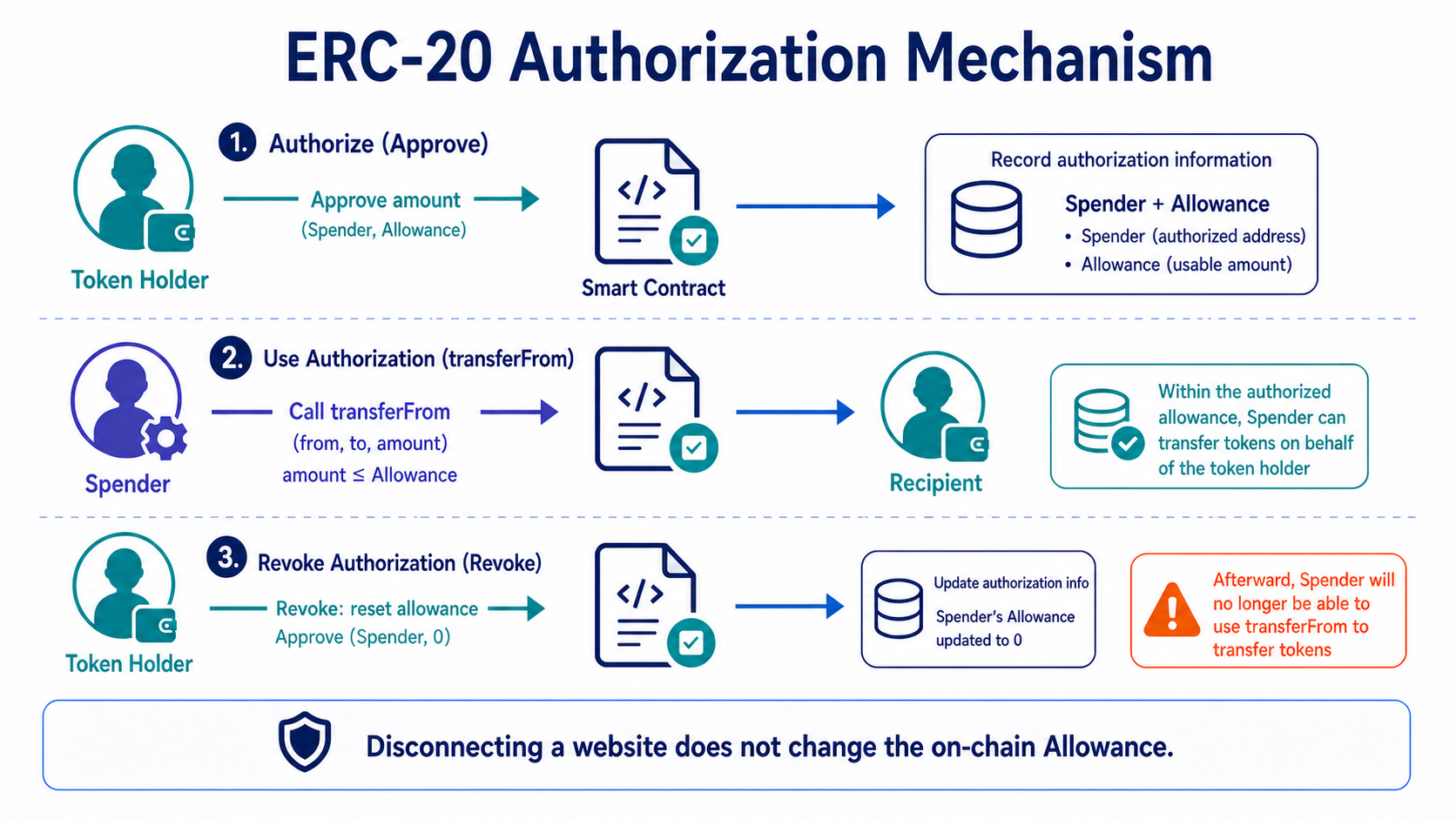
Which Permissions Should You Check?
For ERC-20 tokens, the most common permission is an allowance. NFTs may also grant approval for a single asset or use setApprovalForAll to let an operator manage every NFT in the same collection. A permit-style signature may not yet be on-chain but could already be in a third party's possession, ready for submission.
Smart accounts can also have modules, session keys, spending limits, and other permissions. Checking only token allowances may miss account extensions capable of executing transactions directly.
How Should You Perform Regular Cleanup?
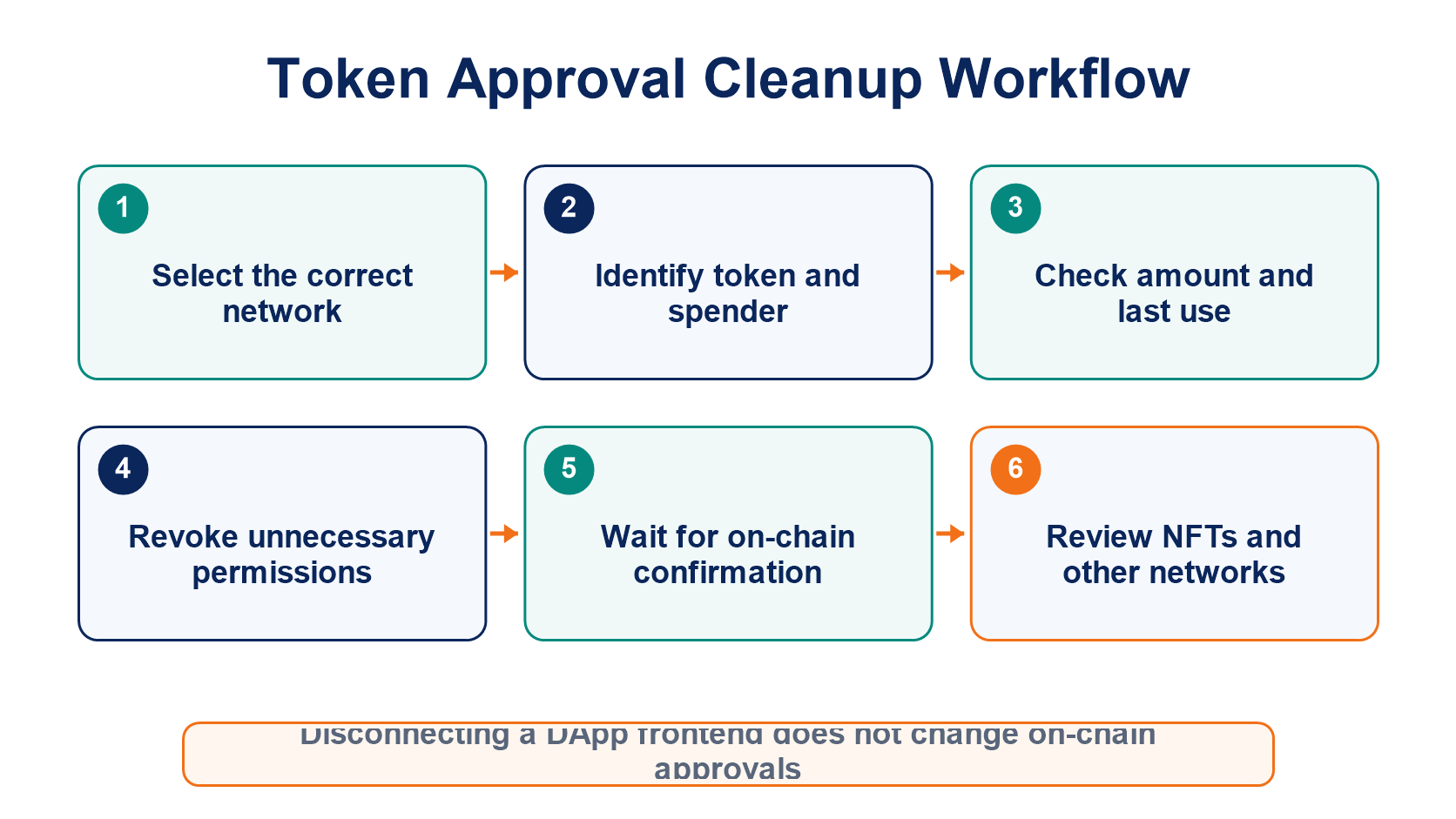
Open an approval checker from your wallet or a trusted block explorer, then verify the network, token, spender, allowance, and last-used time for each entry. Prioritize revoking contracts you do not recognize, no longer use, have granted unlimited allowances to, or that have been involved in security incidents.
Revoking an approval is an on-chain transaction and requires gas on the correct network. The old approval may remain valid until the transaction is confirmed. If you use multiple networks, review each one separately because approvals for the same address are independent across chains.
Should You Reject Every Unlimited Approval?
A limited allowance can reduce exposure from a single approval, but it also creates repeated approval transactions and additional gas costs. Frequently used, trusted protocols may justify the convenience, though you should still consider contract upgradeability, frontend security, administrator privileges, and the value held in the wallet.
A safer practice is to keep only the assets needed for a specific task in an interaction wallet and revoke approvals when that task ends. Long-term storage wallets should not connect to DApps frequently.
What Should You Do After Discovering a Malicious Approval?
Revoke it through a trusted entry point and record the contract, spender, and transaction. If assets have already been transferred, check whether other token and NFT permissions remain active.
If your seed phrase or private key may have been exposed, move your assets to a new wallet immediately. For the full path of approval scams disguised as airdrops, read Airdrop Scams and Contract Approval Traps. For broader key-security guidance, see Private Keys and Seed Phrases.
Frequently Asked Questions
Will Revoking an Approval Affect Assets Already Deposited in a DeFi Protocol?
Revoking an approval usually affects only future transfers from your wallet. It does not automatically withdraw positions already held in a protocol, although the exact behavior should be confirmed for each contract.
Should I Revoke an Approval After Moving the Token Balance Elsewhere?
If the address may receive the same token again, the old approval still creates risk. If you retire the address, make sure no funds are sent to it in the future.
Does a Revocation Website Need My Seed Phrase?
No. A trusted tool only needs to connect to your wallet and ask you to sign an on-chain revocation transaction.
Is Disconnecting My Wallet from a Website the Same as Revoking an Approval?
No. Disconnecting only ends the frontend session. On-chain allowances and operator permissions remain active.
Lectura recomendada
Ver más

Service@hotcoin.com
Product@hotcoin.com
Business@hotcoin.com
Casecn@hotcoin.com